

Response Structure
The response contains the following top-level fields:Chunk, Table, and Cell Identifiers
Each chunk, table, and table cell has a unique identifier (ID) that appears in multiple parts of the API response. Use these IDs to link different sets of information across the response. The ID format depends on the element type:Sequential Numbering for Tables and Cells
Table and cell IDs use sequential numbering within each page. The first table element on the first page has ID0-1, and its first cell has ID 0-2. All subsequent table elements and cells on that page continue this sequential numbering (0-3, 0-4, etc.).
The numbering restarts for each new page. For example, the first table on the second page will have ID 1-1, and its first cell will have ID 1-2.
Parsed Chunks (chunks)
A chunk is a distinct region or element in the parsed document. The chunks array contains all parsed chunks from the document in reading order.
Each chunk object in the chunks array contains:
Splits
Thesplits array groups chunks into logical sections based on the split parameter. Each split object includes the chunks, markdown content, and page numbers for that section.
- If the
splitparameter was omitted: The API returns the entire document as a single split. - If page-level splits were used (
split=page): The API organizes chunks by page. For multi-page documents, this creates one split per page.
Split Object Structure
Eachsplit object contains:
Full Document Split vs. Page-Level Split
When you omit thesplit parameter, the API returns a single split containing the entire document. When you set split=page, the API creates one split per page for multi-page documents.
Grounding Information (grounding)
Grounding is location information that maps each chunk or table cell back to its precise position in the original document. Each grounding entry includes the page number and bounding box coordinates for an element.
The grounding object contains location data for all chunks and table cells in the parsed document.
How the Grounding Object Works
Thegrounding object is a dictionary where chunk, table, and cell IDs are keys. To look up grounding information for any element, use its ID.
What’s included in the grounding object:
- All chunk IDs from the
chunksarray - Table IDs (for entire tables)
- Table cell IDs (individual cells within tables)
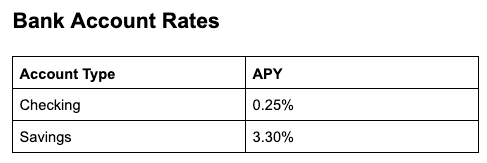
Fields in the Grounding Object
Each key-value pair in thegrounding object uses an ID as the key (chunk ID, table ID, or cell ID) and location data as the value.
Each value is an object with the following fields:
Example:
Example of one key-value pair from the
grounding object (logo chunk):
Grounding Types
Each entry in thegrounding object has a type field that identifies the element type.
Why are grounding types different from chunk types?
Most grounding types correspond directly to chunk types with a “chunk” prefix. However, thegrounding object provides more granular location data than the chunks array.
For tables, the grounding object includes separate entries for the HTML <table> element and individual cells, even though these are not separate chunks. This allows you to look up the precise location of any cell within a table.
The following table lists the grounding types and the corresponding chunk types, when applicable.
Table Grounding Structure
For each table in a document, the grounding object includes three types of entries: table chunk, table, cell. These three types form a hierarchy: the chunk entry provides the overall table location, while the table and cell entries provide precise locations for the HTML elements within that chunk.
Example:
Consider parsing this simple 2-cell table:
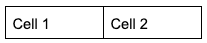
grounding field from the response is shown below, with key elements highlighted in the table:
Table Cell Position Information
Each table cell (tableCell) includes a position field that provides the cell’s location in the table grid.
The row and col values are zero-indexed, where row: 0, col: 0 represents the first row and first column of the table.
The rowspan and colspan values indicate merged cells, with a value of 1 meaning the cell is not merged in that direction.
How to Use the Table Cell Positions
Use the table cell position information in thegrounding to:
- Map parsed data back to specific cells in the original table (for example, verify that a dollar amount came from row 2, column 3)
- Identify merged cells through the
rowspanandcolspanvalues - Programmatically reference cells by their row and column indices
Confidence Score
Agentic Document Extraction returns confidence scores for text, marginalia, card, and table chunks, as well as table cells, when parsing with DPT-2. Confidence scores measure the confidence level of parsed text in Markdown with respect to the actual text or visual data present in the document. Each score ranges from 0.0 (low confidence) to 1.0 (high confidence). Lower values indicate regions where the model was less certain about the output. For example, here are the confidence score fields for a chunk:Confidence score fields
Confidence Score Fields
The grounding object includes the following confidence-related fields:Low Confidence Spans
Thelow_confidence_spans array contains substrings that have confidence scores of 0.95 or lower.
Each object in the low_confidence_spans array contains:
For example, in the parse response below, the API has low confidence for two spans of text within the chunk.
Low confidence spans
Chunks and Elements with Confidence Scores
Confidence scores are available for text, marginalia, card, and table chunks, as well as table cells. ThetableCell elements have confidence scores but do not include low_confidence_spans
| Grounding Type | Chunk Type | Has Confidence Score | Has Low Confidence Spans |
|---|---|---|---|
chunkText | text | ||
chunkMarginalia | marginalia | ||
chunkCard | card | ||
chunkTable | table | ||
table | — | — | — |
tableCell | — | — | |
chunkFigure | figure | — | — |
chunkLogo | logo | — | — |
chunkAttestation | attestation | — | — |
chunkScanCode | scan_code | — | — |
Confidence Score Availability
Confidence scores are only available when using the ADE Parse or ADE Parse Jobs API with DPT-2.Null Confidence Scores
The confidence score will benull in the following situations:
- The file was parsed with DPT-1.
- The chunk or element does not support confidence scores. See a list of supported elements in Chunks and Elements with Confidence Scores.
Response when confidence score not applicable
How to Use Confidence Scores
Confidence scores are not a calibrated probability of correctness. Use them as a ranking or triage signal to flag and prioritize content for human review, rather than as an exact measure of error likelihood.Factors That Can Lower Confidence Scores
Certain document characteristics may result in lower confidence scores:- Low-resolution or degraded scans
- Handwritten text that is difficult to read
- Superscripts and subscripts
- Characters or punctuation that look alike, such as commas and periods
- Words split across lines with a hyphen
- Line endings where it’s unclear whether the text continues in the same paragraph or starts a new one
False Positives
The system is designed to over-flag rather than risk missing potential issues. As a result, some regions may be marked as low confidence even when the parsed output is correct. These false positives mean you may need to review some content that is actually correct, but they help reduce the likelihood of missing content that contains errors.When to Use Chunk-Level vs. Global Grounding
Grounding information is available at the chunk level (chunks[].grounding) and at the global level (grounding). Each has a different level of detail:
| Field | Description | Global Grounding Object | Chunk-Level Grounding |
|---|---|---|---|
box | Bounding box coordinates | ||
page | Zero-indexed page number | ||
confidence | Confidence score | ||
low_confidence_spans | Sections of text with low confidence scores, if any | ||
type | Detailed element type | ||
position | Table cell position |
grounding object when:
- You need table cell positions or other HTML element grounding
- You need confidence scores
- You need to understand relationships between elements
- Building comprehensive document analysis workflows
- You need the complete, authoritative grounding data for all elements in the document
chunks[].grounding) when:
- Iterating through chunks sequentially and need each chunk’s location immediately
- Working with a single chunk in isolation
- Building simple workflows where each chunk is processed independently
Working with Bounding Box Coordinates
Thegrounding objects include the bounding box coordinates for each chunk in the box object:
Bounding Box Values
All bounding box coordinates use normalized values between 0 and 1, where:(0, 0)represents the top-left corner of the page(1, 1)represents the bottom-right corner of the page
Convert Bounding Box Values
To convert bounding box values to pixel coordinates, multiply the normalized values by the image dimensions:Example Response
The following is the API response when parsing this single-page Product Specifications Sheet. The document contains text, a logo, a table, a barcode, and more. Thesplit parameter was omitted in the API call.