
This page provides resources for building (ADE) applications with AI coding tools like Claude Code, Cursor, and VS Code:Documentation Index
Fetch the complete documentation index at: https://docs.landing.ai/llms.txt
Use this file to discover all available pages before exploring further.
- ADE skills for AI coding agents
- A documentation MCP server
- Shortcuts for connecting AI tools to docs pages
- Documentation pages in llms.txt format
- Documentation pages as Markdown
Skills
Skills are instruction files that teach AI coding agents how to use effectively. offers ADE skills in the ADE Document Processing Skills repository.Install Skills via the Claude Code Plugin
Claude Code users can install the ADE skills as a plugin, which is an extension that bundles skills, agents, and other capabilities. Run the following commands in Claude Code to install the ADE skills plugin:Install Skills with Other Methods
Different AI coding tools have different methods for installing skills. Check the documentation for your AI coding tool to learn how to install skill files. Depending on the installation method, you may need to download or clone the ADE Document Processing Skills repository and copy the skill files to the relevant directories.MCP Server
The ADE MCP server connects AI tools to documentation and ADE skills. When connected, your agent can search the documentation and access all ADE skills without additional setup. MCP server URL:https://docs.landing.ai/mcp
- Claude Code
- Claude.ai
- Cursor
- VS Code
Run the following command:
Shortcuts for Connecting AI Tools
Use the contextual menu on any docs page to connect to AI tools, copy content as Markdown, or install the ADE docs MCP server. Click the drop-down icon at the top of any page to open it.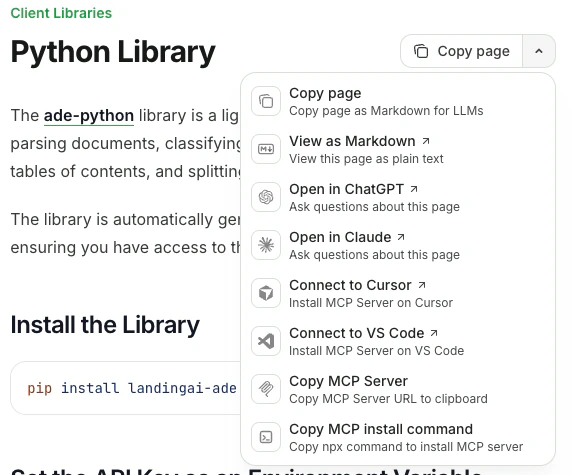
| Option | What it does |
|---|---|
| Copy page | Copies the page as Markdown |
| View as Markdown | Opens the page in Markdown format |
| Open in ChatGPT | Creates a ChatGPT conversation with the page as context |
| Open in Claude | Creates a Claude conversation with the page as context |
| Connect to Cursor | Installs the ADE docs MCP server in Cursor |
| Connect to VS Code | Installs the ADE docs MCP server in VS Code |
| Copy MCP server URL | Copies https://docs.landing.ai/mcp to your clipboard |
| Copy MCP install command | Copies the MCP server install command to your clipboard |
Access Documentation Pages as llms.txt
Access an index of all documentation pages at llms.txt. For a combined file of all documentation content, use llms-full.txt. These files follow the llms.txt standard for AI tool consumption.Access Documentation as Markdown
View any page as plain Markdown by adding.md to the page URL.