

Overview
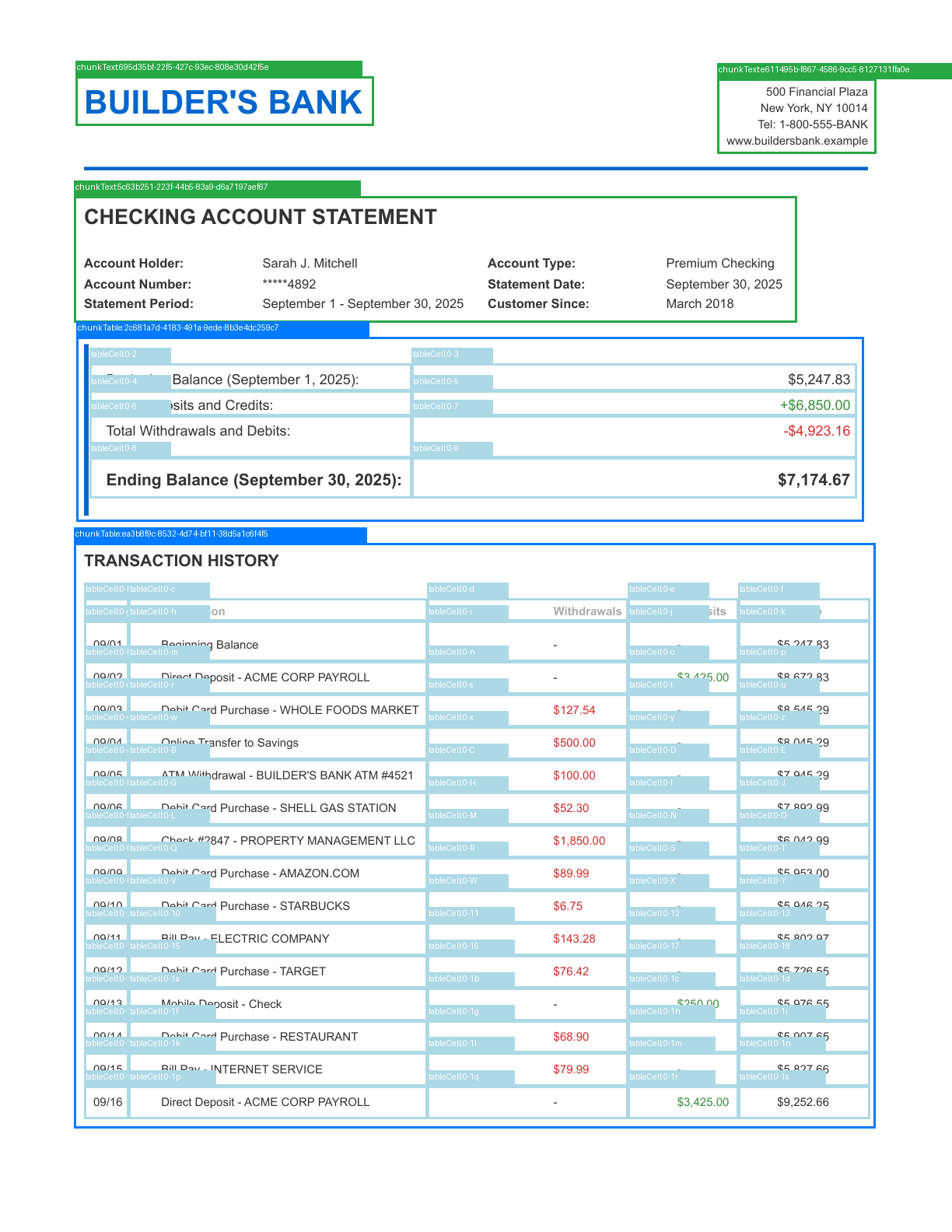
Use this script to visualize parsed chunks by drawing color-coded bounding boxes on your document. Each chunk type uses a distinct color, making it easy to see how the document was parsed. The script identifies chunk types and table cells. For PDFs, the script creates a separate annotated PNG for each page (page_1_annotated.png, page_2_annotated.png). For image files, the script creates a single page_annotated.png.
The image below shows an example output with bounding boxes drawn on the first page of a PDF (Python library):
These examples require the Python or TypeScript client library. Before running a script, set your API key and install the library and any required dependencies.
Scripts
from pathlib import Path
from landingai_ade import LandingAIADE
from PIL import Image, ImageDraw
import pymupdf

# Define colors for each chunk type
CHUNK_TYPE_COLORS = {
    "chunkText": (40, 167, 69),        # Green
    "chunkTable": (0, 123, 255),       # Blue
    "chunkMarginalia": (111, 66, 193), # Purple
    "chunkFigure": (255, 0, 255),      # Magenta
    "chunkLogo": (144, 238, 144),      # Light green
    "chunkCard": (255, 165, 0),        # Orange
    "chunkAttestation": (0, 255, 255), # Cyan
    "chunkScanCode": (255, 193, 7),    # Yellow
    "chunkForm": (220, 20, 60),        # Red
    "tableCell": (173, 216, 230),      # Light blue
    "table": (70, 130, 180),           # Steel blue
}

def draw_bounding_boxes(parse_response, document_path):
    """Draw bounding boxes around each chunk."""
    def create_annotated_image(image, groundings, page_num=0):
        """Create an annotated image with grounding boxes and labels."""
        annotated_img = image.copy()
        draw = ImageDraw.Draw(annotated_img)

        img_width, img_height = image.size

        for gid, grounding in groundings.items():
            # Check if grounding belongs to this page (for PDFs)
            if grounding.page != page_num:
                continue

            box = grounding.box

            # Extract coordinates from box
            left, top, right, bottom = box.left, box.top, box.right, box.bottom

            # Convert to pixel coordinates
            x1 = int(left * img_width)
            y1 = int(top * img_height)
            x2 = int(right * img_width)
            y2 = int(bottom * img_height)

            # Draw bounding box
            color = CHUNK_TYPE_COLORS.get(grounding.type, (128, 128, 128))  # Default to gray
            draw.rectangle([x1, y1, x2, y2], outline=color, width=3)

            # Draw label background and text
            label = f"{grounding.type}:{gid}"
            label_y = max(0, y1 - 20)
            draw.rectangle([x1, label_y, x1 + len(label) * 8, y1], fill=color)
            draw.text((x1 + 2, label_y + 2), label, fill=(255, 255, 255))

        return annotated_img

    if document_path.suffix.lower() == '.pdf':
        pdf = pymupdf.open(document_path)
        total_pages = len(pdf)
        base_name = document_path.stem

        for page_num in range(total_pages):
            page = pdf[page_num]
            pix = page.get_pixmap(matrix=pymupdf.Matrix(2, 2))  # 2x scaling
            img = Image.frombytes("RGB", [pix.width, pix.height], pix.samples)

            # Create and save annotated image
            annotated_img = create_annotated_image(img, parse_response.grounding, page_num)
            annotated_path = f"page_{page_num + 1}_annotated.png"
            annotated_img.save(annotated_path)
            print(f"Annotated image saved to: {annotated_path}")

        pdf.close()
    else:
        # Load image file directly
        img = Image.open(document_path)
        if img.mode != "RGB":
            img = img.convert("RGB")

        # Create and save annotated image
        annotated_img = create_annotated_image(img, parse_response.grounding)
        annotated_path = "page_annotated.png"
        annotated_img.save(annotated_path)
        print(f"Annotated image saved to: {annotated_path}")

    return None

# Initialize client (uses the API key from the VISION_AGENT_API_KEY environment variable)
client = LandingAIADE()

# Replace with your file path
document_path = Path("/path/to/file/document")

# Parse the document
print("Parsing document...")
parse_response = client.parse(
    document=document_path,
    model="dpt-2-latest"
)
print("Parsing complete!")

# Draw bounding boxes and create annotated images
draw_bounding_boxes(parse_response, document_path)
import LandingAIADE from "landingai-ade";
import fs from "fs";
import path from "path";
import { createCanvas, loadImage } from "canvas";
import { pdf } from "pdf-to-img";

// Define colors for each chunk type
const CHUNK_TYPE_COLORS: Record<string, [number, number, number]> = {
  chunkText: [40, 167, 69],        // Green
  chunkTable: [0, 123, 255],       // Blue
  chunkMarginalia: [111, 66, 193], // Purple
  chunkFigure: [255, 0, 255],      // Magenta
  chunkLogo: [144, 238, 144],      // Light green
  chunkCard: [255, 165, 0],        // Orange
  chunkAttestation: [0, 255, 255], // Cyan
  chunkScanCode: [255, 193, 7],    // Yellow
  chunkForm: [220, 20, 60],        // Red
  tableCell: [173, 216, 230],      // Light blue
  table: [70, 130, 180],           // Steel blue
};

function rgbToString(rgb: [number, number, number]): string {
  return `rgb(${rgb[0]}, ${rgb[1]}, ${rgb[2]})`;
}

async function drawAnnotations(
  imageBuffer: Buffer,
  groundings: any,
  pageNum: number
): Promise<Buffer> {
  // Load the rendered PDF page image
  const image = await loadImage(imageBuffer);
  const canvas = createCanvas(image.width, image.height);
  const ctx = canvas.getContext("2d");

  // Draw the original PDF page
  ctx.drawImage(image, 0, 0);

  const imgWidth = canvas.width;
  const imgHeight = canvas.height;

  // Draw bounding boxes for each grounding
  for (const [gid, grounding] of Object.entries(groundings)) {
    const g = grounding as any;

    // Check if grounding belongs to this page
    if (g.page !== pageNum) {
      continue;
    }

    const box = g.box;

    // Convert normalized coordinates to pixel coordinates
    const x1 = Math.floor(box.left * imgWidth);
    const y1 = Math.floor(box.top * imgHeight);
    const x2 = Math.floor(box.right * imgWidth);
    const y2 = Math.floor(box.bottom * imgHeight);

    // Get color for this chunk type (default to gray)
    const color = CHUNK_TYPE_COLORS[g.type] || [128, 128, 128];
    const colorString = rgbToString(color);

    // Draw bounding box
    ctx.strokeStyle = colorString;
    ctx.lineWidth = 3;
    ctx.strokeRect(x1, y1, x2 - x1, y2 - y1);

    // Draw label background and text
    const label = `${g.type}:${gid.substring(0, 8)}`;
    const labelY = Math.max(0, y1 - 20);

    ctx.fillStyle = colorString;
    ctx.fillRect(x1, labelY, label.length * 8, 20);

    ctx.fillStyle = "white";
    ctx.font = "12px sans-serif";
    ctx.fillText(label, x1 + 2, labelY + 14);
  }

  return canvas.toBuffer("image/png");
}

async function drawBoundingBoxes(parseResponse: any, documentPath: string) {
  const fileExtension = path.extname(documentPath).toLowerCase();

  if (fileExtension === ".pdf") {
    // Convert PDF to images using pdf-to-img
    const document = await pdf(documentPath, { scale: 2.0 });

    let pageNum = 0;
    for await (const page of document) {
      console.log(`Processing page ${pageNum + 1}...`);

      // Draw annotations on the rendered PDF page
      const annotatedBuffer = await drawAnnotations(
        page,
        parseResponse.grounding,
        pageNum
      );

      // Save annotated image
      const outputPath = `page_${pageNum + 1}_annotated.png`;
      fs.writeFileSync(outputPath, annotatedBuffer);
      console.log(`Annotated image saved to: ${outputPath}`);

      pageNum++;
    }
  } else {
    // Load image file directly
    const image = await loadImage(documentPath);
    const canvas = createCanvas(image.width, image.height);
    const ctx = canvas.getContext("2d");

    // Draw the image
    ctx.drawImage(image, 0, 0);

    const imgWidth = canvas.width;
    const imgHeight = canvas.height;

    // Draw bounding boxes for page 0
    for (const [gid, grounding] of Object.entries(parseResponse.grounding)) {
      const g = grounding as any;

      if (g.page !== 0) continue;

      const box = g.box;
      const x1 = Math.floor(box.left * imgWidth);
      const y1 = Math.floor(box.top * imgHeight);
      const x2 = Math.floor(box.right * imgWidth);
      const y2 = Math.floor(box.bottom * imgHeight);

      const color = CHUNK_TYPE_COLORS[g.type] || [128, 128, 128];
      const colorString = rgbToString(color);

      ctx.strokeStyle = colorString;
      ctx.lineWidth = 3;
      ctx.strokeRect(x1, y1, x2 - x1, y2 - y1);

      const label = `${g.type}:${gid.substring(0, 8)}`;
      const labelY = Math.max(0, y1 - 20);

      ctx.fillStyle = colorString;
      ctx.fillRect(x1, labelY, label.length * 8, 20);

      ctx.fillStyle = "white";
      ctx.font = "12px sans-serif";
      ctx.fillText(label, x1 + 2, labelY + 14);
    }

    // Save annotated image
    const buffer = canvas.toBuffer("image/png");
    fs.writeFileSync("page_annotated.png", buffer);
    console.log("Annotated image saved to: page_annotated.png");
  }
}

// Initialize client (uses the API key from the VISION_AGENT_API_KEY environment variable)
const client = new LandingAIADE();

async function visualizeChunks() {
  // Replace with your file path
  const documentPath = "/path/to/file/document";

  // Parse the document
  console.log("Parsing document...");
  const parseResponse = await client.parse({
    document: fs.createReadStream(documentPath),
    model: "dpt-2-latest"
  });
  console.log("Parsing complete!");

  // Draw bounding boxes and create annotated images
  await drawBoundingBoxes(parseResponse, documentPath);
}

visualizeChunks();