> ## Documentation Index
> Fetch the complete documentation index at: https://docs.landing.ai/llms.txt
> Use this file to discover all available pages before exploring further.
# Changelog
> Learn about updates and new features across the ADE v2 APIs: Parse, Extract, Parse Jobs, and Extract Jobs.
export const ade = 'Agentic Document Extraction';
export const dpt3 = 'DPT-3';
export const parseDpt3 = 'Parse';
## The ADE v2 APIs Are Generally Available
The {ade} v2 APIs, powered by {dpt3}, are now generally available: [Parse](./parse), [Parse Jobs](./parse-async), [Extract](./extract), and [Extract Jobs](./extract-async).
We have made many improvements since the May Preview, including faster processing and a cleaner, more consistent response format.
Parse your first document with the v2 APIs.
Move from the v1 (DPT-2) APIs.
## New Guide: Choose a Processing Mode and Service Tier
The new [Sync vs Async Processing](./sync-async) guide compares the three ways to process documents, so you can choose the right call for each workload:
* Synchronous requests
* Jobs on the `priority` tier
* Jobs on the `standard` tier (the default)
## New Response Format for the Parse and Extract v2 APIs
We updated the response format of the [Parse v2](./parse) and [Extract v2](./extract) APIs based on developer feedback. The endpoints, authentication, and Markdown output format are unchanged. The changes are breaking if your code reads the `structure` or `grounding` output from Parse, the `extraction_metadata` output from Extract, sends the `options.pages` selector, or polls Parse Jobs.
For the current response shapes, see [Parse API Response](./parse-response) and [Extract API Response](./extract-response). For the full list of changes and how to update your code, see the [July 17 Migration Notes](./migration-july-17).
## Simplified Pricing
We have simplified pricing. For the Explore and Team plans, \$1 buys 100 credits. This is applicable to both the EU and US regions. See [Plans & Billing](../ade/ade-pricing).
Credit *consumption* rates are unchanged. To see how many credits each API call consumes, go to [Credit Consumption for ADE v2](/dpt3/credit-consumption).
## Fixed: Bounding Boxes for EXIF
Images with EXIF orientation metadata (such as phone photos) are now parsed upright, so bounding boxes align with the image as a viewer sees it. See [Working with Boxes](/dpt3/parse-response#working-with-boxes).
This release updated the [Parse v2 API](./parse) and launched three new {ade} v2 APIs, all powered by {dpt3}:
* **[Parse Jobs v2](./parse-async)**: Parse documents asynchronously. Submit a document, receive a `job_id`, and poll for the result. Jobs accept up to 6,000 pages and 1 GiB per PDF, and can save output directly to a URL you control.
* **[Extract v2](./extract)**: Pull specific fields from Markdown with a JSON schema, with span-level grounding that maps each value back to its source.
* **[Extract Jobs v2](./extract-async)**: Run long-running extractions asynchronously, for long documents or large schemas.
Parse Jobs and Extract Jobs choose a service tier when you create a job: `standard` (the default, half the credits) or `priority` (faster turnaround at the full rate). For current tier behavior, see [Sync vs Async Processing](./sync-async).
Also in this release:
* **New Playground URL.** The {ade} Playground moved to [ade.landing.ai](https://ade.landing.ai/) in the US and [ade.eu-west-1.landing.ai](https://ade.eu-west-1.landing.ai) in the EU. Links to the previous `va.landing.ai` URL redirect automatically.
* **Redesigned Usage page.** The [Usage page](https://ade.landing.ai/settings/usage) shows daily and monthly consumption charts and detailed per-job logs. See [Monitor Credit Usage](../ade/ade-pricing#monitor-credit-usage).
## HTML Tables by Default
Tables now return as HTML instead of pipe-syntax Markdown. HTML preserves merged cells and nested layouts that pipe syntax cannot represent.
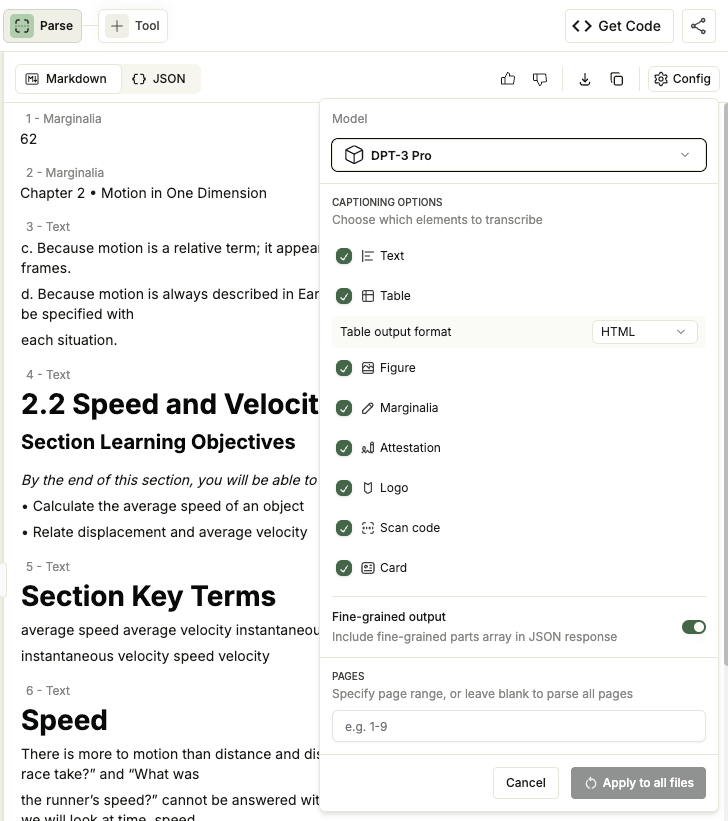
## Parse Options in the Playground
The Parse tab's **Config** menu now exposes {dpt3} parse options directly in the browser: choose which element types to caption, set the table output format, toggle fine-grained grounding, and select specific pages.
These controls map to the API's [`options`](./parse-input#request-options) field.
See [Parse in the Playground](./playground).
 ## Preview of DPT-3 and the New Parse API
{dpt3}, our newest parsing model, and the redesigned [{parseDpt3} API](https://docs.landing.ai/api-reference/parse/ade-parse) are now available in Preview. {dpt3} is a complete rethink of document parsing for the era of AI agents and agentic workflows: a new model architecture, a new response shape, and complexity-aware pricing.
Upload a document directly in the browser. No code required.
See parameters, response fields, and code samples.
### Highlights
* **Designed for agent systems.** Semantic block ids, a predictable hierarchy, and Markdown span pointers so AI agents can map results back to source.
* **Hierarchical layout model.** The structured output is a nested hierarchy: pages, blocks on each page, and cells within tables.
* **Visual grounding.** A bounding box on every block, plus finer-grained grounding within blocks.
* **Cleaner, more standardized Markdown.** Consistent, structured Markdown output designed for RAG and downstream processing.
* **New endpoint and response shape.** Calls go to the [new API](https://docs.landing.ai/api-reference/parse/ade-parse), which returns the document as Markdown plus a hierarchical `structure` tree. See the [Migration Guide](./migration-guide).
### Get Started
* [Overview](./overview)
* [Quickstart](./quickstart)
* [Migration Guide from DPT-2](./migration-guide)
## Preview of DPT-3 and the New Parse API
{dpt3}, our newest parsing model, and the redesigned [{parseDpt3} API](https://docs.landing.ai/api-reference/parse/ade-parse) are now available in Preview. {dpt3} is a complete rethink of document parsing for the era of AI agents and agentic workflows: a new model architecture, a new response shape, and complexity-aware pricing.
Upload a document directly in the browser. No code required.
See parameters, response fields, and code samples.
### Highlights
* **Designed for agent systems.** Semantic block ids, a predictable hierarchy, and Markdown span pointers so AI agents can map results back to source.
* **Hierarchical layout model.** The structured output is a nested hierarchy: pages, blocks on each page, and cells within tables.
* **Visual grounding.** A bounding box on every block, plus finer-grained grounding within blocks.
* **Cleaner, more standardized Markdown.** Consistent, structured Markdown output designed for RAG and downstream processing.
* **New endpoint and response shape.** Calls go to the [new API](https://docs.landing.ai/api-reference/parse/ade-parse), which returns the document as Markdown plus a hierarchical `structure` tree. See the [Migration Guide](./migration-guide).
### Get Started
* [Overview](./overview)
* [Quickstart](./quickstart)
* [Migration Guide from DPT-2](./migration-guide)