> ## Documentation Index
> Fetch the complete documentation index at: https://docs.landing.ai/llms.txt
> Use this file to discover all available pages before exploring further.
# Section
> Generate a hierarchical table of contents from a parsed document (Preview).
export const section = 'ADE Section';
export const split = 'ADE Split';
export const adeTypeScriptLibrary = 'ade-typescript';
export const adePythonLibrary = 'ade-python';
export const companyName = 'LandingAI';
export const extract = 'ADE Extract';
export const parse = 'ADE Parse';
export const ade = 'Agentic Document Extraction';
Use the [{section} API](https://docs.landing.ai/api-reference/tools/ade-section) to generate a hierarchical table of contents (TOC) from a parsed document.
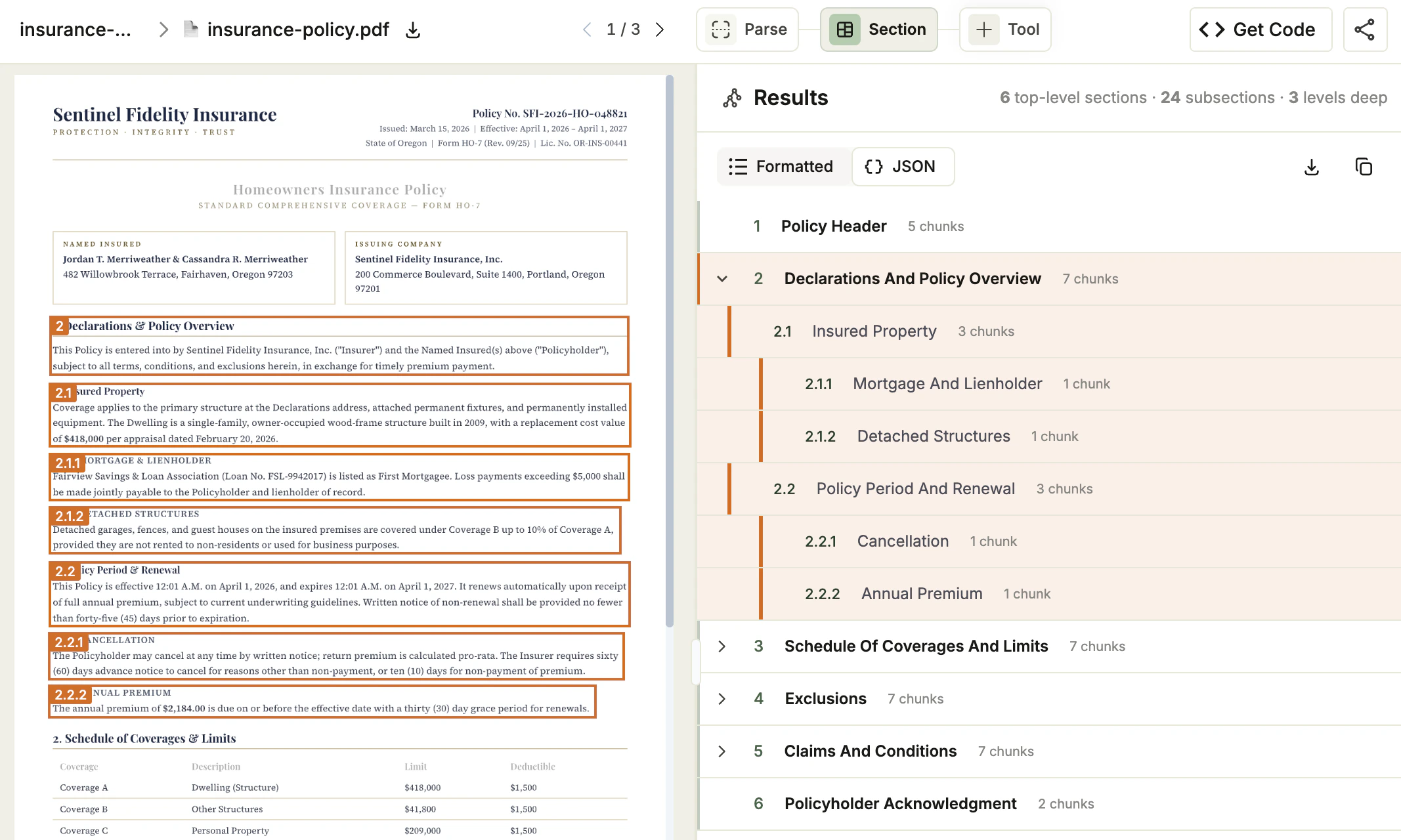
{section} analyzes the semantic structure of your document and returns a flat, reading-order list of sections and subsections, each with a title, hierarchy level, section number, and a reference to the starting chunk in the parsed document.
 {section} is in Preview. This feature is still in development and may not return accurate results. Do not use this feature in production environments.
## Example Use Cases
Use {section} in workflows that need to navigate, scope, or retrieve content by section:
* **Extraction pipelines**: Scope extraction queries to specific sections of a document (for example, "extract all tables in the Claims section").
* **RAG and search**: Use section-aware chunking instead of sliding-window chunking for more relevant retrieval results.
* **Document review**: Generate a navigable TOC for long documents such as insurance policies, contracts, reports, and technical manuals.
* **Cross-document analysis**: Process large document batches and compare structure across a corpus.
* **LLM applications**: Provide context windows organized by section rather than arbitrary token splits.
## How It Works
{section} accepts the Markdown output from {parse} (which contains [reference anchors](./ade-markdown-response#anchor-tags)) and returns a structured table of contents.
{section} automatically infers the document's hierarchy. You can also pass an optional `guidelines` parameter to control how sections are grouped.
The response includes two formats for the same TOC:
* **`table_of_contents`**: A structured JSON array for programmatic use
* **`table_of_contents_md`**: A Markdown-formatted TOC you can prepend to the document for navigation
The TOCs that {section} generates are in English, regardless of the source document language.
## Run Parse First
The {section} API requires the Markdown output from the [{parse} API](https://docs.landing.ai/api-reference/tools/ade-parse) as input. The Markdown must contain [reference anchors](./ade-markdown-response#anchor-tags) (``) that {section} uses to map sections back to specific chunks in the original document.
## Section in the Playground
Use the [Playground](https://ade.landing.ai) to test sectioning visually before incorporating it into your code. Upload a document, review the generated table of contents, and adjust the structure if needed.
When the table of contents matches your use case, use the generated script with the [API](#section-with-the-api), [Python library](./ade-python#section-getting-started), or [TypeScript library](./ade-typescript#section-getting-started) to section documents at scale.
1. Go to the [Playground](https://ade.landing.ai).
2. Open a project and upload the file you want to section. Parse runs first.
3. After parsing completes, click **+ Tool** in the top toolbar and select **Section**. {section} runs on every parsed file in the project. Section will run also automatically on any files later uploaded to the project.
4. In the **Results** panel, review the generated table of contents. The header shows the number of top-level sections, the number of subsections, and the maximum depth.
5. Hover over a section in the tree to highlight its chunks in the document viewer. Click a section to filter the viewer to just that section's chunks. Click the section again to restore the full view.
6. You can toggle between a visual representation of the results (**Formatted**) and the actual API JSON response (**JSON**).
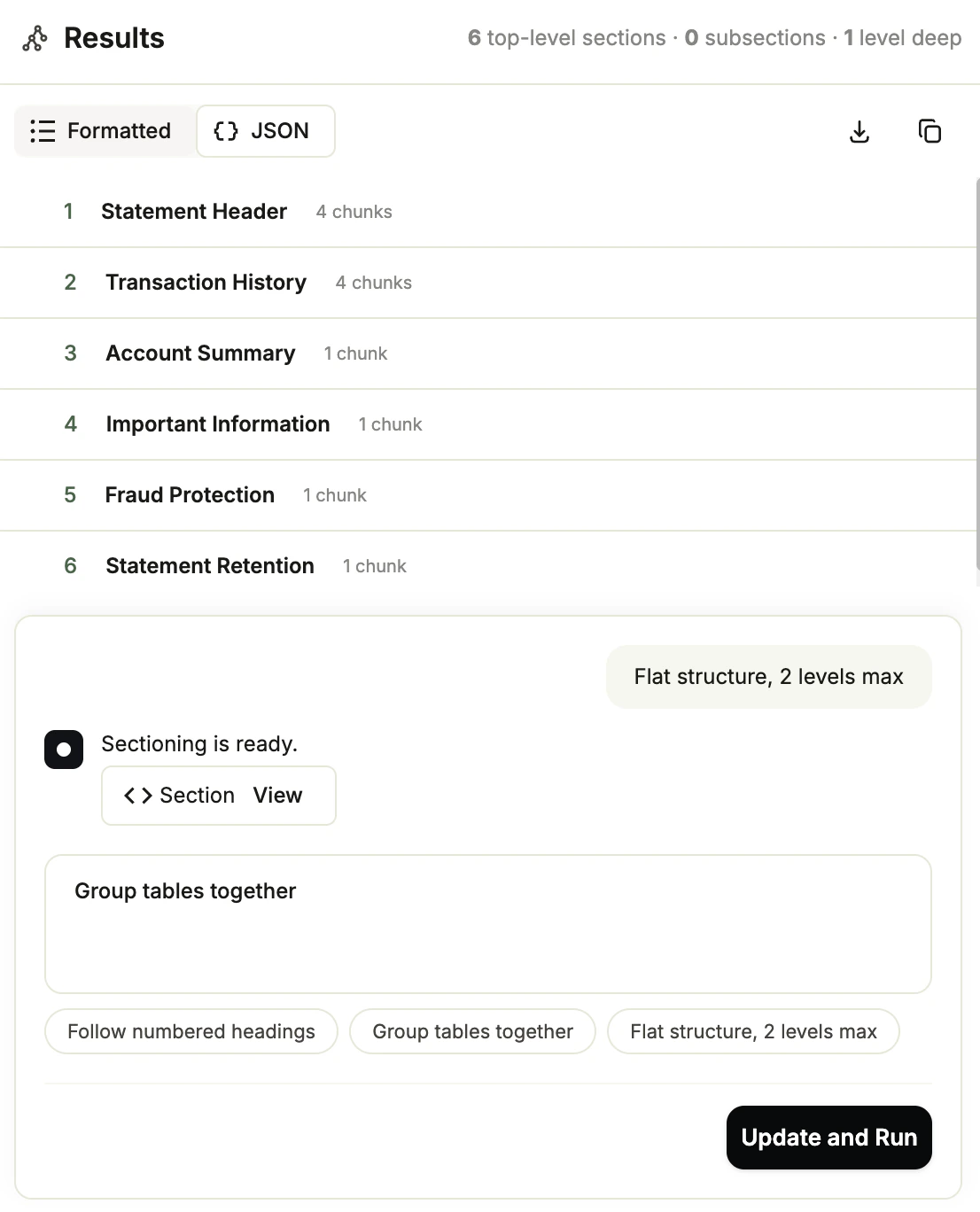
7. (Optional) Enter natural-language instructions refining the sectioning in the **Guidelines** text box and click **Update and Run**. For more details, go to [Refine the Table of Contents with Guidelines](#refine-the-table-of-contents-with-guidelines).
8. Once the structure matches your use case, [get a ready-to-use script](#get-a-ready-to-use-section-script).
### Refine the Table of Contents with Guidelines
To adapt the structure to your use case, pass a natural-language guideline to control how {section} groups content. Guidelines are optional and apply per file. Only the most recent guideline for a file is kept; submitting a new guideline replaces the previous result.
To submit a guideline:
1. Go to the [Playground](https://ade.landing.ai/) and open a project that has Section enabled.
2. Select the file you want to refine.
3. At the bottom of the **Section** panel, click **Add Custom Section Guidelines (Optional)** to expand that panel.
4. Enter natural-language instructions or click one of the suggestions to prefill the input.
5. Click **Update and Run**. {section} regenerates the table of contents for the selected file using your guideline.
{section} is in Preview. This feature is still in development and may not return accurate results. Do not use this feature in production environments.
## Example Use Cases
Use {section} in workflows that need to navigate, scope, or retrieve content by section:
* **Extraction pipelines**: Scope extraction queries to specific sections of a document (for example, "extract all tables in the Claims section").
* **RAG and search**: Use section-aware chunking instead of sliding-window chunking for more relevant retrieval results.
* **Document review**: Generate a navigable TOC for long documents such as insurance policies, contracts, reports, and technical manuals.
* **Cross-document analysis**: Process large document batches and compare structure across a corpus.
* **LLM applications**: Provide context windows organized by section rather than arbitrary token splits.
## How It Works
{section} accepts the Markdown output from {parse} (which contains [reference anchors](./ade-markdown-response#anchor-tags)) and returns a structured table of contents.
{section} automatically infers the document's hierarchy. You can also pass an optional `guidelines` parameter to control how sections are grouped.
The response includes two formats for the same TOC:
* **`table_of_contents`**: A structured JSON array for programmatic use
* **`table_of_contents_md`**: A Markdown-formatted TOC you can prepend to the document for navigation
The TOCs that {section} generates are in English, regardless of the source document language.
## Run Parse First
The {section} API requires the Markdown output from the [{parse} API](https://docs.landing.ai/api-reference/tools/ade-parse) as input. The Markdown must contain [reference anchors](./ade-markdown-response#anchor-tags) (``) that {section} uses to map sections back to specific chunks in the original document.
## Section in the Playground
Use the [Playground](https://ade.landing.ai) to test sectioning visually before incorporating it into your code. Upload a document, review the generated table of contents, and adjust the structure if needed.
When the table of contents matches your use case, use the generated script with the [API](#section-with-the-api), [Python library](./ade-python#section-getting-started), or [TypeScript library](./ade-typescript#section-getting-started) to section documents at scale.
1. Go to the [Playground](https://ade.landing.ai).
2. Open a project and upload the file you want to section. Parse runs first.
3. After parsing completes, click **+ Tool** in the top toolbar and select **Section**. {section} runs on every parsed file in the project. Section will run also automatically on any files later uploaded to the project.
4. In the **Results** panel, review the generated table of contents. The header shows the number of top-level sections, the number of subsections, and the maximum depth.
5. Hover over a section in the tree to highlight its chunks in the document viewer. Click a section to filter the viewer to just that section's chunks. Click the section again to restore the full view.
6. You can toggle between a visual representation of the results (**Formatted**) and the actual API JSON response (**JSON**).
7. (Optional) Enter natural-language instructions refining the sectioning in the **Guidelines** text box and click **Update and Run**. For more details, go to [Refine the Table of Contents with Guidelines](#refine-the-table-of-contents-with-guidelines).
8. Once the structure matches your use case, [get a ready-to-use script](#get-a-ready-to-use-section-script).
### Refine the Table of Contents with Guidelines
To adapt the structure to your use case, pass a natural-language guideline to control how {section} groups content. Guidelines are optional and apply per file. Only the most recent guideline for a file is kept; submitting a new guideline replaces the previous result.
To submit a guideline:
1. Go to the [Playground](https://ade.landing.ai/) and open a project that has Section enabled.
2. Select the file you want to refine.
3. At the bottom of the **Section** panel, click **Add Custom Section Guidelines (Optional)** to expand that panel.
4. Enter natural-language instructions or click one of the suggestions to prefill the input.
5. Click **Update and Run**. {section} regenerates the table of contents for the selected file using your guideline.
 ### Get a Ready-to-Use Section Script
After you create a table of contents, {ade} generates a script to section files using the current guideline (if any). The Playground provides two versions: one for calling the API directly, and one for the [{adePythonLibrary} library](./ade-python).
**To get the script:**
1. Go to the [Playground](https://ade.landing.ai/).
2. Open a project.
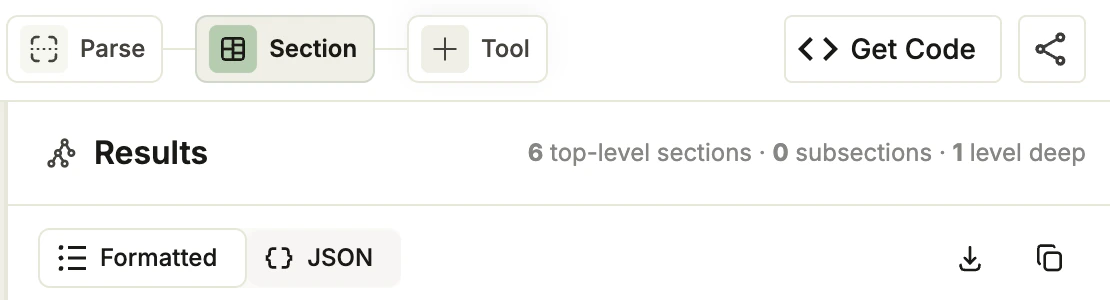
3. Click the **Section** tab.
4. Click **Get Code**.
### Get a Ready-to-Use Section Script
After you create a table of contents, {ade} generates a script to section files using the current guideline (if any). The Playground provides two versions: one for calling the API directly, and one for the [{adePythonLibrary} library](./ade-python).
**To get the script:**
1. Go to the [Playground](https://ade.landing.ai/).
2. Open a project.
3. Click the **Section** tab.
4. Click **Get Code**.
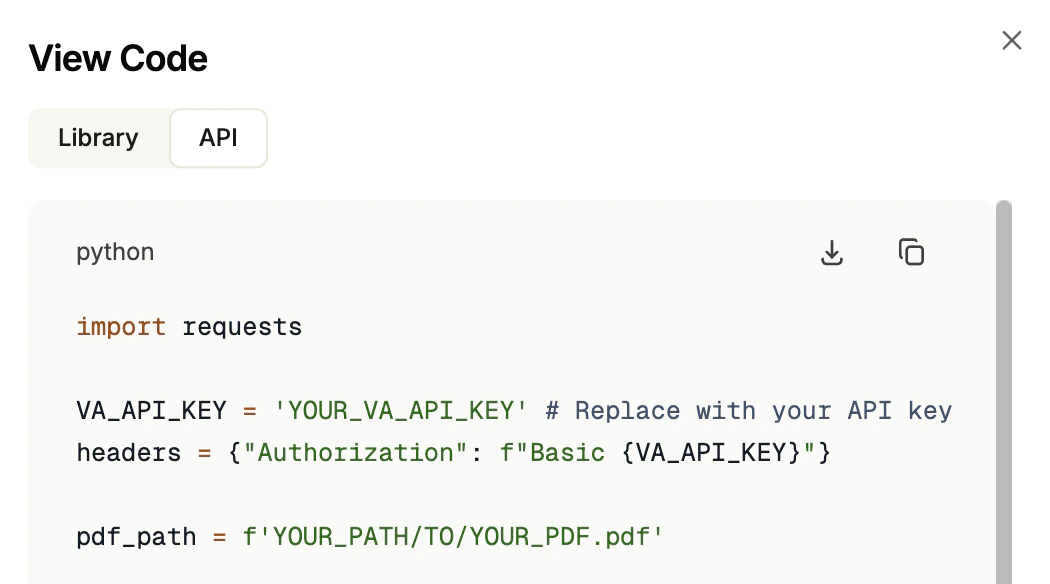
 5. The **View Code** pop-up opens. Click the **Library** or **API** tab to see the code for each method.
6. Click the **Download** or **Copy** buttons to get the code.
5. The **View Code** pop-up opens. Click the **Library** or **API** tab to see the code for each method.
6. Click the **Download** or **Copy** buttons to get the code.
 ## Section with the API
Section a document by calling the [{section}](https://docs.landing.ai/api-reference/tools/ade-section) endpoint.
```shell theme={null}
curl -X POST 'https://api.va.landing.ai/v1/ade/section' \
-H 'Authorization: Bearer YOUR_API_KEY' \
-F 'markdown=@parsed_output.md' \
-F 'model=section-latest'
```
### Parameters
Get the full parameters from the [API reference](https://docs.landing.ai/api-reference/tools/ade-section).
| Parameter | Required | Description |
| :------------- | :--------------------------------- | :------------------------------------------------------------------------------------------------------------------------------------------------------------------------------------------------------------------------------------------------------------------------------------------------------------------------------------------------ |
| `markdown` | Required if `markdown_url` omitted | The Markdown output from the [{parse} API](https://docs.landing.ai/api-reference/tools/ade-parse). Accepts a file upload or a raw string. |
| `markdown_url` | Required if `markdown` omitted | A URL pointing to a Markdown file to fetch and section. |
| `guidelines` | Optional | Natural-language instructions that control how the hierarchy is built. When omitted, the API infers structure automatically. Examples:
## Section with the API
Section a document by calling the [{section}](https://docs.landing.ai/api-reference/tools/ade-section) endpoint.
```shell theme={null}
curl -X POST 'https://api.va.landing.ai/v1/ade/section' \
-H 'Authorization: Bearer YOUR_API_KEY' \
-F 'markdown=@parsed_output.md' \
-F 'model=section-latest'
```
### Parameters
Get the full parameters from the [API reference](https://docs.landing.ai/api-reference/tools/ade-section).
| Parameter | Required | Description |
| :------------- | :--------------------------------- | :------------------------------------------------------------------------------------------------------------------------------------------------------------------------------------------------------------------------------------------------------------------------------------------------------------------------------------------------ |
| `markdown` | Required if `markdown_url` omitted | The Markdown output from the [{parse} API](https://docs.landing.ai/api-reference/tools/ade-parse). Accepts a file upload or a raw string. |
| `markdown_url` | Required if `markdown` omitted | A URL pointing to a Markdown file to fetch and section. |
| `guidelines` | Optional | Natural-language instructions that control how the hierarchy is built. When omitted, the API infers structure automatically. Examples:
• `"Treat each numbered article as a top-level section"`
• `"Create a flat structure, no more than 2 levels deep"`
• `"Separate the introduction and appendices from the main body"` |
| `model` | Optional | The section model version to use. If omitted, the API uses the latest model. For more information, see [Section Model Versions](./ade-section-models). |
For detailed information about the API response, go to [JSON Response for Sectioning](./ade-section-response).
For credit consumption rates, see [Credit Consumption](./ade-credit-consumption#credit-costs-for-the-section-api).
## Use Section with Our Libraries
Click one of the tiles below to learn how to use the [{section}](https://docs.landing.ai/api-reference/tools/ade-section) API with our libraries.
Use {section} with our Python library.

 }
href="./ade-typescript#section-getting-started"
>
Use {section} with our TypeScript library.
## Share Your Feedback
{section} is in public preview and we are actively looking for feedback to improve it. To share your experience, [schedule a feedback session with us](https://landing-ai.zoom.us/zbook/landingai-fatimasalehbhai/landingai-ade-feedback).
Come prepared to discuss:
* What is working well
* Any challenges you've encountered and how the feature could improve
* The email address for your {ade} account, found in your [profile page](https://ade.landing.ai/settings/personal/profile)
* The documents you used
* The code you used
}
href="./ade-typescript#section-getting-started"
>
Use {section} with our TypeScript library.
## Share Your Feedback
{section} is in public preview and we are actively looking for feedback to improve it. To share your experience, [schedule a feedback session with us](https://landing-ai.zoom.us/zbook/landingai-fatimasalehbhai/landingai-ade-feedback).
Come prepared to discuss:
* What is working well
* Any challenges you've encountered and how the feature could improve
* The email address for your {ade} account, found in your [profile page](https://ade.landing.ai/settings/personal/profile)
* The documents you used
* The code you used