> ## Documentation Index
> Fetch the complete documentation index at: https://docs.landing.ai/llms.txt
> Use this file to discover all available pages before exploring further.
# Visualize Parsed Chunks: Draw Bounding Boxes
> Draw color-coded bounding boxes on your document to see how each chunk type was parsed.
export const companyName = 'LandingAI';
export const extract = 'ADE Extract';
export const parse = 'ADE Parse';
export const ade = 'Agentic Document Extraction';
## Overview
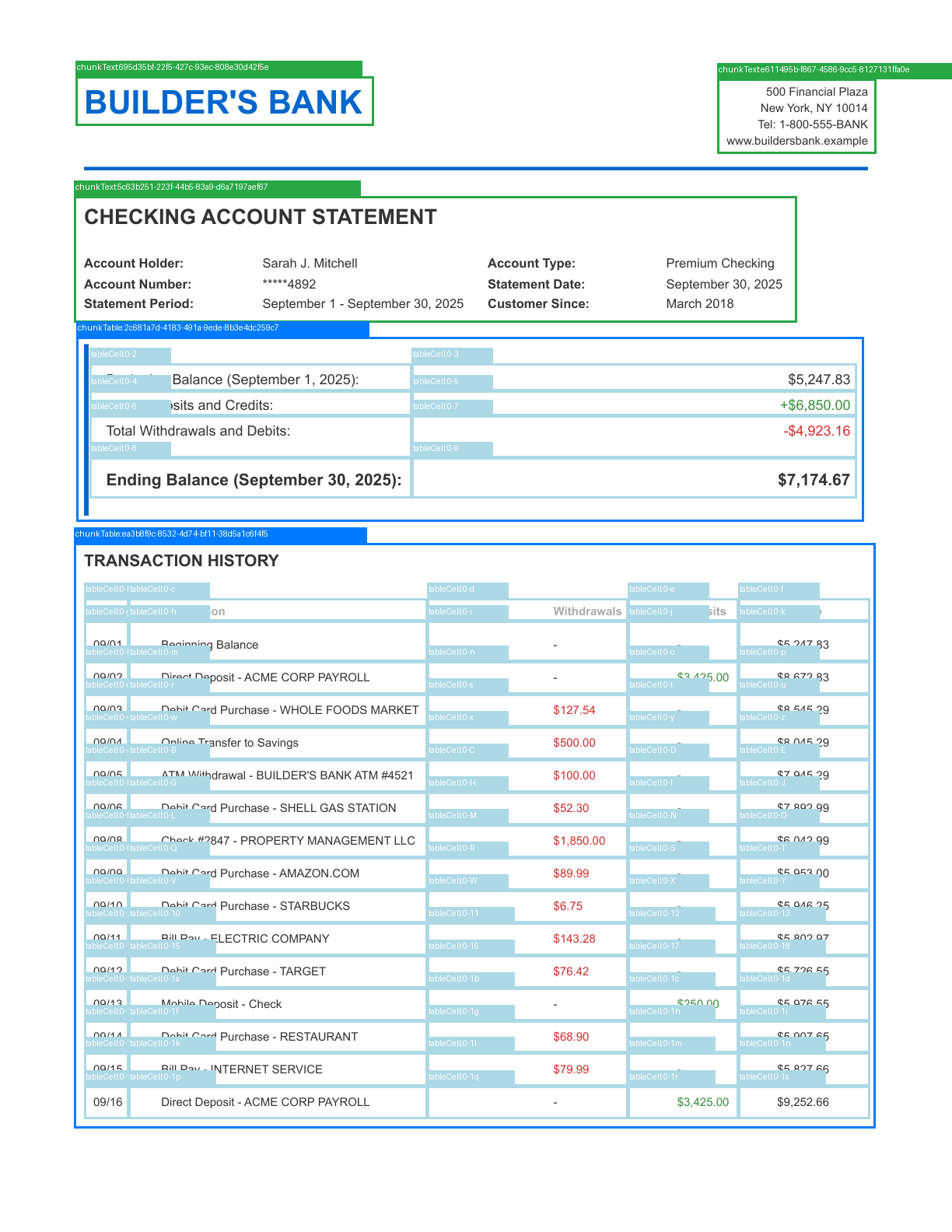
Use this script to visualize parsed chunks by drawing color-coded bounding boxes on your document. Each chunk type uses a distinct color, making it easy to see how the document was parsed.
The script identifies [chunk types](./ade-chunk-types) and table cells. For PDFs, the script creates a separate annotated PNG for each page (`page_1_annotated.png`, `page_2_annotated.png`). For image files, the script creates a single `page_annotated.png`.
The image below shows an example output with bounding boxes drawn on the first page of a PDF (Python library):
 These examples require the [Python](./ade-python) or [TypeScript](./ade-typescript) client library. Before running a script, set your API key and install the library and any required dependencies.
## Scripts
```python Python [expandable] theme={null}
from pathlib import Path
from landingai_ade import LandingAIADE
from PIL import Image, ImageDraw
import pymupdf
# Define colors for each chunk type
CHUNK_TYPE_COLORS = {
"chunkText": (40, 167, 69), # Green
"chunkTable": (0, 123, 255), # Blue
"chunkMarginalia": (111, 66, 193), # Purple
"chunkFigure": (255, 0, 255), # Magenta
"chunkLogo": (144, 238, 144), # Light green
"chunkCard": (255, 165, 0), # Orange
"chunkAttestation": (0, 255, 255), # Cyan
"chunkScanCode": (255, 193, 7), # Yellow
"chunkForm": (220, 20, 60), # Red
"tableCell": (173, 216, 230), # Light blue
"table": (70, 130, 180), # Steel blue
}
def draw_bounding_boxes(parse_response, document_path):
"""Draw bounding boxes around each chunk."""
def create_annotated_image(image, groundings, page_num=0):
"""Create an annotated image with grounding boxes and labels."""
annotated_img = image.copy()
draw = ImageDraw.Draw(annotated_img)
img_width, img_height = image.size
for gid, grounding in groundings.items():
# Check if grounding belongs to this page (for PDFs)
if grounding.page != page_num:
continue
box = grounding.box
# Extract coordinates from box
left, top, right, bottom = box.left, box.top, box.right, box.bottom
# Convert to pixel coordinates
x1 = int(left * img_width)
y1 = int(top * img_height)
x2 = int(right * img_width)
y2 = int(bottom * img_height)
# Draw bounding box
color = CHUNK_TYPE_COLORS.get(grounding.type, (128, 128, 128)) # Default to gray
draw.rectangle([x1, y1, x2, y2], outline=color, width=3)
# Draw label background and text
label = f"{grounding.type}:{gid}"
label_y = max(0, y1 - 20)
draw.rectangle([x1, label_y, x1 + len(label) * 8, y1], fill=color)
draw.text((x1 + 2, label_y + 2), label, fill=(255, 255, 255))
return annotated_img
if document_path.suffix.lower() == '.pdf':
pdf = pymupdf.open(document_path)
total_pages = len(pdf)
base_name = document_path.stem
for page_num in range(total_pages):
page = pdf[page_num]
pix = page.get_pixmap(matrix=pymupdf.Matrix(2, 2)) # 2x scaling
img = Image.frombytes("RGB", [pix.width, pix.height], pix.samples)
# Create and save annotated image
annotated_img = create_annotated_image(img, parse_response.grounding, page_num)
annotated_path = f"page_{page_num + 1}_annotated.png"
annotated_img.save(annotated_path)
print(f"Annotated image saved to: {annotated_path}")
pdf.close()
else:
# Load image file directly
img = Image.open(document_path)
if img.mode != "RGB":
img = img.convert("RGB")
# Create and save annotated image
annotated_img = create_annotated_image(img, parse_response.grounding)
annotated_path = "page_annotated.png"
annotated_img.save(annotated_path)
print(f"Annotated image saved to: {annotated_path}")
return None
# Initialize client (uses the API key from the VISION_AGENT_API_KEY environment variable)
client = LandingAIADE()
# Replace with your file path
document_path = Path("/path/to/file/document")
# Parse the document
print("Parsing document...")
parse_response = client.parse(
document=document_path,
model="dpt-2-latest"
)
print("Parsing complete!")
# Draw bounding boxes and create annotated images
draw_bounding_boxes(parse_response, document_path)
```
```typescript TypeScript [expandable] theme={null}
import LandingAIADE from "landingai-ade";
import fs from "fs";
import path from "path";
import { createCanvas, loadImage } from "canvas";
import { pdf } from "pdf-to-img";
// Define colors for each chunk type
const CHUNK_TYPE_COLORS: Record = {
chunkText: [40, 167, 69], // Green
chunkTable: [0, 123, 255], // Blue
chunkMarginalia: [111, 66, 193], // Purple
chunkFigure: [255, 0, 255], // Magenta
chunkLogo: [144, 238, 144], // Light green
chunkCard: [255, 165, 0], // Orange
chunkAttestation: [0, 255, 255], // Cyan
chunkScanCode: [255, 193, 7], // Yellow
chunkForm: [220, 20, 60], // Red
tableCell: [173, 216, 230], // Light blue
table: [70, 130, 180], // Steel blue
};
function rgbToString(rgb: [number, number, number]): string {
return `rgb(${rgb[0]}, ${rgb[1]}, ${rgb[2]})`;
}
async function drawAnnotations(
imageBuffer: Buffer,
groundings: any,
pageNum: number
): Promise {
// Load the rendered PDF page image
const image = await loadImage(imageBuffer);
const canvas = createCanvas(image.width, image.height);
const ctx = canvas.getContext("2d");
// Draw the original PDF page
ctx.drawImage(image, 0, 0);
const imgWidth = canvas.width;
const imgHeight = canvas.height;
// Draw bounding boxes for each grounding
for (const [gid, grounding] of Object.entries(groundings)) {
const g = grounding as any;
// Check if grounding belongs to this page
if (g.page !== pageNum) {
continue;
}
const box = g.box;
// Convert normalized coordinates to pixel coordinates
const x1 = Math.floor(box.left * imgWidth);
const y1 = Math.floor(box.top * imgHeight);
const x2 = Math.floor(box.right * imgWidth);
const y2 = Math.floor(box.bottom * imgHeight);
// Get color for this chunk type (default to gray)
const color = CHUNK_TYPE_COLORS[g.type] || [128, 128, 128];
const colorString = rgbToString(color);
// Draw bounding box
ctx.strokeStyle = colorString;
ctx.lineWidth = 3;
ctx.strokeRect(x1, y1, x2 - x1, y2 - y1);
// Draw label background and text
const label = `${g.type}:${gid.substring(0, 8)}`;
const labelY = Math.max(0, y1 - 20);
ctx.fillStyle = colorString;
ctx.fillRect(x1, labelY, label.length * 8, 20);
ctx.fillStyle = "white";
ctx.font = "12px sans-serif";
ctx.fillText(label, x1 + 2, labelY + 14);
}
return canvas.toBuffer("image/png");
}
async function drawBoundingBoxes(parseResponse: any, documentPath: string) {
const fileExtension = path.extname(documentPath).toLowerCase();
if (fileExtension === ".pdf") {
// Convert PDF to images using pdf-to-img
const document = await pdf(documentPath, { scale: 2.0 });
let pageNum = 0;
for await (const page of document) {
console.log(`Processing page ${pageNum + 1}...`);
// Draw annotations on the rendered PDF page
const annotatedBuffer = await drawAnnotations(
page,
parseResponse.grounding,
pageNum
);
// Save annotated image
const outputPath = `page_${pageNum + 1}_annotated.png`;
fs.writeFileSync(outputPath, annotatedBuffer);
console.log(`Annotated image saved to: ${outputPath}`);
pageNum++;
}
} else {
// Load image file directly
const image = await loadImage(documentPath);
const canvas = createCanvas(image.width, image.height);
const ctx = canvas.getContext("2d");
// Draw the image
ctx.drawImage(image, 0, 0);
const imgWidth = canvas.width;
const imgHeight = canvas.height;
// Draw bounding boxes for page 0
for (const [gid, grounding] of Object.entries(parseResponse.grounding)) {
const g = grounding as any;
if (g.page !== 0) continue;
const box = g.box;
const x1 = Math.floor(box.left * imgWidth);
const y1 = Math.floor(box.top * imgHeight);
const x2 = Math.floor(box.right * imgWidth);
const y2 = Math.floor(box.bottom * imgHeight);
const color = CHUNK_TYPE_COLORS[g.type] || [128, 128, 128];
const colorString = rgbToString(color);
ctx.strokeStyle = colorString;
ctx.lineWidth = 3;
ctx.strokeRect(x1, y1, x2 - x1, y2 - y1);
const label = `${g.type}:${gid.substring(0, 8)}`;
const labelY = Math.max(0, y1 - 20);
ctx.fillStyle = colorString;
ctx.fillRect(x1, labelY, label.length * 8, 20);
ctx.fillStyle = "white";
ctx.font = "12px sans-serif";
ctx.fillText(label, x1 + 2, labelY + 14);
}
// Save annotated image
const buffer = canvas.toBuffer("image/png");
fs.writeFileSync("page_annotated.png", buffer);
console.log("Annotated image saved to: page_annotated.png");
}
}
// Initialize client (uses the API key from the VISION_AGENT_API_KEY environment variable)
const client = new LandingAIADE();
async function visualizeChunks() {
// Replace with your file path
const documentPath = "/path/to/file/document";
// Parse the document
console.log("Parsing document...");
const parseResponse = await client.parse({
document: fs.createReadStream(documentPath),
model: "dpt-2-latest"
});
console.log("Parsing complete!");
// Draw bounding boxes and create annotated images
await drawBoundingBoxes(parseResponse, documentPath);
}
visualizeChunks();
```
These examples require the [Python](./ade-python) or [TypeScript](./ade-typescript) client library. Before running a script, set your API key and install the library and any required dependencies.
## Scripts
```python Python [expandable] theme={null}
from pathlib import Path
from landingai_ade import LandingAIADE
from PIL import Image, ImageDraw
import pymupdf
# Define colors for each chunk type
CHUNK_TYPE_COLORS = {
"chunkText": (40, 167, 69), # Green
"chunkTable": (0, 123, 255), # Blue
"chunkMarginalia": (111, 66, 193), # Purple
"chunkFigure": (255, 0, 255), # Magenta
"chunkLogo": (144, 238, 144), # Light green
"chunkCard": (255, 165, 0), # Orange
"chunkAttestation": (0, 255, 255), # Cyan
"chunkScanCode": (255, 193, 7), # Yellow
"chunkForm": (220, 20, 60), # Red
"tableCell": (173, 216, 230), # Light blue
"table": (70, 130, 180), # Steel blue
}
def draw_bounding_boxes(parse_response, document_path):
"""Draw bounding boxes around each chunk."""
def create_annotated_image(image, groundings, page_num=0):
"""Create an annotated image with grounding boxes and labels."""
annotated_img = image.copy()
draw = ImageDraw.Draw(annotated_img)
img_width, img_height = image.size
for gid, grounding in groundings.items():
# Check if grounding belongs to this page (for PDFs)
if grounding.page != page_num:
continue
box = grounding.box
# Extract coordinates from box
left, top, right, bottom = box.left, box.top, box.right, box.bottom
# Convert to pixel coordinates
x1 = int(left * img_width)
y1 = int(top * img_height)
x2 = int(right * img_width)
y2 = int(bottom * img_height)
# Draw bounding box
color = CHUNK_TYPE_COLORS.get(grounding.type, (128, 128, 128)) # Default to gray
draw.rectangle([x1, y1, x2, y2], outline=color, width=3)
# Draw label background and text
label = f"{grounding.type}:{gid}"
label_y = max(0, y1 - 20)
draw.rectangle([x1, label_y, x1 + len(label) * 8, y1], fill=color)
draw.text((x1 + 2, label_y + 2), label, fill=(255, 255, 255))
return annotated_img
if document_path.suffix.lower() == '.pdf':
pdf = pymupdf.open(document_path)
total_pages = len(pdf)
base_name = document_path.stem
for page_num in range(total_pages):
page = pdf[page_num]
pix = page.get_pixmap(matrix=pymupdf.Matrix(2, 2)) # 2x scaling
img = Image.frombytes("RGB", [pix.width, pix.height], pix.samples)
# Create and save annotated image
annotated_img = create_annotated_image(img, parse_response.grounding, page_num)
annotated_path = f"page_{page_num + 1}_annotated.png"
annotated_img.save(annotated_path)
print(f"Annotated image saved to: {annotated_path}")
pdf.close()
else:
# Load image file directly
img = Image.open(document_path)
if img.mode != "RGB":
img = img.convert("RGB")
# Create and save annotated image
annotated_img = create_annotated_image(img, parse_response.grounding)
annotated_path = "page_annotated.png"
annotated_img.save(annotated_path)
print(f"Annotated image saved to: {annotated_path}")
return None
# Initialize client (uses the API key from the VISION_AGENT_API_KEY environment variable)
client = LandingAIADE()
# Replace with your file path
document_path = Path("/path/to/file/document")
# Parse the document
print("Parsing document...")
parse_response = client.parse(
document=document_path,
model="dpt-2-latest"
)
print("Parsing complete!")
# Draw bounding boxes and create annotated images
draw_bounding_boxes(parse_response, document_path)
```
```typescript TypeScript [expandable] theme={null}
import LandingAIADE from "landingai-ade";
import fs from "fs";
import path from "path";
import { createCanvas, loadImage } from "canvas";
import { pdf } from "pdf-to-img";
// Define colors for each chunk type
const CHUNK_TYPE_COLORS: Record = {
chunkText: [40, 167, 69], // Green
chunkTable: [0, 123, 255], // Blue
chunkMarginalia: [111, 66, 193], // Purple
chunkFigure: [255, 0, 255], // Magenta
chunkLogo: [144, 238, 144], // Light green
chunkCard: [255, 165, 0], // Orange
chunkAttestation: [0, 255, 255], // Cyan
chunkScanCode: [255, 193, 7], // Yellow
chunkForm: [220, 20, 60], // Red
tableCell: [173, 216, 230], // Light blue
table: [70, 130, 180], // Steel blue
};
function rgbToString(rgb: [number, number, number]): string {
return `rgb(${rgb[0]}, ${rgb[1]}, ${rgb[2]})`;
}
async function drawAnnotations(
imageBuffer: Buffer,
groundings: any,
pageNum: number
): Promise {
// Load the rendered PDF page image
const image = await loadImage(imageBuffer);
const canvas = createCanvas(image.width, image.height);
const ctx = canvas.getContext("2d");
// Draw the original PDF page
ctx.drawImage(image, 0, 0);
const imgWidth = canvas.width;
const imgHeight = canvas.height;
// Draw bounding boxes for each grounding
for (const [gid, grounding] of Object.entries(groundings)) {
const g = grounding as any;
// Check if grounding belongs to this page
if (g.page !== pageNum) {
continue;
}
const box = g.box;
// Convert normalized coordinates to pixel coordinates
const x1 = Math.floor(box.left * imgWidth);
const y1 = Math.floor(box.top * imgHeight);
const x2 = Math.floor(box.right * imgWidth);
const y2 = Math.floor(box.bottom * imgHeight);
// Get color for this chunk type (default to gray)
const color = CHUNK_TYPE_COLORS[g.type] || [128, 128, 128];
const colorString = rgbToString(color);
// Draw bounding box
ctx.strokeStyle = colorString;
ctx.lineWidth = 3;
ctx.strokeRect(x1, y1, x2 - x1, y2 - y1);
// Draw label background and text
const label = `${g.type}:${gid.substring(0, 8)}`;
const labelY = Math.max(0, y1 - 20);
ctx.fillStyle = colorString;
ctx.fillRect(x1, labelY, label.length * 8, 20);
ctx.fillStyle = "white";
ctx.font = "12px sans-serif";
ctx.fillText(label, x1 + 2, labelY + 14);
}
return canvas.toBuffer("image/png");
}
async function drawBoundingBoxes(parseResponse: any, documentPath: string) {
const fileExtension = path.extname(documentPath).toLowerCase();
if (fileExtension === ".pdf") {
// Convert PDF to images using pdf-to-img
const document = await pdf(documentPath, { scale: 2.0 });
let pageNum = 0;
for await (const page of document) {
console.log(`Processing page ${pageNum + 1}...`);
// Draw annotations on the rendered PDF page
const annotatedBuffer = await drawAnnotations(
page,
parseResponse.grounding,
pageNum
);
// Save annotated image
const outputPath = `page_${pageNum + 1}_annotated.png`;
fs.writeFileSync(outputPath, annotatedBuffer);
console.log(`Annotated image saved to: ${outputPath}`);
pageNum++;
}
} else {
// Load image file directly
const image = await loadImage(documentPath);
const canvas = createCanvas(image.width, image.height);
const ctx = canvas.getContext("2d");
// Draw the image
ctx.drawImage(image, 0, 0);
const imgWidth = canvas.width;
const imgHeight = canvas.height;
// Draw bounding boxes for page 0
for (const [gid, grounding] of Object.entries(parseResponse.grounding)) {
const g = grounding as any;
if (g.page !== 0) continue;
const box = g.box;
const x1 = Math.floor(box.left * imgWidth);
const y1 = Math.floor(box.top * imgHeight);
const x2 = Math.floor(box.right * imgWidth);
const y2 = Math.floor(box.bottom * imgHeight);
const color = CHUNK_TYPE_COLORS[g.type] || [128, 128, 128];
const colorString = rgbToString(color);
ctx.strokeStyle = colorString;
ctx.lineWidth = 3;
ctx.strokeRect(x1, y1, x2 - x1, y2 - y1);
const label = `${g.type}:${gid.substring(0, 8)}`;
const labelY = Math.max(0, y1 - 20);
ctx.fillStyle = colorString;
ctx.fillRect(x1, labelY, label.length * 8, 20);
ctx.fillStyle = "white";
ctx.font = "12px sans-serif";
ctx.fillText(label, x1 + 2, labelY + 14);
}
// Save annotated image
const buffer = canvas.toBuffer("image/png");
fs.writeFileSync("page_annotated.png", buffer);
console.log("Annotated image saved to: page_annotated.png");
}
}
// Initialize client (uses the API key from the VISION_AGENT_API_KEY environment variable)
const client = new LandingAIADE();
async function visualizeChunks() {
// Replace with your file path
const documentPath = "/path/to/file/document";
// Parse the document
console.log("Parsing document...");
const parseResponse = await client.parse({
document: fs.createReadStream(documentPath),
model: "dpt-2-latest"
});
console.log("Parsing complete!");
// Draw bounding boxes and create annotated images
await drawBoundingBoxes(parseResponse, documentPath);
}
visualizeChunks();
```