> ## Documentation Index
> Fetch the complete documentation index at: https://docs.landing.ai/llms.txt
> Use this file to discover all available pages before exploring further.
# Document Pre-Trained Transformers (Parsing Models)
> Choose a parsing model (DPT) and set it when parsing files.
export const adePythonLibrary = 'ade-python';
export const dpt2mini = 'DPT-2 mini';
export const dpt2 = 'DPT-2';
export const dpt1 = 'DPT-1';
export const dpt = 'Document Pre-Trained Transformer';
export const companyName = 'LandingAI';
export const extract = 'ADE Extract';
export const parse = 'ADE Parse';
export const ade = 'Agentic Document Extraction';
## Parsing Models Overview
A **{dpt}** (DPT) is the model that powers the parsing capabilities of the ADE Parsing APIs. The DPT identifies document layouts and chunks, then generates descriptive explanations (captions) for those chunks.
## Availability
The ability to select a {dpt} is available:
* in the [Playground](#set-the-model-in-the-playground)
* when calling the [{parse}](#set-the-model-in-the-api) or [Parse Jobs](https://docs.landing.ai/api-reference/tools/ade-parse-jobs) APIs
* when using the [Python](https://github.com/landing-ai/ade-python) and [TypeScript](https://github.com/landing-ai/ade-typescript) libraries
## Model Versions and Snapshots
The following table lists the available `model` values for the {parse} and ADE Async Parse API:
| Model Values | Description |
| ------------------- | ------------------------------------------------------------------------------------------ |
| dpt-2 | The latest snapshot of {dpt2}. |
| dpt-2-latest | The latest snapshot of {dpt2}. |
| dpt-2-20250919 | The snapshot of {dpt2} released on September 19, 2025. |
| dpt-2-20251103 | The snapshot of {dpt2} released on November 3, 2025. |
| dpt-2-20260302 | The snapshot of {dpt2} released on March 2, 2026. [See improvements.](#dpt-2-20260302) |
| dpt-2-20260410 | The snapshot of {dpt2} released on April 10, 2026. [See improvements.](#dpt-2-20260410) |
| dpt-2-mini | The latest snapshot of {dpt2mini}. |
| dpt-2-mini-20251003 | The snapshot of {dpt2mini} released on October 3, 2025. |
| dpt-2-mini-20260302 | The snapshot of {dpt2mini} released on March 2, 2026. [See improvements.](#dpt-2-20260302) |
| dpt-2-mini-latest | The latest snapshot of {dpt2mini}. |
### Why Model Versioning Matters
When integrating the API, you have two options for specifying the model:
1. **Use a general model name** (like `dpt-2` or `dpt-2-latest`) to always get the newest version. This automatically give you improvements and updates, but parsing results may change when new model versions are released
2. **Use a specific snapshot** (like `dpt-2-20250919`) to pin to an exact model version. This ensures consistent parsing results over time, but you won't receive improvements.
If you use only a general model name like `dpt-2` in production, your application may produce different results when we release model updates. Consider whether you need consistent results or prefer to receive the latest improvements.
### Understanding Snapshots and -latest
**Snapshots** are frozen versions of a model released on specific dates. Each snapshot maintains the same parsing behavior indefinitely, making your results predictable.
The **latest** suffix always points to the most recent snapshot of that model.
## DPT-2
{dpt2} was introduced in September 2025.
It builds upon an earlier model, and offers these advanced features:
* **Agentic Table Captioning**: {dpt2} can parse large, complex, no-gridline, and merged-cell tables with unprecedented fidelity. Every cell is preserved, aligned, and made accessible—enabling cell-level grounding so you know exactly where values came from.
* **Refined Figure Captioning**: Logos, seals, and small figures are now identified precisely and concisely, eliminating the noise of verbose descriptions.
* **Smarter Layout Detection**: Fewer chunks are missed, even in messy scans. {dpt2} can even detect stamps inside tables and process them separately—critical for compliance workflows.
* **Expanded Chunk Ontology**: Beyond text, tables, and figures, {dpt2} now recognizes attestation (signatures, stamps, seals), ID cards, logos, barcodes, and QR codes—ensuring all document elements are classified consistently. To learn more, go to [Chunk Types](./ade-chunk-types).
### dpt-2-20260410
The `dpt-2-20260410` snapshot builds on previous {dpt2} snapshots with these improvements:
* **Improved cell parsing in forms and tables**: Text positioned at different locations within a cell is now captured more completely.
* **Improved column alignment in complex tables**: Cell data now more accurately aligns with its corresponding column headers.
### dpt-2-20260302
The `dpt-2-20260302` snapshot builds on previous {dpt2} snapshots with several improvements, including:
* **Table boundary detection**: Tables that were previously split into multiple chunks are now correctly identified as a single table.
* **Improved large table accuracy**: Large tables are now parsed more accurately.
* **Special characters returned as Unicode**: Characters such as asterisks are now returned as their Unicode characters (for example, `*`) rather than as spelled-out strings like `asterisk`.
The table boundary detection and table parsing improvements in this snapshot are also included in `dpt-2-mini-20260302`.
### DPT-2 Availability
The {dpt2} can be used in these API endpoints:
* [{parse}](https://docs.landing.ai/api-reference/tools/ade-parse)
* [ADE Parse Jobs](https://docs.landing.ai/api-reference/tools/ade-parse-jobs)
## DPT-2 mini
{dpt2mini} is a lightweight model optimized for simple, digitally native documents. It provides cost-effective parsing for straightforward document structures.
{dpt2mini} is in Preview. This model is still in development and may not return accurate results. Do not use this model in production environments.
### Supported Features
{dpt2mini} supports:
* Digitally native documents, such as PDFs created from digital files.
* English text.
* Layout detection and document structure identification.
* Simple tables.
* All [chunk types](./ade-chunk-types), including paragraphs, figures, and more. The model transcribes any text present in image-based chunk types and generates concise descriptions for visual elements.
### Ideal Document Types
{dpt2mini} is ideal for digitally native English documents with straightforward layouts, such as:
* Business correspondence (letters, memos, emails)
* Simple reports and documentation
* Basic forms with key-value pairs
* Invoices with simple tables
* Digital contracts
### Limitations and When to Use DPT-2 Instead
{dpt2mini} does not support:
* Scanned documents or handwritten content.
* Non-English languages.
* Complex tables with multi-level headers, merged cells, or nested structures.
* Very small fonts.
* Full visual element analysis. Image-based [chunk types](./ade-chunk-types) (`figure`, `logo`, `card`, `attestation`, and `scan_code`) are identified and receive concise descriptions, but not the in-depth analysis that {dpt2} provides.
If your use case requires any of the features that {dpt2mini} does not support, use {dpt2} instead.
### DPT-2 mini Availability
The {dpt2mini} can be used in these API endpoints:
* [{parse}](https://docs.landing.ai/api-reference/tools/ade-parse)
* [ADE Parse Jobs](https://docs.landing.ai/api-reference/tools/ade-parse-jobs)
## Set the Model in the API
When calling the [{parse}](https://docs.landing.ai/api-reference/tools/ade-parse) or [ADE Parse Jobs](https://docs.landing.ai/api-reference/tools/ade-parse-jobs) endpoint, you can set the model using the `model` parameter.
If you omit the `model` parameter, the API will use the latest snapshot of the `dpt-2` model.
For example, run the command below to use the latest snapshot of {dpt2}.
```shell theme={null}
curl -X POST 'https://api.va.landing.ai/v1/ade/parse' \
-H 'Authorization: Bearer YOUR_API_KEY' \
-F 'document=@document.pdf' \
-F 'model=dpt-2-latest'
```
## Set the Model with the Library
When using the [{adePythonLibrary}](https://github.com/landing-ai/ade-python) library, you can set the model using the `model` parameter in the `parse()` function.
If you omit the `model` parameter, the library will use the latest snapshot of the `dpt-2` model.
For example, use this code to parse a document with the latest snapshot of {dpt2}:
```python theme={null}
from pathlib import Path
from landingai_ade import LandingAIADE
client = LandingAIADE()
response = client.parse(
document=Path("/path/to/document.pdf"),
model="dpt-2-latest"
)
```
## Set the Model in the Playground
To select the parsing model in the Playground:
1. Open a project in the [Playground](https://va.landing.ai/).
2. Click the **Parse** tab.
3. In the top-right corner of the parse result panel, click **Config**.
4. From the **Model** drop-down, select the model you want to use.
5. Click **Re-run all files**.
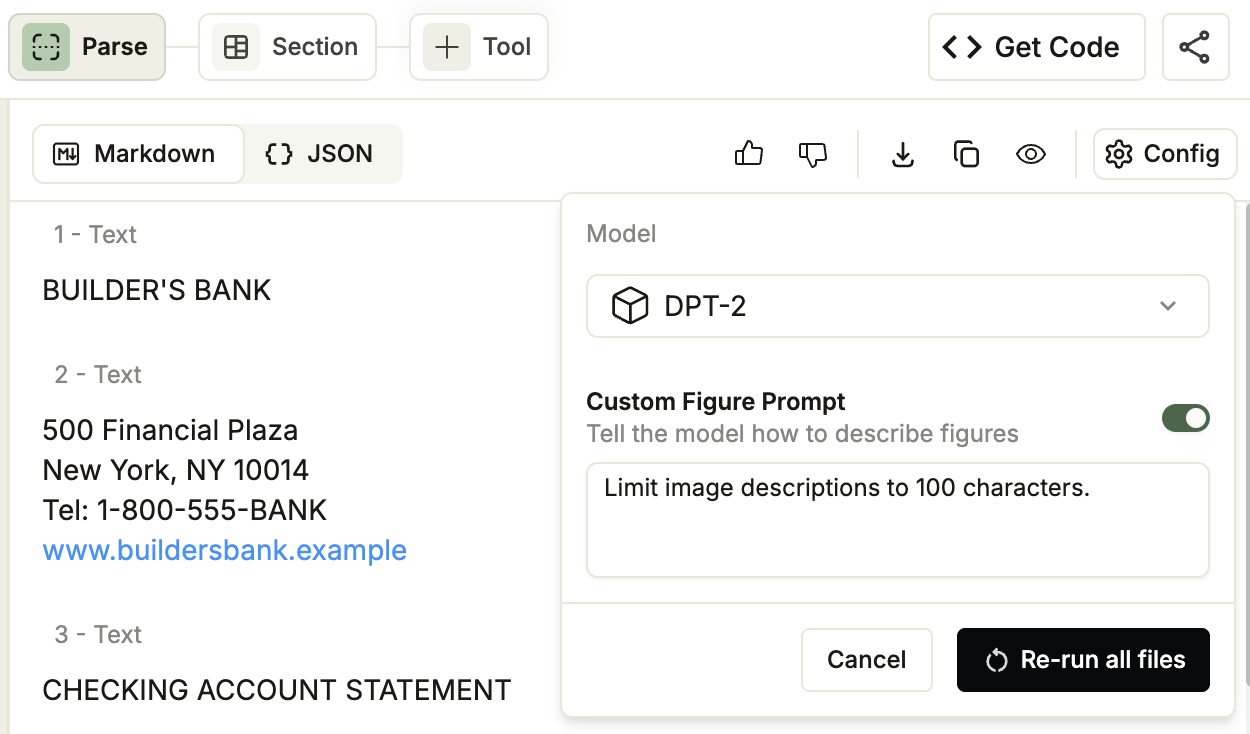 Switching the model re-parses every file in the project. If you switch back to a model that was already applied to the project, the Playground reuses the cached parse results instead of re-parsing.