> ## Documentation Index
> Fetch the complete documentation index at: https://docs.landing.ai/llms.txt
> Use this file to discover all available pages before exploring further.
# Custom Prompts for Figure Descriptions
> Customize how figures and images are described during parsing.
export const splitJSON = 'split rules';
export const split = 'ADE Split';
export const adeTypeScriptLibrary = 'ade-typescript';
export const adePythonLibrary = 'ade-python';
export const dpt2mini = 'DPT-2 mini';
export const dpt2 = 'DPT-2';
export const dpt1 = 'DPT-1';
export const dpt = 'Document Pre-Trained Transformer';
export const companyName = 'LandingAI';
export const extract = 'ADE Extract';
export const parse = 'ADE Parse';
export const ade = 'Agentic Document Extraction';
When you parse a file, the parsing results include descriptions of images called **captions**. Captions appear in the `markdown` field of `figure`-type chunks. For more information, see [Image-Based Chunks](./ade-markdown-response#image-based-chunks).
Use the optional `custom_prompts` parameter to tell {ade} how to describe figures during parsing.
```bash highlight={4} theme={null}
curl -X POST 'https://api.va.landing.ai/v1/ade/parse' \
-H 'Authorization: Bearer YOUR_API_KEY' \
-F 'document=@document.pdf' \
-F 'custom_prompts={"figure":"YOUR_CUSTOM_PROMPT"}'
```
## When to Add Custom Prompts
Adding custom prompts can be helpful if:
* The default image descriptions do not fit your use case.
* The downstream processing tasks require the image descriptions to use a specific format or language.
* The images or charts are unique to your organization or use case and you need to provide additional context about what they represent.
## Sample Prompts
**Make the description more concise**
This is helpful if you want to minimize the number of input tokens when running the Split or Extract APIs, or if the images are straightforward and do not need much description.
```bash theme={null}
custom_prompts={"figure":"Limit the description to 50 characters. Be concise but communicate the core message of the image. Do not truncate sentences."}
```
**Omit the description**
This is helpful if you don't need the image descriptions in your post-parsing tasks.
```bash theme={null}
custom_prompts={"figure":"Do not describe the image. Return an empty string."}
```
**Set the language**
This is useful if your downstream tasks require descriptions in a specific language.
```bash theme={null}
custom_prompts={"figure":"Return the description in Spanish."}
```
**Return a specific format**
This is useful if you want to standardize or change how the image is described.
```bash theme={null}
custom_prompts={"figure":"If the image is a chart, format the data as an HTML table"}
```
**Use a standard description**
This is useful if you want to return the same string for every figure.
```bash theme={null}
custom_prompts={"figure":"Only return this string as the description: This is an image"}
```
## Supported Models
The `custom_prompts` parameter is only supported with {dpt2}.
{dpt2mini} does not generate figure captions, so the parameter does not apply when using that model. Passing it with {dpt2mini} will return a 422 error. For more information about parsing models, see [Document Pre-Trained Transformers (Parsing Models)](./ade-parse-models).
## Requirements
The `custom_prompts` parameter accepts a JSON string. Only the `figure` key is supported. Any other key will be rejected.
The custom prompt can include up to 512 characters.
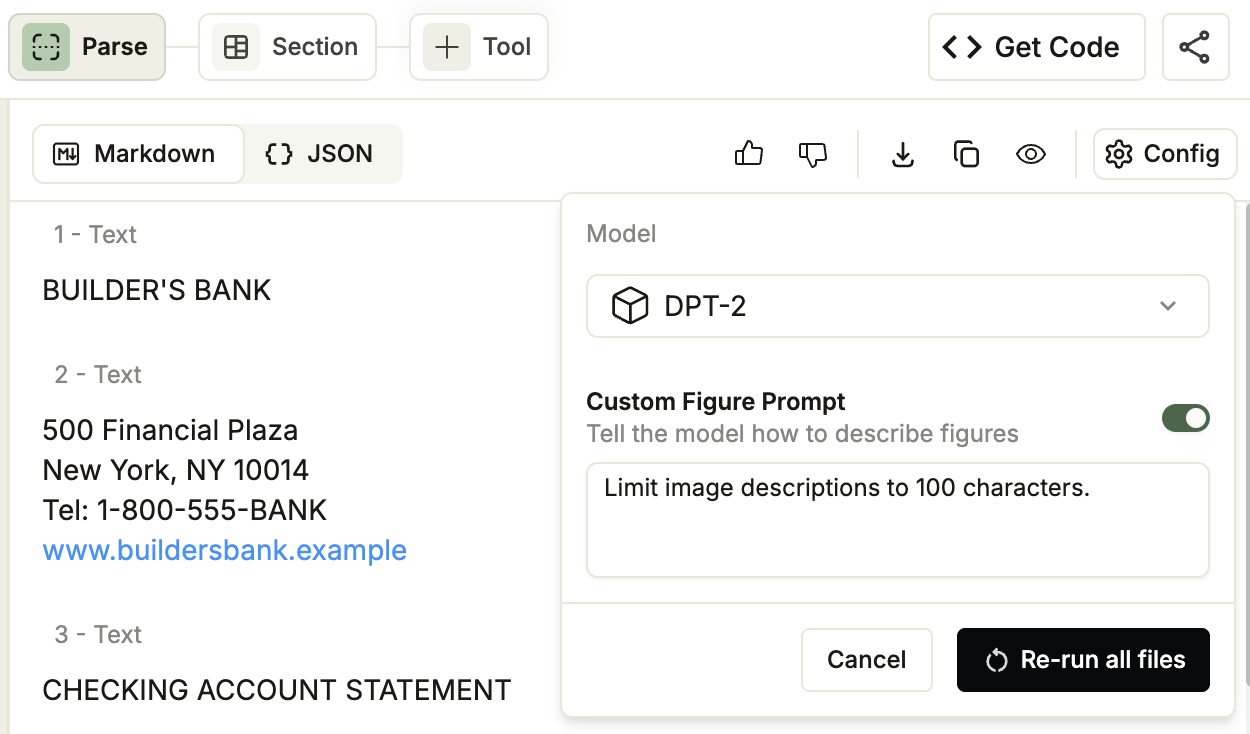
## Use Custom Prompts in the Playground
Apply a custom figure prompt to every file in a project directly from the [Playground](https://va.landing.ai/) without writing any code.
1. Open a project in the [Playground](https://va.landing.ai/).
2. Click the **Parse** tab.
3. In the top-right corner of the parse result panel, click **Config**.
4. From the **Model** drop-down, select {dpt2}. The **Custom Figure Prompt** option is only available with {dpt2}.
5. Turn on the **Custom Figure Prompt** toggle and enter your prompt (up to 512 characters).
6. Click **Re-run all files**. The Playground re-parses every file in the project using your prompt.
 ## Use Custom Prompts with the API
```bash Parse theme={null}
curl -X POST 'https://api.va.landing.ai/v1/ade/parse' \
-H 'Authorization: Bearer YOUR_API_KEY' \
-F 'document=@document.pdf' \
-F 'custom_prompts={"figure":"Describe axis labels in detail."}'
```
```bash Parse Jobs theme={null}
curl -X POST 'https://api.va.landing.ai/v1/ade/parse/jobs' \
-H 'Authorization: Bearer YOUR_API_KEY' \
-F 'document=@document.pdf' \
-F 'custom_prompts={"figure":"Describe axis labels in detail."}'
```
## Use Custom Prompts with Our Libraries
When using the [{adePythonLibrary}](https://github.com/landing-ai/ade-python) library, pass `custom_prompts` as a JSON string using `json.dumps`. The Parse endpoints use multipart form data, so the parameter does not accept a dictionary directly.
You can also pass a string literal (for example, `'{"figure": "YOUR_CUSTOM_PROMPT"}'`), but `json.dumps` is preferred because it handles escaping and formatting automatically, reducing the risk of malformed JSON that causes a 422 error.
### Parse
```python Python theme={null}
import json
from pathlib import Path
from landingai_ade import LandingAIADE
client = LandingAIADE()
# Replace with your file path
response = client.parse(
document=Path("/path/to/file/document"),
custom_prompts=json.dumps({"figure": "YOUR_CUSTOM_PROMPT"}),
)
print(response.chunks)
# Save Markdown output (useful if you plan to run extract on the Markdown)
with open("output.md", "w", encoding="utf-8") as f:
f.write(response.markdown)
```
```typescript TypeScript theme={null}
import LandingAIADE from "landingai-ade";
import fs from "fs";
const client = new LandingAIADE();
// Replace with your file path
const response = await client.parse({
document: fs.createReadStream("/path/to/file/document"),
custom_prompts: { figure: "YOUR_CUSTOM_PROMPT" },
});
console.log(response.chunks);
// Save Markdown to a file
if (response.markdown) {
fs.writeFileSync("output.md", response.markdown, "utf-8");
} else {
console.log("No 'markdown' field found in the response");
}
```
### Parse Jobs
```python Python [expandable] theme={null}
import json
import time
from pathlib import Path
from landingai_ade import LandingAIADE
client = LandingAIADE()
# Step 1: Create a parse job
job = client.parse_jobs.create(
document=Path("/path/to/file/document"),
custom_prompts=json.dumps({"figure": "YOUR_CUSTOM_PROMPT"}),
)
job_id = job.job_id
print(f"Job {job_id} created.")
# Step 2: Get the parsing results
while True:
response = client.parse_jobs.get(job_id)
if response.status == "completed":
print(f"Job {job_id} completed.")
break
print(f"Job {job_id}: {response.status} ({response.progress * 100:.0f}% complete)")
time.sleep(5)
```
```typescript TypeScript [expandable] theme={null}
import LandingAIADE from "landingai-ade";
import fs from "fs";
const client = new LandingAIADE();
// Step 1: Create a parse job
const job = await client.parseJobs.create({
document: fs.createReadStream("/path/to/file/document"),
custom_prompts: { figure: "YOUR_CUSTOM_PROMPT" },
});
const jobId = job.job_id;
console.log(`Job ${jobId} created.`);
// Step 2: Get the parsing results
while (true) {
const response = await client.parseJobs.get(jobId);
if (response.status === "completed") {
console.log(`Job ${jobId} completed.`);
break;
}
console.log(`Job ${jobId}: ${response.status} (${(response.progress * 100).toFixed(0)}% complete)`);
await new Promise(resolve => setTimeout(resolve, 5000));
}
```
## Use Custom Prompts with the API
```bash Parse theme={null}
curl -X POST 'https://api.va.landing.ai/v1/ade/parse' \
-H 'Authorization: Bearer YOUR_API_KEY' \
-F 'document=@document.pdf' \
-F 'custom_prompts={"figure":"Describe axis labels in detail."}'
```
```bash Parse Jobs theme={null}
curl -X POST 'https://api.va.landing.ai/v1/ade/parse/jobs' \
-H 'Authorization: Bearer YOUR_API_KEY' \
-F 'document=@document.pdf' \
-F 'custom_prompts={"figure":"Describe axis labels in detail."}'
```
## Use Custom Prompts with Our Libraries
When using the [{adePythonLibrary}](https://github.com/landing-ai/ade-python) library, pass `custom_prompts` as a JSON string using `json.dumps`. The Parse endpoints use multipart form data, so the parameter does not accept a dictionary directly.
You can also pass a string literal (for example, `'{"figure": "YOUR_CUSTOM_PROMPT"}'`), but `json.dumps` is preferred because it handles escaping and formatting automatically, reducing the risk of malformed JSON that causes a 422 error.
### Parse
```python Python theme={null}
import json
from pathlib import Path
from landingai_ade import LandingAIADE
client = LandingAIADE()
# Replace with your file path
response = client.parse(
document=Path("/path/to/file/document"),
custom_prompts=json.dumps({"figure": "YOUR_CUSTOM_PROMPT"}),
)
print(response.chunks)
# Save Markdown output (useful if you plan to run extract on the Markdown)
with open("output.md", "w", encoding="utf-8") as f:
f.write(response.markdown)
```
```typescript TypeScript theme={null}
import LandingAIADE from "landingai-ade";
import fs from "fs";
const client = new LandingAIADE();
// Replace with your file path
const response = await client.parse({
document: fs.createReadStream("/path/to/file/document"),
custom_prompts: { figure: "YOUR_CUSTOM_PROMPT" },
});
console.log(response.chunks);
// Save Markdown to a file
if (response.markdown) {
fs.writeFileSync("output.md", response.markdown, "utf-8");
} else {
console.log("No 'markdown' field found in the response");
}
```
### Parse Jobs
```python Python [expandable] theme={null}
import json
import time
from pathlib import Path
from landingai_ade import LandingAIADE
client = LandingAIADE()
# Step 1: Create a parse job
job = client.parse_jobs.create(
document=Path("/path/to/file/document"),
custom_prompts=json.dumps({"figure": "YOUR_CUSTOM_PROMPT"}),
)
job_id = job.job_id
print(f"Job {job_id} created.")
# Step 2: Get the parsing results
while True:
response = client.parse_jobs.get(job_id)
if response.status == "completed":
print(f"Job {job_id} completed.")
break
print(f"Job {job_id}: {response.status} ({response.progress * 100:.0f}% complete)")
time.sleep(5)
```
```typescript TypeScript [expandable] theme={null}
import LandingAIADE from "landingai-ade";
import fs from "fs";
const client = new LandingAIADE();
// Step 1: Create a parse job
const job = await client.parseJobs.create({
document: fs.createReadStream("/path/to/file/document"),
custom_prompts: { figure: "YOUR_CUSTOM_PROMPT" },
});
const jobId = job.job_id;
console.log(`Job ${jobId} created.`);
// Step 2: Get the parsing results
while (true) {
const response = await client.parseJobs.get(jobId);
if (response.status === "completed") {
console.log(`Job ${jobId} completed.`);
break;
}
console.log(`Job ${jobId}: ${response.status} (${(response.progress * 100).toFixed(0)}% complete)`);
await new Promise(resolve => setTimeout(resolve, 5000));
}
```