 Below is the full parsing response for this document with the `markdown` fields highlighted. Notice that each chunk's HTML anchor tag (the `` element) appears consistently across all `markdown` fields.
This consistency means you can reference any chunk by its ID, whether you're working with the complete document Markdown, a specific split, or an individual chunk.
```json Markdown Fields {2,5,19,33,47,68} [expandable] theme={null}
{
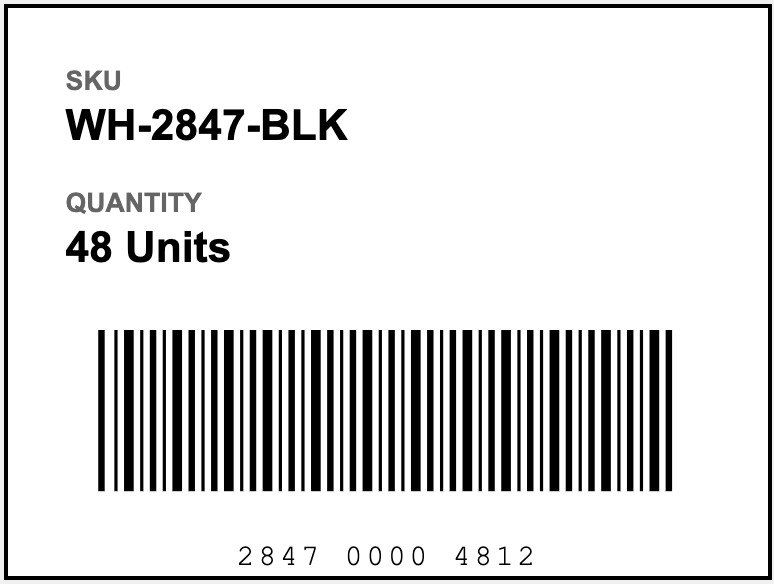
"markdown": "\n\nSKU\nWH-2847-BLK\n\n\n\nQUANTITY\n\n48 Units\n\n\n\n<::scan_code: Barcode\n\nThis is a clear, well-defined linear barcode with distinct black bars on a white background, showing no visible quality issues.::>\n\n\n\n2847 0000 4812\n---\n",
"chunks": [
{
"markdown": "\n\nSKU\nWH-2847-BLK",
"type": "text",
"id": "69a645fe-8617-4be8-b66f-68d7788755c0",
"grounding": {
"box": {
"left": 0.06628379225730896,
"top": 0.09509064257144928,
"right": 0.4664609134197235,
"bottom": 0.2678269147872925
},
"page": 0
}
},
{
"markdown": "\n\nQUANTITY\n\n48 Units",
"type": "text",
"id": "bdaf2198-0fdc-4c94-be54-a49ca796ea0f",
"grounding": {
"box": {
"left": 0.06750398874282837,
"top": 0.3068091869354248,
"right": 0.3204823434352875,
"bottom": 0.47341251373291016
},
"page": 0
}
},
{
"markdown": "\n\n<::scan_code: Barcode\n\nThis is a clear, well-defined linear barcode with distinct black bars on a white background, showing no visible quality issues.::>",
"type": "scan_code",
"id": "65fe085e-b8c8-46e0-848c-f0c32ccf16e8",
"grounding": {
"box": {
"left": 0.11207544803619385,
"top": 0.5374823212623596,
"right": 0.8830909729003906,
"bottom": 0.8660760521888733
},
"page": 0
}
},
{
"markdown": "\n\n2847 0000 4812\n---\n",
"type": "text",
"id": "9e551c40-3eaa-4d77-a219-50b7f4a57e05",
"grounding": {
"box": {
"left": 0.28996485471725464,
"top": 0.9088556170463562,
"right": 0.7057502269744873,
"bottom": 0.9888754487037659
},
"page": 0
}
}
],
"splits": [
{
"class": "page",
"identifier": "page_0",
"pages": [
0
],
"markdown": "\n\nSKU\nWH-2847-BLK\n\n\n\nQUANTITY\n\n48 Units\n\n\n\n<::scan_code: Barcode\n\nThis is a clear, well-defined linear barcode with distinct black bars on a white background, showing no visible quality issues.::>\n\n\n\n2847 0000 4812\n---\n",
"chunks": [
"69a645fe-8617-4be8-b66f-68d7788755c0",
"bdaf2198-0fdc-4c94-be54-a49ca796ea0f",
"65fe085e-b8c8-46e0-848c-f0c32ccf16e8",
"9e551c40-3eaa-4d77-a219-50b7f4a57e05"
]
}
],
"grounding": {
"69a645fe-8617-4be8-b66f-68d7788755c0": {
"box": {
"left": 0.06628379225730896,
"top": 0.09509064257144928,
"right": 0.4664609134197235,
"bottom": 0.2678269147872925
},
"page": 0,
"type": "chunkText"
},
"bdaf2198-0fdc-4c94-be54-a49ca796ea0f": {
"box": {
"left": 0.06750398874282837,
"top": 0.3068091869354248,
"right": 0.3204823434352875,
"bottom": 0.47341251373291016
},
"page": 0,
"type": "chunkText"
},
"65fe085e-b8c8-46e0-848c-f0c32ccf16e8": {
"box": {
"left": 0.11207544803619385,
"top": 0.5374823212623596,
"right": 0.8830909729003906,
"bottom": 0.8660760521888733
},
"page": 0,
"type": "chunkScanCode"
},
"9e551c40-3eaa-4d77-a219-50b7f4a57e05": {
"box": {
"left": 0.28996485471725464,
"top": 0.9088556170463562,
"right": 0.7057502269744873,
"bottom": 0.9888754487037659
},
"page": 0,
"type": "chunkText"
}
},
"metadata": {
"filename": "pallet-label.png",
"org_id": null,
"page_count": 1,
"duration_ms": 4226,
"credit_usage": 3,
"job_id": "y2xvbwlqc1p9ynwfkx4tx7q7q",
"version": "dpt-2-20250919"
}
}
```
## Markdown Structure
The `markdown` field includes a parsed chunk or a sequence of chunks.
Each chunk begins with an [HTML anchor tag](#anchor-tags) containing a unique identifier, followed by the chunk content.
For example, the following `markdown` field contains two chunks:
* A figure chunk (ID: `4c29090b-b75e-4d5f-95b6-24a7d5668486`) with a description of the image
* A text chunk (ID: `ae2e4e41-9443-4fb5-bced-199915f97dec`) containing formatted address information
```json theme={null}
"markdown": "\n\n<::An illustration of a sun with eight rays extending outwards.: figure::>\n\n\n\n**Eliza Smith**\n123 Main St.\nMountain View, CA 94041"
```
### Anchor Tags
Each chunk begins with an HTML anchor tag containing the chunk's unique identifier.
The `id` attribute contains the UUID that matches the corresponding entry in the `chunks` array, enabling you to trace content back to its location in the original document.
```html theme={null}
```
### Content Format by Chunk Type
The Markdown content format varies based on the [chunk type](./ade-chunk-types):
* [Text-Based Chunks](#text-based-chunks)
* [Image-Based Chunks](#image-based-chunks)
* [Table Chunks](#table-chunks)
* [Spreadsheets](#spreadsheets)
#### Text-Based Chunks
For text-based chunks (`text`, `marginalia`), content appears as standard Markdown text:
```markdown theme={null}
## Heading Text
Paragraph content with **bold** and *italic* formatting.
```
#### Image-Based Chunks
Image-based chunks (`figure`, `logo`, `card`, `attestation`, `scan_code`) use a special delimiter format that wraps the caption or description:
```markdown theme={null}
<::Caption or description of the visual element: figure::>
```
#### Table Chunks
Table chunks (`table`) appear as HTML table markup.
Most table elements include unique `id` attributes. These IDs use the format `{page_number}-{base62_sequential_number}`, where the page number starts at 0 and the sequential number increments for each element within the page.
If a page contains multiple tables, the ID numbering continues sequentially across all tables on that page.
Table cells that span multiple rows or columns include `rowspan` or `colspan` attributes in the HTML markup.
This ID system allows you to trace individual cells, rows, and tables back to their locations in the original document. The [JSON response](./ade-json-response#table-cell-position-information) also includes position information (row, column, rowspan, colspan) for each table cell in the grounding object.
```markdown theme={null}
Below is the full parsing response for this document with the `markdown` fields highlighted. Notice that each chunk's HTML anchor tag (the `` element) appears consistently across all `markdown` fields.
This consistency means you can reference any chunk by its ID, whether you're working with the complete document Markdown, a specific split, or an individual chunk.
```json Markdown Fields {2,5,19,33,47,68} [expandable] theme={null}
{
"markdown": "\n\nSKU\nWH-2847-BLK\n\n\n\nQUANTITY\n\n48 Units\n\n\n\n<::scan_code: Barcode\n\nThis is a clear, well-defined linear barcode with distinct black bars on a white background, showing no visible quality issues.::>\n\n\n\n2847 0000 4812\n---\n",
"chunks": [
{
"markdown": "\n\nSKU\nWH-2847-BLK",
"type": "text",
"id": "69a645fe-8617-4be8-b66f-68d7788755c0",
"grounding": {
"box": {
"left": 0.06628379225730896,
"top": 0.09509064257144928,
"right": 0.4664609134197235,
"bottom": 0.2678269147872925
},
"page": 0
}
},
{
"markdown": "\n\nQUANTITY\n\n48 Units",
"type": "text",
"id": "bdaf2198-0fdc-4c94-be54-a49ca796ea0f",
"grounding": {
"box": {
"left": 0.06750398874282837,
"top": 0.3068091869354248,
"right": 0.3204823434352875,
"bottom": 0.47341251373291016
},
"page": 0
}
},
{
"markdown": "\n\n<::scan_code: Barcode\n\nThis is a clear, well-defined linear barcode with distinct black bars on a white background, showing no visible quality issues.::>",
"type": "scan_code",
"id": "65fe085e-b8c8-46e0-848c-f0c32ccf16e8",
"grounding": {
"box": {
"left": 0.11207544803619385,
"top": 0.5374823212623596,
"right": 0.8830909729003906,
"bottom": 0.8660760521888733
},
"page": 0
}
},
{
"markdown": "\n\n2847 0000 4812\n---\n",
"type": "text",
"id": "9e551c40-3eaa-4d77-a219-50b7f4a57e05",
"grounding": {
"box": {
"left": 0.28996485471725464,
"top": 0.9088556170463562,
"right": 0.7057502269744873,
"bottom": 0.9888754487037659
},
"page": 0
}
}
],
"splits": [
{
"class": "page",
"identifier": "page_0",
"pages": [
0
],
"markdown": "\n\nSKU\nWH-2847-BLK\n\n\n\nQUANTITY\n\n48 Units\n\n\n\n<::scan_code: Barcode\n\nThis is a clear, well-defined linear barcode with distinct black bars on a white background, showing no visible quality issues.::>\n\n\n\n2847 0000 4812\n---\n",
"chunks": [
"69a645fe-8617-4be8-b66f-68d7788755c0",
"bdaf2198-0fdc-4c94-be54-a49ca796ea0f",
"65fe085e-b8c8-46e0-848c-f0c32ccf16e8",
"9e551c40-3eaa-4d77-a219-50b7f4a57e05"
]
}
],
"grounding": {
"69a645fe-8617-4be8-b66f-68d7788755c0": {
"box": {
"left": 0.06628379225730896,
"top": 0.09509064257144928,
"right": 0.4664609134197235,
"bottom": 0.2678269147872925
},
"page": 0,
"type": "chunkText"
},
"bdaf2198-0fdc-4c94-be54-a49ca796ea0f": {
"box": {
"left": 0.06750398874282837,
"top": 0.3068091869354248,
"right": 0.3204823434352875,
"bottom": 0.47341251373291016
},
"page": 0,
"type": "chunkText"
},
"65fe085e-b8c8-46e0-848c-f0c32ccf16e8": {
"box": {
"left": 0.11207544803619385,
"top": 0.5374823212623596,
"right": 0.8830909729003906,
"bottom": 0.8660760521888733
},
"page": 0,
"type": "chunkScanCode"
},
"9e551c40-3eaa-4d77-a219-50b7f4a57e05": {
"box": {
"left": 0.28996485471725464,
"top": 0.9088556170463562,
"right": 0.7057502269744873,
"bottom": 0.9888754487037659
},
"page": 0,
"type": "chunkText"
}
},
"metadata": {
"filename": "pallet-label.png",
"org_id": null,
"page_count": 1,
"duration_ms": 4226,
"credit_usage": 3,
"job_id": "y2xvbwlqc1p9ynwfkx4tx7q7q",
"version": "dpt-2-20250919"
}
}
```
## Markdown Structure
The `markdown` field includes a parsed chunk or a sequence of chunks.
Each chunk begins with an [HTML anchor tag](#anchor-tags) containing a unique identifier, followed by the chunk content.
For example, the following `markdown` field contains two chunks:
* A figure chunk (ID: `4c29090b-b75e-4d5f-95b6-24a7d5668486`) with a description of the image
* A text chunk (ID: `ae2e4e41-9443-4fb5-bced-199915f97dec`) containing formatted address information
```json theme={null}
"markdown": "\n\n<::An illustration of a sun with eight rays extending outwards.: figure::>\n\n\n\n**Eliza Smith**\n123 Main St.\nMountain View, CA 94041"
```
### Anchor Tags
Each chunk begins with an HTML anchor tag containing the chunk's unique identifier.
The `id` attribute contains the UUID that matches the corresponding entry in the `chunks` array, enabling you to trace content back to its location in the original document.
```html theme={null}
```
### Content Format by Chunk Type
The Markdown content format varies based on the [chunk type](./ade-chunk-types):
* [Text-Based Chunks](#text-based-chunks)
* [Image-Based Chunks](#image-based-chunks)
* [Table Chunks](#table-chunks)
* [Spreadsheets](#spreadsheets)
#### Text-Based Chunks
For text-based chunks (`text`, `marginalia`), content appears as standard Markdown text:
```markdown theme={null}
## Heading Text
Paragraph content with **bold** and *italic* formatting.
```
#### Image-Based Chunks
Image-based chunks (`figure`, `logo`, `card`, `attestation`, `scan_code`) use a special delimiter format that wraps the caption or description:
```markdown theme={null}
<::Caption or description of the visual element: figure::>
```
#### Table Chunks
Table chunks (`table`) appear as HTML table markup.
Most table elements include unique `id` attributes. These IDs use the format `{page_number}-{base62_sequential_number}`, where the page number starts at 0 and the sequential number increments for each element within the page.
If a page contains multiple tables, the ID numbering continues sequentially across all tables on that page.
Table cells that span multiple rows or columns include `rowspan` or `colspan` attributes in the HTML markup.
This ID system allows you to trace individual cells, rows, and tables back to their locations in the original document. The [JSON response](./ade-json-response#table-cell-position-information) also includes position information (row, column, rowspan, colspan) for each table cell in the grounding object.
```markdown theme={null}
| Product Summary | |
| Product | Revenue |
| Hardware | 15,230 |
| Software | 8,540 |
 ```markdown theme={null}
{
"markdown": "\n\n
```markdown theme={null}
{
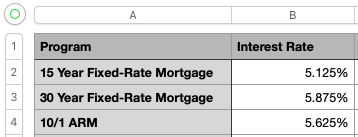
"markdown": "\n\n| Program | \nInterest Rate | \n
| 15 Year Fixed-Rate Mortgage | \n0.05125 | \n
| 30 Year Fixed-Rate Mortgage | \n0.05875 | \n
| 10/1 ARM | \n0.05625 | \n