> ## Documentation Index
> Fetch the complete documentation index at: https://docs.landing.ai/llms.txt
> Use this file to discover all available pages before exploring further.

# JSON Response for Parsing

export const adePythonLibrary = 'ade-python';

export const dpt2mini = 'DPT-2 mini';

export const dpt2 = 'DPT-2';

export const dpt1 = 'DPT-1';

export const dpt = 'Document Pre-Trained Transformer';

export const companyName = 'LandingAI';

export const extract = 'ADE Extract';

export const parse = 'ADE Parse';

export const ade = 'Agentic Document Extraction';

When you parse a document with the [{parse} API](https://docs.landing.ai/api-reference/tools/ade-parse) or complete an [ADE Parse Job](https://docs.landing.ai/api-reference/tools/ade-parse-jobs), the parsed data is returned in a structured JSON format.

The fields and structure of API responses are detailed in the [API Reference](https://docs.landing.ai/api-reference/tools/ade-parse). This article is designed to give additional context about the returned fields and how to use them.

## Response Structure

The response contains the following top-level fields:

| Field                                           | Description                                                                                                                                                                                         |
| ----------------------------------------------- | --------------------------------------------------------------------------------------------------------------------------------------------------------------------------------------------------- |
| [`markdown`](./ade-markdown-response)           | Complete Markdown representation of the document.                                                                                                                                                   |
| [`chunks`](#parsed-chunks-chunks)               | Array of `chunk` objects, one for each parsed region.                                                                                                                                               |
| [`splits`](#splits)                             | Array of `split` objects organizing chunks by page or section.                                                                                                                                      |
| [`grounding`](#grounding-information-grounding) | Object mapping chunk IDs to detailed grounding information, which includes the page number and bounding box coordinates.                                                                            |
| `metadata`                                      | Processing information (credit usage, duration, filename, job ID, page count, version). For partial content responses, includes a `failed_pages` array listing page numbers that failed to process. |

## Chunk, Table, and Cell Identifiers

Each chunk, table, and table cell has a unique identifier (ID) that appears in multiple parts of the API response. Use these IDs to link different sets of information across the response.

The ID format depends on the element type:

| ID Type        | Format                                     | Example                                |
| -------------- | ------------------------------------------ | -------------------------------------- |
| Chunk IDs      | UUID format                                | `7d58c5cf-e4f5-4a7e-ba34-0cd7bc6a6506` |
| Table IDs      | `{page_number}-{base62_sequential_number}` | `0-1`                                  |
| Table cell IDs | `{page_number}-{base62_sequential_number}` | `0-2`, `0-3`                           |

### Sequential Numbering for Tables and Cells

Table and cell IDs use sequential numbering within each page. The first table element on the first page has ID `0-1`, and its first cell has ID `0-2`. All subsequent table elements and cells on that page continue this sequential numbering (`0-3`, `0-4`, etc.).

The numbering restarts for each new page. For example, the first table on the second page will have ID `1-1`, and its first cell will have ID `1-2`.

## Parsed Chunks (`chunks`)

A [chunk](./ade-chunk-types) is a distinct region or element in the parsed document. The `chunks` array contains all parsed chunks from the document in reading order.

Each `chunk` object in the `chunks` array contains:

| Field       | Description                                                                                                                             |
| ----------- | --------------------------------------------------------------------------------------------------------------------------------------- |
| `id`        | Chunk [unique identifier](#chunk-table-and-cell-identifiers) (UUID format).                                                             |
| `markdown`  | [Markdown](./ade-markdown-response) content for the chunk.                                                                              |
| `type`      | [Chunk type](./ade-chunk-types).                                                                                                        |
| `grounding` | The location of the chunk in the document. Contains page number and [bounding box coordinates](#working-with-bounding-box-coordinates). |

## Splits

<Warning>The `split` parameter is different from the [{split} API](./ade-split). If your goal is to separate a document into sub-documents after parsing, use the {split} API, not the `split` parameter.</Warning>

The `splits` array groups chunks into logical sections based on the [`split`](./ade-separate-apis#set-up-splits-for-parsing) parameter. Each split object includes the chunks, markdown content, and page numbers for that section.

* **If the `split` parameter was omitted**: The API returns the entire document as a single split.
* **If page-level splits were used (`split=page`)**: The API organizes chunks by page. For multi-page documents, this creates one split per page.

### Split Object Structure

Each `split` object contains:

| Field        | Description                                                                                                                                                                                                                                                                                                           |
| ------------ | --------------------------------------------------------------------------------------------------------------------------------------------------------------------------------------------------------------------------------------------------------------------------------------------------------------------- |
| `class`      | The split type.<ul><li>`full`: Used when the `split` parameter was not included, and the array includes one entry for the entire document.</li><li>`page`: Used when the `split` parameter was included, and the array contains an entry for each page.</li></ul>                                                     |
| `identifier` | The unique identifier for each entry.<ul><li>`full`: Used when the `split` parameter was not included, and the array includes one entry for the entire document.</li><li>`page_{number}`: Used when the `split` parameter was included. Includes the zero-indexed page number. Examples: `page_0`, `page_1`</li></ul> |
| `pages`      | Array of page numbers (zero-indexed) included in the split.                                                                                                                                                                                                                                                           |
| `markdown`   | Complete markdown content for all chunks in the split.                                                                                                                                                                                                                                                                |
| `chunks`     | Array of [chunk IDs](#chunk-table-and-cell-identifiers) included in the split.                                                                                                                                                                                                                                        |

### Full Document Split vs. Page-Level Split

When you omit the `split` parameter, the API returns a single split containing the entire document. When you set `split=page`, the API creates one split per page for multi-page documents.

<CodeGroup>
  ```json Full Document (Split Omitted) theme={null}
  "splits": [
      {
          "class": "full",
          "identifier": "full",
          "pages": [0],
          "markdown": "...",
          "chunks": ["chunk-id-1", "chunk-id-2"]
      }
  ]
  ```

  ```json Page-Level Split theme={null}
  "splits": [
      {
          "class": "page",
          "identifier": "page_0",
          "pages": [0],
          "markdown": "...",
          "chunks": ["chunk-id-1"]
      },
      {
          "class": "page",
          "identifier": "page_1",
          "pages": [1],
          "markdown": "...",
          "chunks": ["chunk-id-2", "chunk-id-3"]
      }
  ]
  ```
</CodeGroup>

## Grounding Information (`grounding`)

**Grounding** is location information that maps each chunk or table cell back to its precise position in the original document. Each grounding entry includes the page number and bounding box coordinates for an element.

The `grounding` object contains location data for all chunks and table cells in the parsed document.

### How the Grounding Object Works

The `grounding` object is a dictionary where [chunk, table, and cell IDs](#chunk-table-and-cell-identifiers) are keys. To look up grounding information for any element, use its ID.

**What's included in the grounding object:**

* All chunk IDs from the `chunks` array
* Table IDs (for entire tables)
* Table cell IDs (individual cells within tables)

**Example:**

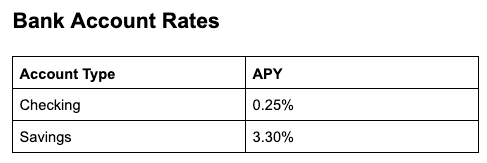
Consider parsing this document containing a table of bank account interest rates:

<img src="https://mintcdn.com/landingaitest/_45tTDfVHnaIeNYU/images/bank-account-rates.png?fit=max&auto=format&n=_45tTDfVHnaIeNYU&q=85&s=8e0d6a0bebbcd673c1d4670c65677638" alt="Example document with bank account interest rates" className="bordered-image" width="487" height="163" data-path="images/bank-account-rates.png" />

The parsed response is shown below, with key elements highlighted in the table:

| Line    | Description                                               | ID                                   |
| ------- | --------------------------------------------------------- | ------------------------------------ |
| Line 47 | `grounding` object begins                                 | N/A                                  |
| Line 48 | Grounding for the text "Bank Account Rates"               | 2831e56d-94f5-4ec4-b001-6e16e188119b |
| Line 58 | Grounding for the table chunk                             | 54905c88-b4b8-45a7-84b5-1dcf5f1d1e60 |
| Line 68 | Grounding for the table ID                                | 0-1                                  |
| Line 78 | Grounding for the first cell in the table, "Account Type" | 0-2                                  |

```json [expandable] lines highlight={47, 48, 58, 68, 78} theme={null}
{
    "markdown": "<a id='2831e56d-94f5-4ec4-b001-6e16e188119b'></a>\n\n## Bank Account Rates\n\n<a id='54905c88-b4b8-45a7-84b5-1dcf5f1d1e60'></a>\n\n<table id=\"0-1\">\n<tr><td id=\"0-2\">Account Type</td><td id=\"0-3\">APY</td></tr>\n<tr><td id=\"0-4\">Checking</td><td id=\"0-5\">0.25%</td></tr>\n<tr><td id=\"0-6\">Savings</td><td id=\"0-7\">3.30%</td></tr>\n</table>",
    "chunks": [
        {
            "markdown": "<a id='2831e56d-94f5-4ec4-b001-6e16e188119b'></a>\n\n## Bank Account Rates",
            "type": "text",
            "id": "2831e56d-94f5-4ec4-b001-6e16e188119b",
            "grounding": {
                "box": {
                    "left": 0.01733572781085968,
                    "top": 0.03853631019592285,
                    "right": 0.46379542350769043,
                    "bottom": 0.212029367685318
                },
                "page": 0
            }
        },
        {
            "markdown": "<a id='54905c88-b4b8-45a7-84b5-1dcf5f1d1e60'></a>\n\n<table id=\"0-1\">\n<tr><td id=\"0-2\">Account Type</td><td id=\"0-3\">APY</td></tr>\n<tr><td id=\"0-4\">Checking</td><td id=\"0-5\">0.25%</td></tr>\n<tr><td id=\"0-6\">Savings</td><td id=\"0-7\">3.30%</td></tr>\n</table>",
            "type": "table",
            "id": "54905c88-b4b8-45a7-84b5-1dcf5f1d1e60",
            "grounding": {
                "box": {
                    "left": 0.018494874238967896,
                    "top": 0.332082062959671,
                    "right": 0.9904391765594482,
                    "bottom": 0.9499841928482056
                },
                "page": 0
            }
        }
    ],
    "splits": [
        {
            "class": "full",
            "identifier": "full",
            "pages": [
                0
            ],
            "markdown": "<a id='2831e56d-94f5-4ec4-b001-6e16e188119b'></a>\n\n## Bank Account Rates\n\n<a id='54905c88-b4b8-45a7-84b5-1dcf5f1d1e60'></a>\n\n<table id=\"0-1\">\n<tr><td id=\"0-2\">Account Type</td><td id=\"0-3\">APY</td></tr>\n<tr><td id=\"0-4\">Checking</td><td id=\"0-5\">0.25%</td></tr>\n<tr><td id=\"0-6\">Savings</td><td id=\"0-7\">3.30%</td></tr>\n</table>",
            "chunks": [
                "2831e56d-94f5-4ec4-b001-6e16e188119b",
                "54905c88-b4b8-45a7-84b5-1dcf5f1d1e60"
            ]
        }
    ],
    "grounding": {
        "2831e56d-94f5-4ec4-b001-6e16e188119b": {
            "box": {
                "left": 0.01733572781085968,
                "top": 0.03853631019592285,
                "right": 0.46379542350769043,
                "bottom": 0.212029367685318
            },
            "page": 0,
            "type": "chunkText"
        },
        "54905c88-b4b8-45a7-84b5-1dcf5f1d1e60": {
            "box": {
                "left": 0.018494874238967896,
                "top": 0.332082062959671,
                "right": 0.9904391765594482,
                "bottom": 0.9499841928482056
            },
            "page": 0,
            "type": "chunkTable"
        },
        "0-1": {
            "box": {
                "left": 0.02559941303263648,
                "top": 0.34709447306434493,
                "right": 0.9833663842655778,
                "bottom": 0.9408472995763262
            },
            "page": 0,
            "type": "table"
        },
        "0-2": {
            "box": {
                "left": 0.025725066969341424,
                "top": 0.34709447306434493,
                "right": 0.5043980858495114,
                "bottom": 0.5451939275066816
            },
            "page": 0,
            "type": "tableCell",
            "position": {
                "row": 0,
                "col": 0,
                "rowspan": 1,
                "colspan": 1,
                "chunk_id": "54905c88-b4b8-45a7-84b5-1dcf5f1d1e60"
            }
        },
        "0-3": {
            "box": {
                "left": 0.5043442644343732,
                "top": 0.3470990955792963,
                "right": 0.9832354042503647,
                "bottom": 0.5451945630018467
            },
            "page": 0,
            "type": "tableCell",
            "position": {
                "row": 0,
                "col": 1,
                "rowspan": 1,
                "colspan": 1,
                "chunk_id": "54905c88-b4b8-45a7-84b5-1dcf5f1d1e60"
            }
        },
        "0-4": {
            "box": {
                "left": 0.025662229745978628,
                "top": 0.5451932923723879,
                "right": 0.5043442644343732,
                "bottom": 0.7430525865339257
            },
            "page": 0,
            "type": "tableCell",
            "position": {
                "row": 1,
                "col": 0,
                "rowspan": 1,
                "colspan": 1,
                "chunk_id": "54905c88-b4b8-45a7-84b5-1dcf5f1d1e60"
            }
        },
        "0-5": {
            "box": {
                "left": 0.5042905263610684,
                "top": 0.5451939275066816,
                "right": 0.9833008650173567,
                "bottom": 0.7429820118984354
            },
            "page": 0,
            "type": "tableCell",
            "position": {
                "row": 1,
                "col": 1,
                "rowspan": 1,
                "colspan": 1,
                "chunk_id": "54905c88-b4b8-45a7-84b5-1dcf5f1d1e60"
            }
        },
        "0-6": {
            "box": {
                "left": 0.02559941303263648,
                "top": 0.7429820118984354,
                "right": 0.5042905263610684,
                "bottom": 0.9408472995763262
            },
            "page": 0,
            "type": "tableCell",
            "position": {
                "row": 2,
                "col": 0,
                "rowspan": 1,
                "colspan": 1,
                "chunk_id": "54905c88-b4b8-45a7-84b5-1dcf5f1d1e60"
            }
        },
        "0-7": {
            "box": {
                "left": 0.5042367730777779,
                "top": 0.7429113809301333,
                "right": 0.9833663842655779,
                "bottom": 0.9408260780878634
            },
            "page": 0,
            "type": "tableCell",
            "position": {
                "row": 2,
                "col": 1,
                "rowspan": 1,
                "colspan": 1,
                "chunk_id": "54905c88-b4b8-45a7-84b5-1dcf5f1d1e60"
            }
        }
    },
    "metadata": {
        "filename": "bank-account-rates.png",
        "org_id": null,
        "page_count": 1,
        "duration_ms": 2836,
        "credit_usage": 3.0,
        "job_id": "def6af5f0485497c81ea46bc4c848f83",
        "version": "dpt-2-20251103",
        "failed_pages": []
    }
}
```

### Fields in the Grounding Object

Each key-value pair in the `grounding` object uses an ID as the key (chunk ID, table ID, or cell ID) and location data as the value.

Each value is an object with the following fields:

| Field                  | Description                                                                                                                       |
| ---------------------- | --------------------------------------------------------------------------------------------------------------------------------- |
| `box`                  | [Bounding box coordinates](#working-with-bounding-box-coordinates)                                                                |
| `page`                 | Zero-indexed page number                                                                                                          |
| `type`                 | Detailed classification. See [grounding types](#grounding-types).                                                                 |
| `confidence`           | Confidence score for text-based chunks. See [Confidence Score](#confidence-score).                                                |
| `low_confidence_spans` | Sections of text with low confidence scores, if any.                                                                              |
| `position`             | For table cells only. Cell location in table grid (row, col, spans). See [Table Cell Position](#table-cell-position-information). |

**Example:**

Example of one key-value pair from the `grounding` object (logo chunk):

```json theme={null}
{
  "grounding": {
    "49c7b7d0-2d8e-4485-8306-3dd820eb13ed": {
      "box": {
        "left": 0.06869561225175858,
        "top": 0.02685479447245598,
        "right": 0.1445186734199524,
        "bottom": 0.08676017820835114
      },
      "page": 0,
      "type": "chunkLogo"
    }
  }
}
```

### Grounding Types

Each entry in the `grounding` object has a `type` field that identifies the element type.

#### Why are grounding types different from chunk types?

Most grounding types correspond directly to [chunk types](./ade-chunk-types) with a "chunk" prefix.

However, the `grounding` object provides more granular location data than the chunks array.

For tables, the grounding object includes separate entries for the HTML `<table>` element and individual cells, even though these are not separate chunks. This allows you to look up the precise location of any cell within a table.

The following table lists the grounding types and the corresponding chunk types, when applicable.

| Grounding Type     | Chunk Type                                                                           |
| ------------------ | ------------------------------------------------------------------------------------ |
| `chunkAttestation` | `attestation`                                                                        |
| `chunkCard`        | `card`                                                                               |
| `chunkFigure`      | `figure`                                                                             |
| `chunkLogo`        | `logo`                                                                               |
| `chunkMarginalia`  | `marginalia`                                                                         |
| `chunkScanCode`    | `scan_code`                                                                          |
| `chunkTable`       | `table`                                                                              |
| `chunkText`        | `text`                                                                               |
| `table`            | Special grounding type representing the HTML `<table>` element within a table chunk. |
| `tableCell`        | Special grounding type representing an individual cell within a table.               |

### Table Grounding Structure

For each table in a document, the grounding object includes three types of entries: **table chunk**, **table**, **cell**.

These three types form a hierarchy: the **chunk** entry provides the overall table location, while the **table** and **cell** entries provide precise locations for the HTML elements within that chunk.

| Entry | Description                                                                 | Type         |
| ----- | --------------------------------------------------------------------------- | ------------ |
| Chunk | The table as a whole. Use when you need the overall table location.         | `chunkTable` |
| Table | The HTML `<table>` element. Use when you need the precise table boundaries. | `table`      |
| Cells | Each individual cell. Use when you need to locate a specific cell.          | `tableCell`  |

**Example:**

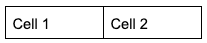
Consider parsing this simple 2-cell table:

<img src="https://mintcdn.com/landingaitest/7p6Xb3YgR7SY0nl9/images/2-cell-table.png?fit=max&auto=format&n=7p6Xb3YgR7SY0nl9&q=85&s=e6c80ac30136fb558398d1197dc0719a" alt="Example table with 2 cells" className="bordered-image" width="207" height="43" data-path="images/2-cell-table.png" />

The `grounding` field from the response is shown below, with key elements highlighted in the table:

| Line    | Description                                          | ID                                   |
| ------- | ---------------------------------------------------- | ------------------------------------ |
| Line 1  | `grounding` object                                   | N/A                                  |
| Line 2  | Grounding for the table chunk                        | ef24b1ea-8dac-4a24-bf60-704b7c6a6bca |
| Line 12 | Grounding for the table ID                           | 0-1                                  |
| Line 22 | Grounding for the first cell in the table, "Cell 1"  | 0-2                                  |
| Line 39 | Grounding for the second cell in the table, "Cell 2" | 0-3                                  |

```json [expandable] lines highlight={1, 2, 12, 22, 39 } theme={null}
"grounding": {
    "ef24b1ea-8dac-4a24-bf60-704b7c6a6bca": {
        "box": {
            "left": 0.15924638509750366,
            "top": 0.19857195019721985,
            "right": 0.6330658197402954,
            "bottom": 0.313611775636673
        },
        "page": 0,
        "type": "chunkTable"
    },
    "0-1": {
        "box": {
            "left": 0.16758577831817933,
            "top": 0.20629539815303133,
            "right": 0.6280869812016796,
            "bottom": 0.3090690124206503
        },
        "page": 0,
        "type": "table"
    },
    "0-2": {
        "box": {
            "left": 0.16758577831817933,
            "top": 0.2062988834957917,
            "right": 0.39743034595752635,
            "bottom": 0.3090588206865543
        },
        "page": 0,
        "type": "tableCell",
        "position": {
            "row": 0,
            "col": 0,
            "rowspan": 1,
            "colspan": 1,
            "chunk_id": "ef24b1ea-8dac-4a24-bf60-704b7c6a6bca"
        }
    },
    "0-3": {
        "box": {
            "left": 0.3972880070815534,
            "top": 0.20629539815303133,
            "right": 0.6280869812016795,
            "bottom": 0.3090690124206503
        },
        "page": 0,
        "type": "tableCell",
        "position": {
            "row": 0,
            "col": 1,
            "rowspan": 1,
            "colspan": 1,
            "chunk_id": "ef24b1ea-8dac-4a24-bf60-704b7c6a6bca"
        }
    }
},
```

### Table Cell Position Information

Each table cell (`tableCell`) includes a `position` field that provides the cell's location in the table grid.

The `row` and `col` values are zero-indexed, where `row: 0, col: 0` represents the first row and first column of the table.

The `rowspan` and `colspan` values indicate merged cells, with a value of 1 meaning the cell is not merged in that direction.

| Field      | Description                                 |
| ---------- | ------------------------------------------- |
| `row`      | Row position (integer, zero-indexed).       |
| `col`      | Column position (integer, zero-indexed).    |
| `rowspan`  | Number of rows the cell spans (integer).    |
| `colspan`  | Number of columns the cell spans (integer). |
| `chunk_id` | Associated chunk identifier (string).       |

#### How to Use the Table Cell Positions

Use the table cell position information in the `grounding` to:

* Map parsed data back to specific cells in the original table (for example, verify that a dollar amount came from row 2, column 3)
* Identify merged cells through the `rowspan` and `colspan` values
* Programmatically reference cells by their row and column indices

### Confidence Score

{ade} returns confidence scores for text, marginalia, card, and table chunks, as well as table cells, when parsing with {dpt2}.

Confidence scores measure the confidence level of parsed text in Markdown with respect to the actual text or visual data present in the document.

Each score ranges from 0.0 (low confidence) to 1.0 (high confidence). Lower values indicate regions where the model was less certain about the output.

For example, here are the confidence score fields for a chunk:

```json Confidence score fields highlight={11-12} theme={null}
"grounding": {
    "42ca60d3-a606-4c9a-a61e-493966b63fd9": {
      "box": {
        "left": 0.8607578277587891,
        "top": 0.9346558451652527,
        "right": 0.9316827058792114,
        "bottom": 0.951895534992218
      },
      "page": 0,
      "type": "chunkMarginalia",
      "confidence": 0.991,
      "low_confidence_spans": []
    }
}
```

#### Confidence Score Fields

The grounding object includes the following confidence-related fields:

| Field                  | Description                                                                                                                                                                                                    |
| ---------------------- | -------------------------------------------------------------------------------------------------------------------------------------------------------------------------------------------------------------- |
| `confidence`           | Overall confidence score for the chunk or element (0.0 to 1.0). When `low_confidence_spans` contains entries, this is the lowest of the span-level or cell-level confidence scores.                            |
| `low_confidence_spans` | Array of objects identifying specific text substrings with confidence scores of 0.95 or lower. Empty array if no low-confidence substrings exist. Learn more in [Low Confidence Spans](#low-confidence-spans). |

#### Low Confidence Spans

The `low_confidence_spans` array contains substrings that have confidence scores of 0.95 or lower.

Each object in the `low_confidence_spans` array contains:

| Field        | Description                                                                                                                                    |
| ------------ | ---------------------------------------------------------------------------------------------------------------------------------------------- |
| `text`       | The substring that has low confidence.                                                                                                         |
| `span`       | Two-element array `[start, end]` indicating the character position range of the substring within the chunk's text. Positions are zero-indexed. |
| `confidence` | Confidence score for this specific substring (0.0 to 1.0).                                                                                     |

For example, in the parse response below, the API has low confidence for two spans of text within the chunk.

```json Low confidence spans highlight={11-27} theme={null}
"grounding": {
    "6be7d3cf-6664-42c7-906c-4957882e40ff": {
      "box": {
        "left": 0.24479518830776215,
        "top": 0.9269143342971802,
        "right": 0.6804859042167664,
        "bottom": 0.9461647272109985
      },
      "page": 0,
      "type": "chunkText",
      "confidence": 0.25,
      "low_confidence_spans": [
        {
          "text": " 1220",
          "span": [
            8,
            13
          ],
          "confidence": 0.25
        },
        {
          "text": "15?\"",
          "span": [
            26,
            30
          ],
          "confidence": 0.62
        }
      ]
    }
  }
```

#### Chunks and Elements with Confidence Scores

Confidence scores are available for text, marginalia, card, and table chunks, as well as table cells.

The `tableCell` elements have confidence scores but do not include `low_confidence_spans`

<table>
  <thead>
    <tr>
      <th>Grounding Type</th>
      <th>Chunk Type</th>
      <th>Has Confidence Score</th>
      <th>Has Low Confidence Spans</th>
    </tr>
  </thead>

  <tbody>
    <tr>
      <td><code>chunkText</code></td>
      <td><code>text</code></td>
      <td><span class="check-icon">✓</span></td>
      <td><span class="check-icon">✓</span></td>
    </tr>

    <tr>
      <td><code>chunkMarginalia</code></td>
      <td><code>marginalia</code></td>
      <td><span class="check-icon">✓</span></td>
      <td><span class="check-icon">✓</span></td>
    </tr>

    <tr>
      <td><code>chunkCard</code></td>
      <td><code>card</code></td>
      <td><span class="check-icon">✓</span></td>
      <td><span class="check-icon">✓</span></td>
    </tr>

    <tr>
      <td><code>chunkTable</code></td>
      <td><code>table</code></td>
      <td><span class="check-icon">✓</span></td>
      <td><span class="check-icon">✓</span></td>
    </tr>

    <tr>
      <td><code>table</code></td>
      <td>—</td>
      <td>—</td>
      <td>—</td>
    </tr>

    <tr>
      <td><code>tableCell</code></td>
      <td>—</td>
      <td><span class="check-icon">✓</span></td>
      <td>—</td>
    </tr>

    <tr>
      <td><code>chunkFigure</code></td>
      <td><code>figure</code></td>
      <td>—</td>
      <td>—</td>
    </tr>

    <tr>
      <td><code>chunkLogo</code></td>
      <td><code>logo</code></td>
      <td>—</td>
      <td>—</td>
    </tr>

    <tr>
      <td><code>chunkAttestation</code></td>
      <td><code>attestation</code></td>
      <td>—</td>
      <td>—</td>
    </tr>

    <tr>
      <td><code>chunkScanCode</code></td>
      <td><code>scan\_code</code></td>
      <td>—</td>
      <td>—</td>
    </tr>
  </tbody>
</table>

#### Confidence Score Availability

Confidence scores are only available when using the {parse} or ADE Parse Jobs API with **{dpt2}**.

#### Null Confidence Scores

The confidence score will be `null` in the following situations:

* The file was parsed with {dpt1} or {dpt2mini}.
* The chunk or element does not support confidence scores. See a list of supported elements in [Chunks and Elements with Confidence Scores](#chunks-and-elements-with-confidence-scores).

For example, here are the confidence score fields for a logo:

```json Response when confidence score not applicable highlight={9-11} theme={null}
    "7215c238-8363-4de3-9f34-dd12c42cf5ec": {
      "box": {
        "left": 0.6948671936988831,
        "top": 0.9627023339271545,
        "right": 0.9369598031044006,
        "bottom": 1
      },
      "page": 0,
      "type": "chunkLogo",
      "confidence": null,
      "low_confidence_spans": []
    }
```

#### How to Use Confidence Scores

Confidence scores are not a calibrated probability of correctness. Use them as a ranking or triage signal to flag and prioritize content for human review, rather than as an exact measure of error likelihood.

#### Factors That Can Lower Confidence Scores

Certain document characteristics may result in lower confidence scores:

* Low-resolution or degraded scans
* Handwritten text that is difficult to read
* Superscripts and subscripts
* Characters or punctuation that look alike, such as commas and periods
* Words split across lines with a hyphen
* Line endings where it's unclear whether the text continues in the same paragraph or starts a new one

#### False Positives

The system is designed to over-flag rather than risk missing potential issues. As a result, some regions may be marked as low confidence even when the parsed output is correct.

These false positives mean you may need to review some content that is actually correct, but they help reduce the likelihood of missing content that contains errors.

## When to Use Chunk-Level vs. Global Grounding

Grounding information is available at the chunk level (`chunks[].grounding`) and at the global level (`grounding`). Each has a different level of detail:

<table>
  <thead>
    <tr>
      <th>Field</th>
      <th>Description</th>
      <th>Global Grounding Object</th>
      <th>Chunk-Level Grounding</th>
    </tr>
  </thead>

  <tbody>
    <tr>
      <td><code>box</code></td>
      <td>Bounding box coordinates</td>
      <td><span class="check-icon">✓</span></td>
      <td><span class="check-icon">✓</span></td>
    </tr>

    <tr>
      <td><code>page</code></td>
      <td>Zero-indexed page number</td>
      <td><span class="check-icon">✓</span></td>
      <td><span class="check-icon">✓</span></td>
    </tr>

    <tr>
      <td><code>confidence</code></td>
      <td>Confidence score</td>
      <td><span class="check-icon">✓</span></td>
      <td><span class="cross-icon">✖</span></td>
    </tr>

    <tr>
      <td><code>low\_confidence\_spans</code></td>
      <td>Sections of text with low confidence scores, if any</td>
      <td><span class="check-icon">✓</span></td>
      <td><span class="cross-icon">✖</span></td>
    </tr>

    <tr>
      <td><code>type</code></td>
      <td>Detailed element type</td>
      <td><span class="check-icon">✓</span></td>
      <td><span class="cross-icon">✖</span></td>
    </tr>

    <tr>
      <td><code>position</code></td>
      <td>Table cell position</td>
      <td><span class="check-icon">✓</span></td>
      <td><span class="cross-icon">✖</span></td>
    </tr>
  </tbody>
</table>

Choose the appropriate source based on your workflow:

**Use the global `grounding` object when:**

* You need table cell positions or other HTML element grounding
* You need confidence scores
* You need to understand relationships between elements
* Building comprehensive document analysis workflows
* You need the complete, authoritative grounding data for all elements in the document

**Use chunk-level grounding (`chunks[].grounding`) when:**

* Iterating through chunks sequentially and need each chunk's location immediately
* Working with a single chunk in isolation
* Building simple workflows where each chunk is processed independently

## Working with Bounding Box Coordinates

The `grounding` objects include the bounding box coordinates for each chunk in the `box` object:

| Field    | Description          |
| -------- | -------------------- |
| `left`   | Left edge position   |
| `top`    | Top edge position    |
| `right`  | Right edge position  |
| `bottom` | Bottom edge position |

### Bounding Box Values

All bounding box coordinates use normalized values between 0 and 1, where:

* `(0, 0)` represents the top-left corner of the page
* `(1, 1)` represents the bottom-right corner of the page

### Convert Bounding Box Values

To convert bounding box values to pixel coordinates, multiply the normalized values by the image dimensions:

```
x1 = left * image_width
y1 = top * image_height
x2 = right * image_width
y2 = bottom * image_height
```

For practical examples of working with bounding box coordinates, go to [Link Extracted Data to Document Locations](./ade-extract-grounding-sample).

## Example Response

The following is the API response when parsing this single-page <a href="/examples/product-specs.pdf" download="product-specs.pdf">Product Specifications Sheet</a>.

The document contains text, a logo, a table, a barcode, and more. The `split` parameter was omitted in the API call.

```json [expandable] theme={null}
{
    "markdown": "<a id='d52a402e-ecbe-45bb-b645-6f879533062d'></a>\n\n# Product Specification Sheet\n\nPremium Wireless Headphones - Model WH-3000\n\n<a id='e82c9292-b032-4115-88b1-8e63a453fa62'></a>\n\n<::logo: Acme\nAcme\nBlue rectangular background with rounded corners, featuring three overlapping white circles and the text \"Acme\" below them::>\n\n<a id='e2d9311c-6034-4a19-845c-8b3bbb607220'></a>\n\n**Product Description:** Premium over-ear wireless headphones featuring advanced noise cancellation technology, superior sound quality, and all-day comfort. Designed for professionals and audiophiles who demand exceptional audio performance.\n\n<a id='6ad71883-8f01-4ca8-854e-67fdf98705c0'></a>\n\nTechnical Specifications\n<table id=\"0-1\">\n<tr><td id=\"0-2\">Feature</td><td id=\"0-3\">Specification</td></tr>\n<tr><td id=\"0-4\">Battery Life</td><td id=\"0-5\">Up to 30 hours with ANC on</td></tr>\n<tr><td id=\"0-6\">Connectivity</td><td id=\"0-7\">Bluetooth 5.3, USB-C</td></tr>\n<tr><td id=\"0-8\">Driver Size</td><td id=\"0-9\">40mm dynamic drivers</td></tr>\n<tr><td id=\"0-a\">Weight</td><td id=\"0-b\">250 grams</td></tr>\n<tr><td id=\"0-c\">Charging Time</td><td id=\"0-d\">2.5 hours (full charge)</td></tr>\n</table>\n\n<a id='a111a086-c0ce-4177-b9d6-32813583c09c'></a>\n\nProduct Identification\n\n<a id='36cfe5fe-1d1f-4025-9fed-8dd30c61e512'></a>\n\n<::scan_code: Barcode (UPC-A)\n012345678905\nUPC: 012345678905 | SKU: WH-3000-BLK\nThis is a standard black and white barcode with clear, readable numbers and text below it. The quality is excellent with no discernible issues.::>\n\n<a id='769360a9-738e-4d46-9815-1c6fadc44fef'></a>\n\nAcme Technologies • Revision 1.2 • February 2026 • For internal use only",
    "chunks": [
        {
            "markdown": "<a id='d52a402e-ecbe-45bb-b645-6f879533062d'></a>\n\n# Product Specification Sheet\n\nPremium Wireless Headphones - Model WH-3000",
            "type": "text",
            "id": "d52a402e-ecbe-45bb-b645-6f879533062d",
            "grounding": {
                "box": {
                    "left": 0.16788743436336517,
                    "top": 0.14442312717437744,
                    "right": 0.6138156652450562,
                    "bottom": 0.20980927348136902
                },
                "page": 0
            }
        },
        {
            "markdown": "<a id='e82c9292-b032-4115-88b1-8e63a453fa62'></a>\n\n<::logo: Acme\nAcme\nBlue rectangular background with rounded corners, featuring three overlapping white circles and the text \"Acme\" below them::>",
            "type": "logo",
            "id": "e82c9292-b032-4115-88b1-8e63a453fa62",
            "grounding": {
                "box": {
                    "left": 0.6695178747177124,
                    "top": 0.13189411163330078,
                    "right": 0.8306078910827637,
                    "bottom": 0.21691173315048218
                },
                "page": 0
            }
        },
        {
            "markdown": "<a id='e2d9311c-6034-4a19-845c-8b3bbb607220'></a>\n\n**Product Description:** Premium over-ear wireless headphones featuring advanced noise cancellation technology, superior sound quality, and all-day comfort. Designed for professionals and audiophiles who demand exceptional audio performance.",
            "type": "text",
            "id": "e2d9311c-6034-4a19-845c-8b3bbb607220",
            "grounding": {
                "box": {
                    "left": 0.16763517260551453,
                    "top": 0.24475212395191193,
                    "right": 0.8179030418395996,
                    "bottom": 0.3363903760910034
                },
                "page": 0
            }
        },
        {
            "markdown": "<a id='6ad71883-8f01-4ca8-854e-67fdf98705c0'></a>\n\nTechnical Specifications\n<table id=\"0-1\">\n<tr><td id=\"0-2\">Feature</td><td id=\"0-3\">Specification</td></tr>\n<tr><td id=\"0-4\">Battery Life</td><td id=\"0-5\">Up to 30 hours with ANC on</td></tr>\n<tr><td id=\"0-6\">Connectivity</td><td id=\"0-7\">Bluetooth 5.3, USB-C</td></tr>\n<tr><td id=\"0-8\">Driver Size</td><td id=\"0-9\">40mm dynamic drivers</td></tr>\n<tr><td id=\"0-a\">Weight</td><td id=\"0-b\">250 grams</td></tr>\n<tr><td id=\"0-c\">Charging Time</td><td id=\"0-d\">2.5 hours (full charge)</td></tr>\n</table>",
            "type": "table",
            "id": "6ad71883-8f01-4ca8-854e-67fdf98705c0",
            "grounding": {
                "box": {
                    "left": 0.16853490471839905,
                    "top": 0.3461304306983948,
                    "right": 0.8309106826782227,
                    "bottom": 0.6140876412391663
                },
                "page": 0
            }
        },
        {
            "markdown": "<a id='a111a086-c0ce-4177-b9d6-32813583c09c'></a>\n\nProduct Identification",
            "type": "text",
            "id": "a111a086-c0ce-4177-b9d6-32813583c09c",
            "grounding": {
                "box": {
                    "left": 0.17146995663642883,
                    "top": 0.6203439235687256,
                    "right": 0.40161988139152527,
                    "bottom": 0.6445382833480835
                },
                "page": 0
            }
        },
        {
            "markdown": "<a id='36cfe5fe-1d1f-4025-9fed-8dd30c61e512'></a>\n\n<::scan_code: Barcode (UPC-A)\n012345678905\nUPC: 012345678905 | SKU: WH-3000-BLK\nThis is a standard black and white barcode with clear, readable numbers and text below it. The quality is excellent with no discernible issues.::>",
            "type": "scan_code",
            "id": "36cfe5fe-1d1f-4025-9fed-8dd30c61e512",
            "grounding": {
                "box": {
                    "left": 0.35067588090896606,
                    "top": 0.6593142151832581,
                    "right": 0.6467784643173218,
                    "bottom": 0.7614949345588684
                },
                "page": 0
            }
        },
        {
            "markdown": "<a id='769360a9-738e-4d46-9815-1c6fadc44fef'></a>\n\nAcme Technologies • Revision 1.2 • February 2026 • For internal use only",
            "type": "text",
            "id": "769360a9-738e-4d46-9815-1c6fadc44fef",
            "grounding": {
                "box": {
                    "left": 0.17040444910526276,
                    "top": 0.7973303198814392,
                    "right": 0.6371863484382629,
                    "bottom": 0.8179382681846619
                },
                "page": 0
            }
        }
    ],
    "splits": [
        {
            "class": "full",
            "identifier": "full",
            "pages": [
                0
            ],
            "markdown": "<a id='d52a402e-ecbe-45bb-b645-6f879533062d'></a>\n\n# Product Specification Sheet\n\nPremium Wireless Headphones - Model WH-3000\n\n<a id='e82c9292-b032-4115-88b1-8e63a453fa62'></a>\n\n<::logo: Acme\nAcme\nBlue rectangular background with rounded corners, featuring three overlapping white circles and the text \"Acme\" below them::>\n\n<a id='e2d9311c-6034-4a19-845c-8b3bbb607220'></a>\n\n**Product Description:** Premium over-ear wireless headphones featuring advanced noise cancellation technology, superior sound quality, and all-day comfort. Designed for professionals and audiophiles who demand exceptional audio performance.\n\n<a id='6ad71883-8f01-4ca8-854e-67fdf98705c0'></a>\n\nTechnical Specifications\n<table id=\"0-1\">\n<tr><td id=\"0-2\">Feature</td><td id=\"0-3\">Specification</td></tr>\n<tr><td id=\"0-4\">Battery Life</td><td id=\"0-5\">Up to 30 hours with ANC on</td></tr>\n<tr><td id=\"0-6\">Connectivity</td><td id=\"0-7\">Bluetooth 5.3, USB-C</td></tr>\n<tr><td id=\"0-8\">Driver Size</td><td id=\"0-9\">40mm dynamic drivers</td></tr>\n<tr><td id=\"0-a\">Weight</td><td id=\"0-b\">250 grams</td></tr>\n<tr><td id=\"0-c\">Charging Time</td><td id=\"0-d\">2.5 hours (full charge)</td></tr>\n</table>\n\n<a id='a111a086-c0ce-4177-b9d6-32813583c09c'></a>\n\nProduct Identification\n\n<a id='36cfe5fe-1d1f-4025-9fed-8dd30c61e512'></a>\n\n<::scan_code: Barcode (UPC-A)\n012345678905\nUPC: 012345678905 | SKU: WH-3000-BLK\nThis is a standard black and white barcode with clear, readable numbers and text below it. The quality is excellent with no discernible issues.::>\n\n<a id='769360a9-738e-4d46-9815-1c6fadc44fef'></a>\n\nAcme Technologies • Revision 1.2 • February 2026 • For internal use only",
            "chunks": [
                "d52a402e-ecbe-45bb-b645-6f879533062d",
                "e82c9292-b032-4115-88b1-8e63a453fa62",
                "e2d9311c-6034-4a19-845c-8b3bbb607220",
                "6ad71883-8f01-4ca8-854e-67fdf98705c0",
                "a111a086-c0ce-4177-b9d6-32813583c09c",
                "36cfe5fe-1d1f-4025-9fed-8dd30c61e512",
                "769360a9-738e-4d46-9815-1c6fadc44fef"
            ]
        }
    ],
    "grounding": {
        "d52a402e-ecbe-45bb-b645-6f879533062d": {
            "box": {
                "left": 0.16788743436336517,
                "top": 0.14442312717437744,
                "right": 0.6138156652450562,
                "bottom": 0.20980927348136902
            },
            "page": 0,
            "type": "chunkText"
        },
        "e82c9292-b032-4115-88b1-8e63a453fa62": {
            "box": {
                "left": 0.6695178747177124,
                "top": 0.13189411163330078,
                "right": 0.8306078910827637,
                "bottom": 0.21691173315048218
            },
            "page": 0,
            "type": "chunkLogo"
        },
        "e2d9311c-6034-4a19-845c-8b3bbb607220": {
            "box": {
                "left": 0.16763517260551453,
                "top": 0.24475212395191193,
                "right": 0.8179030418395996,
                "bottom": 0.3363903760910034
            },
            "page": 0,
            "type": "chunkText"
        },
        "6ad71883-8f01-4ca8-854e-67fdf98705c0": {
            "box": {
                "left": 0.16853490471839905,
                "top": 0.3461304306983948,
                "right": 0.8309106826782227,
                "bottom": 0.6140876412391663
            },
            "page": 0,
            "type": "chunkTable"
        },
        "0-1": {
            "box": {
                "left": 0.17681816766455002,
                "top": 0.3838889918624204,
                "right": 0.8229430485888809,
                "bottom": 0.6081938563658866
            },
            "page": 0,
            "type": "table"
        },
        "0-2": {
            "box": {
                "left": 0.17681816766455002,
                "top": 0.38390272737304887,
                "right": 0.4088692768884933,
                "bottom": 0.4210832942672924
            },
            "page": 0,
            "type": "tableCell",
            "position": {
                "row": 0,
                "col": 0,
                "rowspan": 1,
                "colspan": 1,
                "chunk_id": "6ad71883-8f01-4ca8-854e-67fdf98705c0"
            }
        },
        "0-3": {
            "box": {
                "left": 0.40885843457119975,
                "top": 0.3838889918624204,
                "right": 0.8229109083847056,
                "bottom": 0.42110282924189346
            },
            "page": 0,
            "type": "tableCell",
            "position": {
                "row": 0,
                "col": 1,
                "rowspan": 1,
                "colspan": 1,
                "chunk_id": "6ad71883-8f01-4ca8-854e-67fdf98705c0"
            }
        },
        "0-4": {
            "box": {
                "left": 0.17683986982706765,
                "top": 0.4210723476432389,
                "right": 0.40885843457119975,
                "bottom": 0.45900337698896576
            },
            "page": 0,
            "type": "tableCell",
            "position": {
                "row": 1,
                "col": 0,
                "rowspan": 1,
                "colspan": 1,
                "chunk_id": "6ad71883-8f01-4ca8-854e-67fdf98705c0"
            }
        },
        "0-5": {
            "box": {
                "left": 0.4088473778820912,
                "top": 0.4210832942672924,
                "right": 0.8229174171863827,
                "bottom": 0.45899898681702755
            },
            "page": 0,
            "type": "tableCell",
            "position": {
                "row": 1,
                "col": 1,
                "rowspan": 1,
                "colspan": 1,
                "chunk_id": "6ad71883-8f01-4ca8-854e-67fdf98705c0"
            }
        },
        "0-6": {
            "box": {
                "left": 0.17686202113997704,
                "top": 0.45899898681702755,
                "right": 0.4088473778820912,
                "bottom": 0.4960768409028701
            },
            "page": 0,
            "type": "tableCell",
            "position": {
                "row": 2,
                "col": 0,
                "rowspan": 1,
                "colspan": 1,
                "chunk_id": "6ad71883-8f01-4ca8-854e-67fdf98705c0"
            }
        },
        "0-7": {
            "box": {
                "left": 0.40883656585659384,
                "top": 0.45899115081094266,
                "right": 0.822923787547722,
                "bottom": 0.4960756768254202
            },
            "page": 0,
            "type": "tableCell",
            "position": {
                "row": 2,
                "col": 1,
                "rowspan": 1,
                "colspan": 1,
                "chunk_id": "6ad71883-8f01-4ca8-854e-67fdf98705c0"
            }
        },
        "0-8": {
            "box": {
                "left": 0.17688367164390373,
                "top": 0.4960756768254202,
                "right": 0.40883656585659384,
                "bottom": 0.5339128041911175
            },
            "page": 0,
            "type": "tableCell",
            "position": {
                "row": 3,
                "col": 0,
                "rowspan": 1,
                "colspan": 1,
                "chunk_id": "6ad71883-8f01-4ca8-854e-67fdf98705c0"
            }
        },
        "0-9": {
            "box": {
                "left": 0.4088255320780733,
                "top": 0.4960735986896906,
                "right": 0.8229302909456246,
                "bottom": 0.533930464401036
            },
            "page": 0,
            "type": "tableCell",
            "position": {
                "row": 3,
                "col": 1,
                "rowspan": 1,
                "colspan": 1,
                "chunk_id": "6ad71883-8f01-4ca8-854e-67fdf98705c0"
            }
        },
        "0-a": {
            "box": {
                "left": 0.17690576166324445,
                "top": 0.533902913573485,
                "right": 0.4088255320780733,
                "bottom": 0.5709324331603126
            },
            "page": 0,
            "type": "tableCell",
            "position": {
                "row": 4,
                "col": 0,
                "rowspan": 1,
                "colspan": 1,
                "chunk_id": "6ad71883-8f01-4ca8-854e-67fdf98705c0"
            }
        },
        "0-b": {
            "box": {
                "left": 0.4088147366922871,
                "top": 0.5339128041911175,
                "right": 0.8229366506791294,
                "bottom": 0.5709510466955219
            },
            "page": 0,
            "type": "tableCell",
            "position": {
                "row": 4,
                "col": 1,
                "rowspan": 1,
                "colspan": 1,
                "chunk_id": "6ad71883-8f01-4ca8-854e-67fdf98705c0"
            }
        },
        "0-c": {
            "box": {
                "left": 0.17692738041744768,
                "top": 0.5709220105206869,
                "right": 0.4088147366922871,
                "bottom": 0.6081720470002152
            },
            "page": 0,
            "type": "tableCell",
            "position": {
                "row": 5,
                "col": 0,
                "rowspan": 1,
                "colspan": 1,
                "chunk_id": "6ad71883-8f01-4ca8-854e-67fdf98705c0"
            }
        },
        "0-d": {
            "box": {
                "left": 0.40880387715616723,
                "top": 0.5709324331603126,
                "right": 0.8229430485888809,
                "bottom": 0.6081938563658866
            },
            "page": 0,
            "type": "tableCell",
            "position": {
                "row": 5,
                "col": 1,
                "rowspan": 1,
                "colspan": 1,
                "chunk_id": "6ad71883-8f01-4ca8-854e-67fdf98705c0"
            }
        },
        "a111a086-c0ce-4177-b9d6-32813583c09c": {
            "box": {
                "left": 0.17146995663642883,
                "top": 0.6203439235687256,
                "right": 0.40161988139152527,
                "bottom": 0.6445382833480835
            },
            "page": 0,
            "type": "chunkText"
        },
        "36cfe5fe-1d1f-4025-9fed-8dd30c61e512": {
            "box": {
                "left": 0.35067588090896606,
                "top": 0.6593142151832581,
                "right": 0.6467784643173218,
                "bottom": 0.7614949345588684
            },
            "page": 0,
            "type": "chunkScanCode"
        },
        "769360a9-738e-4d46-9815-1c6fadc44fef": {
            "box": {
                "left": 0.17040444910526276,
                "top": 0.7973303198814392,
                "right": 0.6371863484382629,
                "bottom": 0.8179382681846619
            },
            "page": 0,
            "type": "chunkText"
        }
    },
    "metadata": {
        "filename": "product-specs.pdf",
        "org_id": null,
        "page_count": 1,
        "duration_ms": 14358,
        "credit_usage": 3.0,
        "job_id": "dbad0c1be3874904bf9cec3e5e536471",
        "version": "dpt-2-20251103",
        "failed_pages": []
    }
}
```
