> ## Documentation Index
> Fetch the complete documentation index at: https://docs.landing.ai/llms.txt
> Use this file to discover all available pages before exploring further.
# Extract Data
> Pull specific fields from parsed documents with a schema for high-volume, repeatable extraction.
export const adePythonLibrary = 'ade-python';
export const dpt2 = 'DPT-2';
export const dpt1 = 'DPT-1';
export const dpt = 'Document Pre-Trained Transformer';
export const companyName = 'LandingAI';
export const buildExtract = 'ADE Build Extract Schema';
export const extract = 'ADE Extract';
export const parse = 'ADE Parse';
export const ade = 'Agentic Document Extraction';
## Overview
Use the [{extract} API](https://docs.landing.ai/api-reference/tools/ade-extract) to pull specific data fields from parsed documents. You define a schema that specifies which fields to extract, and {extract} returns their values in a structured, predictable format.
{extract} is designed for high-volume, repeatable workflows: use it when you need to retrieve the same set of fields from many documents, such as pulling invoice totals, contract dates, or form field values.
Results are consistent across documents with varying layouts because extraction is schema-driven.
## Extraction Capabilities
The following capabilities are available with model [`extract-20260314`](./ade-extract-models#extract-20260314) or later.
* **Unlimited schema size**: No limits on the number of fields, nested levels, or characters in a schema.
* **Semantic field matching**: Use the [`x-alternativeNames`](./ade-extract-schema-json#alternative-names) keyword to define alternative labels for a field. The model maps fields by meaning, so fields with different names across documents resolve to the same schema field.
* **Consistent formatting**: Use the [`format`](./ade-extract-schema-json#format) keyword to specify how extracted values should be formatted.
* **Improved handling of large content**: Better extraction from large tables, large arrays, and long documents.
* **Cross-page table reconstruction**: Tables that span page breaks are returned as a single array, with no post-processing needed.
For schema-building capabilities including master schemas and schema drift detection, see [Build Extraction Schemas with the API](./ade-extract-schema-api).
## Run Parse First
{extract} runs after [Parse](./parse), which is required as the first step in all ADE workflows. It can also follow [Split](./ade-split) if you're working with multi-document files.
## Get Started: Extraction Workflow
You can use the schema extraction wizard directly in our [Playground](https://ade.landing.ai/) to build and validate an extraction schema. The Playground generates scripts that you can then copy and use in your own code:
1. Use the schema extraction wizard in our [Playground](./ade-extract-playground) to build a schema tailored to your documents.
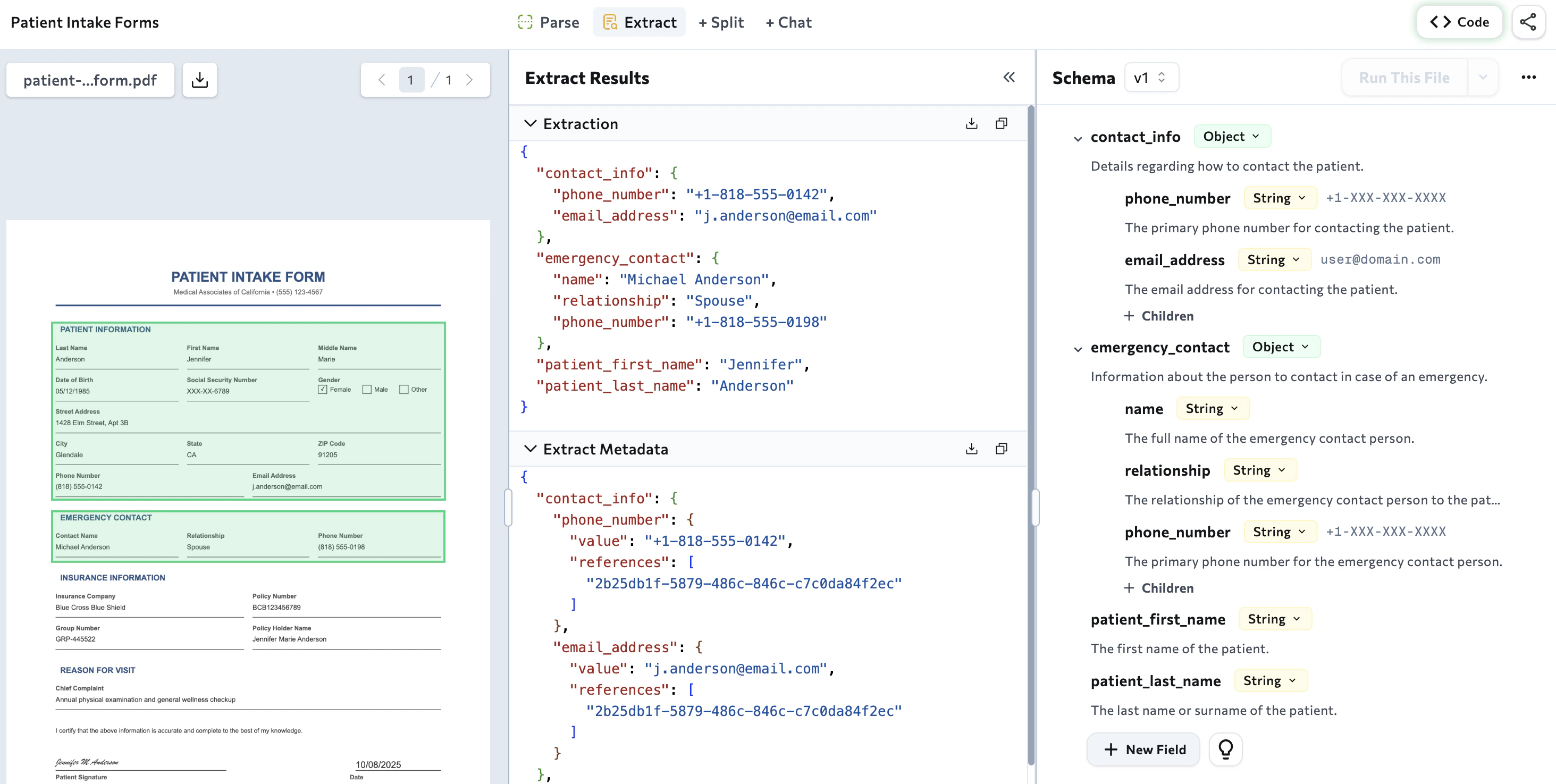 2. Copy the script for the method you plan on using: the [{adePythonLibrary} library](./ade-python#extract-getting-started) or the [API](#use-ade-extract-to-extract-fields-from-markdown).
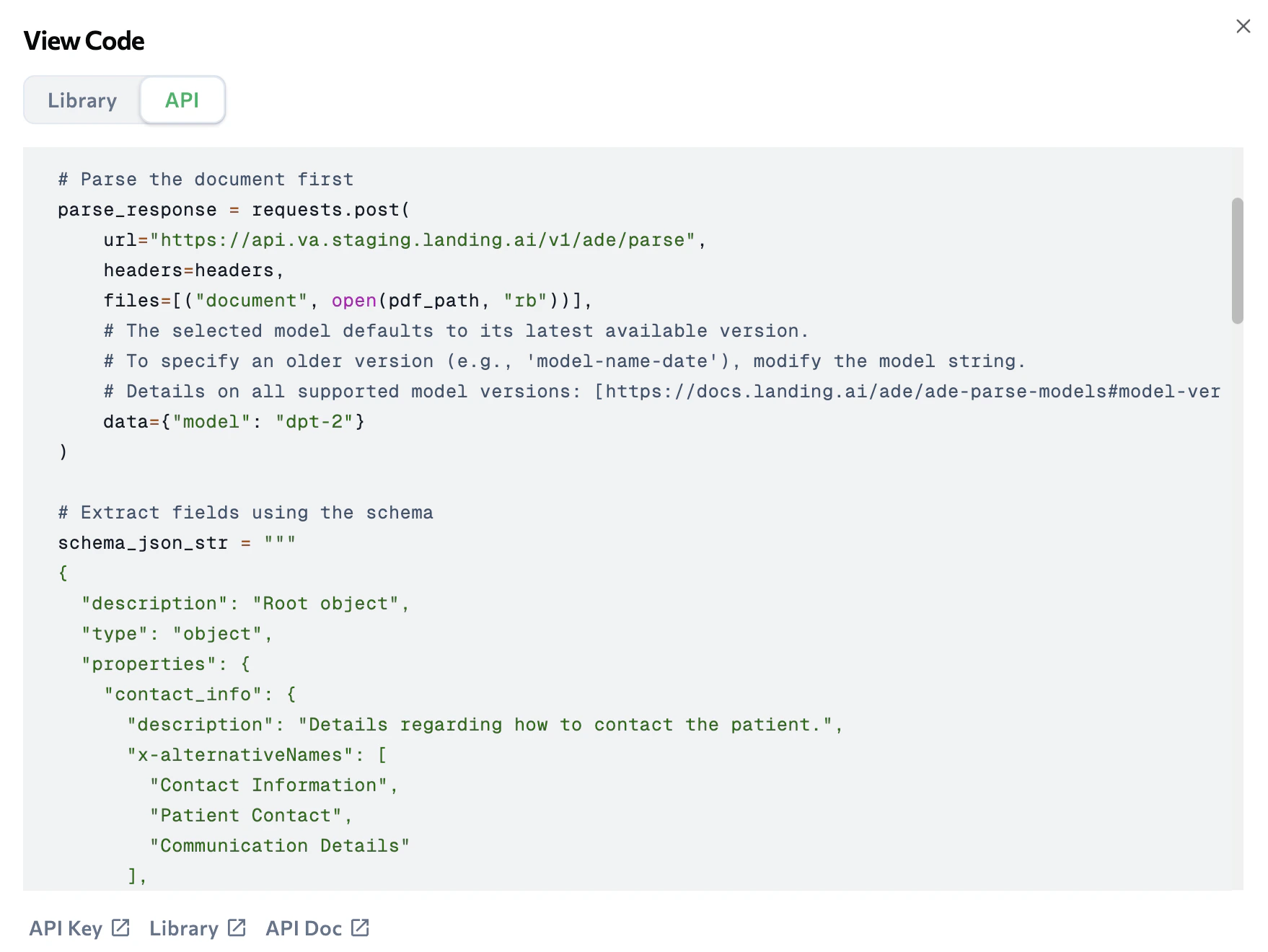 3. Paste the script into your code.
## Use the ADE Extract API to Extract Fields from Markdown
Use the {extract} API to extract data from the Markdown output created by the [{parse} API](./parse).
See the full {extract} API reference [here](https://docs.landing.ai/api-reference/tools/ade-extract).
### Specify Documents to Run Extraction On
The {extract} API offers two parameters for specifying the document you want to extract from:
* `markdown`: Specify the actual Markdown file you want to run extraction on.
* `markdown_url`: Include the URL to the Markdown file you want to run extraction on.
### Set the Extraction Schema
Set the extraction schema in the `schema` parameter. The schema must meet specific format and property requirements. For detailed guidance, see [JSON Schema for Extraction](./ade-extract-schema-json).
### Set the `strict` Parameter
Use the optional `strict` parameter to control how the API handles schemas that include [keywords that cause errors](./ade-extract-schema-json#keywords-that-cause-errors).
* If `strict` is `false`: the API continues processing and returns a `206` (Partial Content).
* If `strict` is `true`: the API stops processing and returns a `422` (Unprocessable Entity).
In both cases, the API returns `422` if the schema fails validation, and `206` if the extracted output does not conform to the schema after extraction completes.
### Extracted Output
For details about the extraction response structure and fields, see [JSON Response for Extraction](./ade-extract-response).
## Run Extract with Our Libraries
Click one of the tiles below to learn how to run the [{extract} API](https://docs.landing.ai/api-reference/tools/ade-extract) with our libraries.
Run Extract with our Python library.
3. Paste the script into your code.
## Use the ADE Extract API to Extract Fields from Markdown
Use the {extract} API to extract data from the Markdown output created by the [{parse} API](./parse).
See the full {extract} API reference [here](https://docs.landing.ai/api-reference/tools/ade-extract).
### Specify Documents to Run Extraction On
The {extract} API offers two parameters for specifying the document you want to extract from:
* `markdown`: Specify the actual Markdown file you want to run extraction on.
* `markdown_url`: Include the URL to the Markdown file you want to run extraction on.
### Set the Extraction Schema
Set the extraction schema in the `schema` parameter. The schema must meet specific format and property requirements. For detailed guidance, see [JSON Schema for Extraction](./ade-extract-schema-json).
### Set the `strict` Parameter
Use the optional `strict` parameter to control how the API handles schemas that include [keywords that cause errors](./ade-extract-schema-json#keywords-that-cause-errors).
* If `strict` is `false`: the API continues processing and returns a `206` (Partial Content).
* If `strict` is `true`: the API stops processing and returns a `422` (Unprocessable Entity).
In both cases, the API returns `422` if the schema fails validation, and `206` if the extracted output does not conform to the schema after extraction completes.
### Extracted Output
For details about the extraction response structure and fields, see [JSON Response for Extraction](./ade-extract-response).
## Run Extract with Our Libraries
Click one of the tiles below to learn how to run the [{extract} API](https://docs.landing.ai/api-reference/tools/ade-extract) with our libraries.
Run Extract with our Python library.
 }
href="./ade-typescript#extract-getting-started"
>
Run Extract with our TypeScript library.
## Use Parse Markdown for Best Results
The {extract} API is optimized for Markdown generated by the {parse} API. The parsed output includes element IDs, anchor tags, chunk tags, and other metadata that {extract} uses during the extraction process.
{extract} can also process generic Markdown files or edited Parse Markdown, but results may be less accurate.
For best results:
* Use only Markdown output from the {parse} API, not generic Markdown files.
* Do not edit the Markdown from {parse} before passing it to {extract}.
}
href="./ade-typescript#extract-getting-started"
>
Run Extract with our TypeScript library.
## Use Parse Markdown for Best Results
The {extract} API is optimized for Markdown generated by the {parse} API. The parsed output includes element IDs, anchor tags, chunk tags, and other metadata that {extract} uses during the extraction process.
{extract} can also process generic Markdown files or edited Parse Markdown, but results may be less accurate.
For best results:
* Use only Markdown output from the {parse} API, not generic Markdown files.
* Do not edit the Markdown from {parse} before passing it to {extract}.