> ## Documentation Index
> Fetch the complete documentation index at: https://docs.landing.ai/llms.txt
> Use this file to discover all available pages before exploring further.
# Changelog
> Learn about updates and new features in ADE.
export const classify = 'ADE Classify';
export const section = 'ADE Section';
export const splitJSON = 'split rules';
export const split = 'ADE Split';
export const adeTypeScriptLibrary = 'ade-typescript';
export const adePythonLibrary = 'ade-python';
export const dpt2mini = 'DPT-2 mini';
export const dpt2 = 'DPT-2';
export const dpt1 = 'DPT-1';
export const dpt = 'Document Pre-Trained Transformer';
export const companyName = 'LandingAI';
export const buildExtract = 'ADE Build Extract Schema';
export const extract = 'ADE Extract';
export const parse = 'ADE Parse';
export const ade = 'Agentic Document Extraction';
## ADE Extract Jobs
The [ADE Extract Jobs API](./ade-extract-async) is the asynchronous alternative to the standard {extract} API. Instead of waiting for a single request to finish, you create a job, receive a `job_id` immediately, and retrieve the extracted fields when the job is complete.
Use Extract Jobs for long-running extractions, such as extracting from long documents or when using large, complex schemas.
### Get Started
* [Asynchronous Extraction (Extract Jobs)](./ade-extract-async)
* [ADE Extract Jobs API reference](https://docs.landing.ai/api-reference/tools/ade-extract-jobs)
## Section Is Now Available in the Playground
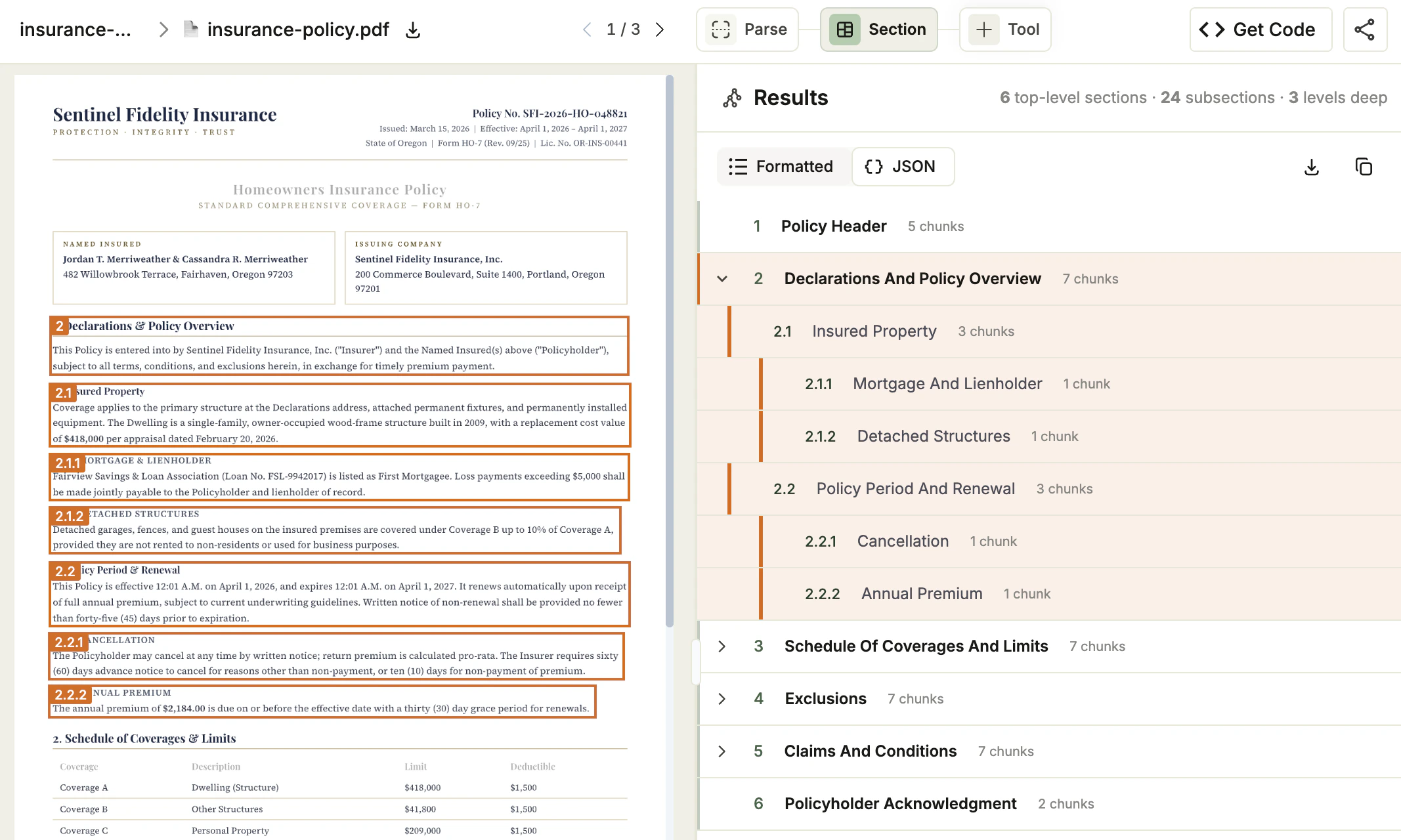
You can now use [{section}](./ade-section) in the [Playground](https://ade.landing.ai/). After you parse a file, add the **Section** tool to your project and {section} runs automatically on your files.
In the Playground, you can:
* Review the generated table of contents as a hierarchical tree, and toggle between **Formatted** and **JSON** views.
* Refine the table of contents by submitting natural-language guidelines.
* Export a ready-to-use script for the [API](./ade-section#section-with-the-api) or the [{adePythonLibrary} library](./ade-python#section-getting-started).
For full details, go to [Section in the Playground](./ade-section#section-in-the-playground).
 {section} is in Preview. This feature is still in development and may not return accurate results. Do not use this feature in production environments.
## New Config Drop-Down for Parse
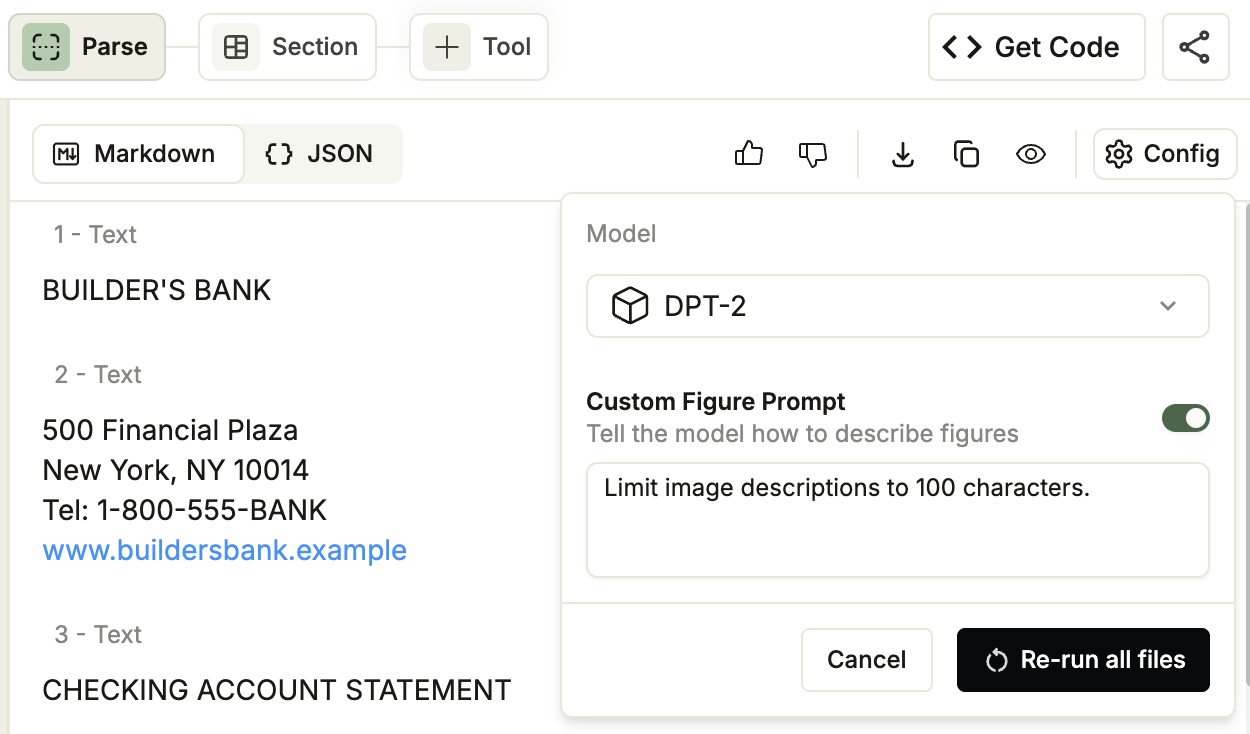
The **Parse** tool in the [Playground](https://ade.landing.ai/) now includes a **Config** drop-down for selecting the parsing model and applying a custom figure prompt to your project.
When you change the model or the prompt, the Playground re-parses every file in the project.
For more information, see:
* [Set the Model in the Playground](./ade-parse-models#set-the-model-in-the-playground)
* [Use Custom Prompts in the Playground](./ade-parse-custom-prompts#use-custom-prompts-in-the-playground)
{section} is in Preview. This feature is still in development and may not return accurate results. Do not use this feature in production environments.
## New Config Drop-Down for Parse
The **Parse** tool in the [Playground](https://ade.landing.ai/) now includes a **Config** drop-down for selecting the parsing model and applying a custom figure prompt to your project.
When you change the model or the prompt, the Playground re-parses every file in the project.
For more information, see:
* [Set the Model in the Playground](./ade-parse-models#set-the-model-in-the-playground)
* [Use Custom Prompts in the Playground](./ade-parse-custom-prompts#use-custom-prompts-in-the-playground)
 ## Updated Playground Design
The {ade} [Playground](https://ade.landing.ai/) has a new look.
The updated design makes it easier to load files and get started, and surfaces more resources directly in the left side-navigation panel, including:
* **APIs**: Quick access to the ADE API reference
* **Plan & Billing**: View and manage your plan and billing information
* **Events**: View your processing activity
Two new APIs are now available in public preview:
* [{classify}](#ade-classify)
* [{section}](#ade-section)
## ADE Classify
[{classify}](./ade-classify) classifies each page of a document by category. You provide a document and a list of classes, and the API assigns a class to each page concurrently.
Use the results to route pages to downstream systems such as [Parse](./parse), [Split](./ade-split), or [Extract](./ade-extract).
[Get started with {classify}](./ade-classify).
## ADE Section
[{section}](./ade-section) generates a hierarchical table of contents from a previously parsed document.
It accepts the Markdown output from {parse} (which contains reference anchors) and returns a flat, reading-order list of sections with their hierarchy levels and chunk references.
[Get started with {section}](./ade-section).
## A Note About Public Preview
These APIs are in Preview. These features are still in development and may not return accurate results. Do not use these features in production environments.
## New Parsing Model Snapshot: dpt-2-20260410
A new snapshot of {dpt2} is now available: `dpt-2-20260410`.
`dpt-2-20260410` builds on previous versions with these improvements:
* **Improved cell parsing in forms and tables**: Text positioned at different locations within a cell is now captured more completely.
* **Improved column alignment in complex tables**: Cell data now more accurately aligns with its corresponding column headers.
### How This Affects Your Results
If your code uses `dpt-2-latest` or `dpt-2`, it now points to this new snapshot and your parsing results may change.
To receive the latest improvements automatically, continue using a `-latest` alias. To maintain consistent results over time, pin your code to a specific snapshot (for example, `dpt-2-20260302`). For more information, go to [Why Model Versioning Matters](./ade-parse-models#why-model-versioning-matters).
This release includes a new extraction model version, an updated {extract} API with expanded schema support, the [{buildExtract} API](./ade-extract-schema-api) for programmatic schema creation, and a new projects experience in the Playground. It also introduces credit usage for AI-powered schema building tools.
* [New Extraction Model: extract-20260314](#new-extraction-model-extract-20260314)
* [Expanded Extraction Functionality](#expanded-extraction-functionality)
* [Build Extract Schema API](#build-extract-schema-api)
* [Projects in the Playground](#projects-in-the-playground)
* [Schema Building Tools Consume Credits](#schema-building-tools-consume-credits)
## New Extraction Model: extract-20260314
All extraction improvements in this release require model `extract-20260314`. For a full list of what this model enables, see [extract-20260314](./ade-extract-models#extract-20260314).
* **If you use `extract-latest`**: no changes needed. You already have access to the new model.
* **If you specify a model version in your code**: update it to `extract-20260314` to access these improvements.
## Expanded Extraction Functionality
The {extract} API no longer has limits on schema length, number of nested levels, or other schema constraints.
## Cross-Page Table Reconstruction
Tables that span page breaks are now returned as a single array, with no post-processing needed.
## Long Document Support
The {extract} API now supports documents of 1,000 or more pages, without splitting or merging files first.
## Build Extract Schema API
The new {buildExtract} API lets you programmatically create and update extraction schemas, providing the same schema-building capabilities as the Playground.
* [Build Extract Schema API reference](https://docs.landing.ai/api-reference/tools/ade-build-extract-schema)
* [How to use the Build Extract Schema API](./ade-extract-schema-api)
## Projects in the Playground
Files in the Playground are now organized into projects. Projects let you group similar documents together and create and apply extraction schemas across multiple documents at once.
## Schema Building Tools Consume Credits
Running AI-powered schema building tools consumes credits. This applies to:
* The **Refine Schema**, **View Suggested Fields**, and **Write a Schema Prompt** tools in the Playground
* The {buildExtract} API
This release changes how subscription plans handle usage beyond the credit allocation for your billing cycle. These changes ensure that exceeding your credits does not disrupt your service.
* **No more overage charges.** Purchase prepaid credits in advance to cover usage beyond the credit allocation for your billing cycle.
* **Auto Recharge as a buffer.** Automatically purchase credits when your balance falls below a set threshold.
* **Explore credits count too.** If you upgraded from an Explore plan on or after April 2, 2026, your unused Explore credits are added to your buffer.
Read on for details about each of these changes and other updates in this release. Get all pricing information in [Plans & Billing](./ade-pricing).
## Prepaid Credits Replace Overage Charges
Overage charges for subscription plans have been eliminated. Previously, if you exceeded your allocated credits for a billing cycle, you were billed after the fact.
You can now purchase "Pay-As-You-Go" credits in advance. If you exceed your allocated credits for a billing cycle, the prepaid credits are used automatically.
This change goes into effect for your upcoming billing cycle. To learn more, go to [Overages](./ade-pricing#overages)
## Auto Recharge Now Available on Subscription Plans
Auto Recharge was previously available only on the Explore plan. It is now also available on subscription plans.
Auto Recharge is enabled by default on subscription plans. When your credit balance falls below a set threshold, credits are purchased automatically. To learn more, go to [Auto Recharge](./ade-pricing#auto-recharge).
## Explore Credits Transfer When You Upgrade
If you upgrade from a Personal account to a subscription plan on or after April 2, 2026, your unused credits transfer to your new organization and are added to your credit pool.
This pool is drawn from if you exceed your credit allocation for a billing cycle, with credits that expire soonest consumed first.
To learn more, go to [Upgrade Team Plans](./ade-pricing#upgrade-team-plans).
## Updated Credit Expiration Timeline
When you create an {ade} account, you receive a set of free credits. These free credits expire 90 days after you create your account.
## Personal Accounts Are Now Organizations
When you create an {ade} account, it is now automatically an organization. If you upgrade to a subscription plan, you keep the same organization. This means you get to keep your API keys, files, and settings. To learn more, go to [Organizations & Members](./ade-members).
**Already on a subscription?** Your Personal account and subscription organization remain separate. This ensures that files and data in your Personal organization are not shared with members of your subscription organization.
## Custom Prompts for Figure Descriptions
The {parse} and ADE Parse Jobs APIs include a new optional `custom_prompts` parameter that lets you tell {ade} how to describe figures during parsing. This is useful when the default figure descriptions do not fit your use case, such as for domain-specific charts or images unique to your organization.
Pass your prompt in the `custom_prompts` parameter when calling the [ADE Parse](https://docs.landing.ai/api-reference/tools/ade-parse) or [ADE Parse Jobs](https://docs.landing.ai/api-reference/tools/ade-parse-jobs) APIs, or using the [Python](https://github.com/landing-ai/ade-python) and [TypeScript](https://github.com/landing-ai/ade-typescript) libraries.
The `custom_prompts` parameter is only supported when using {dpt2}.
For more information, see [Custom Prompts for Figure Descriptions](./ade-parse-custom-prompts).
## SSO Support for SAML 2.0 and OIDC
Enterprise plans now support single sign-on (SSO) via SAML 2.0 and OpenID Connect (OIDC). SSO allows your organization to manage {ade} access through your existing identity provider (IdP).
To get started, see [Single Sign-On (SSO)](./ade-sso).
## DPT-2 mini Updates
{dpt2mini} includes the following updates:
* **Improved table accuracy**: Table parsing accuracy has been improved for simple tables.
* **Visual element captions**: {dpt2mini} now generates concise captions for image-based chunk types, including `figure`, `logo`, `card`, `attestation`, and `scan_code`.
These changes apply to all {dpt2mini} snapshots.
To learn more, go to [DPT-2 mini](./ade-parse-models#dpt-2-mini).
## New Parsing Model Snapshots
New snapshots of {dpt2} and {dpt2mini} are now available:
* **{dpt2}**: `dpt-2-20260302`
* **{dpt2mini}**: `dpt-2-mini-20260302`
`dpt-2-20260302` builds on previous versions with several improvements, including:
* **Table boundary detection**: Tables that were previously split into multiple chunks are now correctly identified as a single table.
* **Improved large table accuracy**: Large tables are now parsed more accurately.
* **Special characters returned as Unicode**: Characters such as asterisks are now returned as their Unicode characters (for example, `*`) rather than as spelled-out strings like `asterisk`.
The table boundary detection and large table accuracy improvements are also included in `dpt-2-mini-20260302`.
To learn more about parsing models and snapshots, go to [Document Pre-Trained Transformers (Parsing Models)](./ade-parse-models).
### How This Affects Your Results
If your code uses `dpt-2-latest`, `dpt-2`, `dpt-2-mini-latest`, or `dpt-2-mini`, it now points to these new snapshots and your parsing results may change.
To receive the latest improvements automatically, continue using a `-latest` alias. To maintain consistent results over time, pin your code to a specific snapshot (for example, `dpt-2-20251103`). For more information, go to [Why Model Versioning Matters](./ade-parse-models#why-model-versioning-matters).
## Parse Password-Protected Files
Accounts with [Zero Data Retention (ZDR)](./zdr) enabled can now parse password-protected files. Pass the document's password in the `password` parameter when calling the [ADE Parse](https://docs.landing.ai/api-reference/tools/ade-parse) or [ADE Parse Jobs](https://docs.landing.ai/api-reference/tools/ade-parse-jobs) APIs, or using the [Python](https://github.com/landing-ai/ade-python) and [TypeScript](https://github.com/landing-ai/ade-typescript) libraries.
For more information, go to [Parse Password-Protected Files](./ade-parse-password).
## LandingLens and LandingEdge Documentation Has Moved
Documentation for LandingLens and LandingEdge has moved to [landinglens.docs.landing.ai](https://landinglens.docs.landing.ai/).
Existing links to docs.landing.ai/landinglens and docs.landing.ai/landingedge will automatically redirect to the new site.
## Extraction Schema Validation Fix
The {extract} API now correctly validates `anyOf` sub-schemas before processing begins. If a sub-schema within `anyOf` is missing both the `type` and `anyOf` keywords, the API returns a 400 error identifying the invalid path in the schema. Previously, this caused an unexpected extraction failure.
For more information about extraction response statuses and errors, go to [Troubleshoot Extraction](./ade-extract-troubleshoot).
## Confidence Scores
The parsed results now include **confidence scores** for text, marginalia, card, and table chunks, as well as table cells.
Confidence scores measure the confidence level of parsed text in Markdown with respect to the actual text or visual data present in the document.
Each score ranges from 0.0 (low confidence) to 1.0 (high confidence). Lower values indicate regions where the model was less certain about the output.
The confidence score feature is in Preview. The numeric range and distribution may change as we continue to develop and improve the model.
### Use Confidence Scores in the Playground
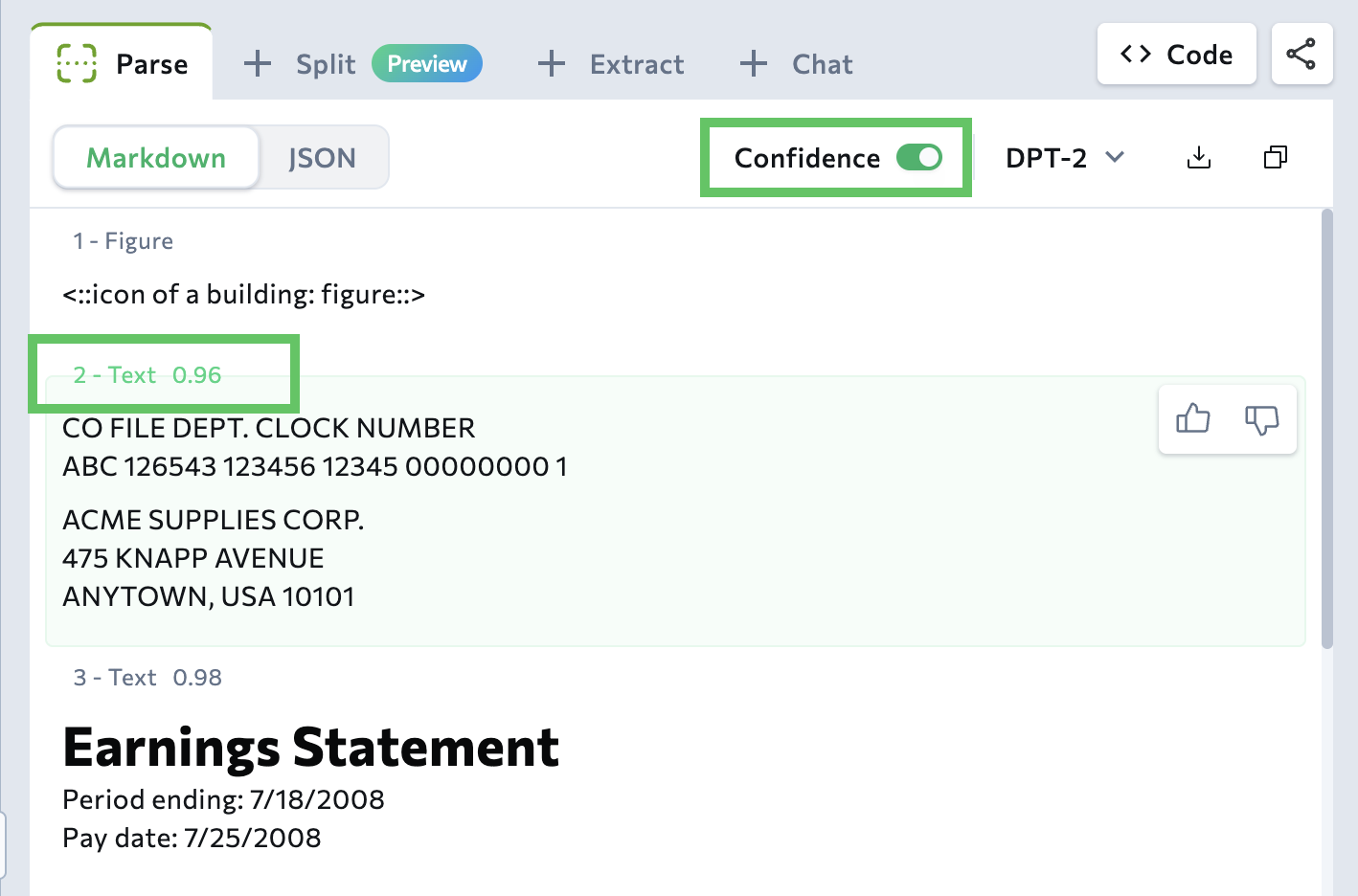
After parsing a document in the Playground, turn on the **Confidence** toggle (the toggle is only available when using {dpt2}).
In the **Markdown** tab, the confidence score displays next to the chunk type.
## Updated Playground Design
The {ade} [Playground](https://ade.landing.ai/) has a new look.
The updated design makes it easier to load files and get started, and surfaces more resources directly in the left side-navigation panel, including:
* **APIs**: Quick access to the ADE API reference
* **Plan & Billing**: View and manage your plan and billing information
* **Events**: View your processing activity
Two new APIs are now available in public preview:
* [{classify}](#ade-classify)
* [{section}](#ade-section)
## ADE Classify
[{classify}](./ade-classify) classifies each page of a document by category. You provide a document and a list of classes, and the API assigns a class to each page concurrently.
Use the results to route pages to downstream systems such as [Parse](./parse), [Split](./ade-split), or [Extract](./ade-extract).
[Get started with {classify}](./ade-classify).
## ADE Section
[{section}](./ade-section) generates a hierarchical table of contents from a previously parsed document.
It accepts the Markdown output from {parse} (which contains reference anchors) and returns a flat, reading-order list of sections with their hierarchy levels and chunk references.
[Get started with {section}](./ade-section).
## A Note About Public Preview
These APIs are in Preview. These features are still in development and may not return accurate results. Do not use these features in production environments.
## New Parsing Model Snapshot: dpt-2-20260410
A new snapshot of {dpt2} is now available: `dpt-2-20260410`.
`dpt-2-20260410` builds on previous versions with these improvements:
* **Improved cell parsing in forms and tables**: Text positioned at different locations within a cell is now captured more completely.
* **Improved column alignment in complex tables**: Cell data now more accurately aligns with its corresponding column headers.
### How This Affects Your Results
If your code uses `dpt-2-latest` or `dpt-2`, it now points to this new snapshot and your parsing results may change.
To receive the latest improvements automatically, continue using a `-latest` alias. To maintain consistent results over time, pin your code to a specific snapshot (for example, `dpt-2-20260302`). For more information, go to [Why Model Versioning Matters](./ade-parse-models#why-model-versioning-matters).
This release includes a new extraction model version, an updated {extract} API with expanded schema support, the [{buildExtract} API](./ade-extract-schema-api) for programmatic schema creation, and a new projects experience in the Playground. It also introduces credit usage for AI-powered schema building tools.
* [New Extraction Model: extract-20260314](#new-extraction-model-extract-20260314)
* [Expanded Extraction Functionality](#expanded-extraction-functionality)
* [Build Extract Schema API](#build-extract-schema-api)
* [Projects in the Playground](#projects-in-the-playground)
* [Schema Building Tools Consume Credits](#schema-building-tools-consume-credits)
## New Extraction Model: extract-20260314
All extraction improvements in this release require model `extract-20260314`. For a full list of what this model enables, see [extract-20260314](./ade-extract-models#extract-20260314).
* **If you use `extract-latest`**: no changes needed. You already have access to the new model.
* **If you specify a model version in your code**: update it to `extract-20260314` to access these improvements.
## Expanded Extraction Functionality
The {extract} API no longer has limits on schema length, number of nested levels, or other schema constraints.
## Cross-Page Table Reconstruction
Tables that span page breaks are now returned as a single array, with no post-processing needed.
## Long Document Support
The {extract} API now supports documents of 1,000 or more pages, without splitting or merging files first.
## Build Extract Schema API
The new {buildExtract} API lets you programmatically create and update extraction schemas, providing the same schema-building capabilities as the Playground.
* [Build Extract Schema API reference](https://docs.landing.ai/api-reference/tools/ade-build-extract-schema)
* [How to use the Build Extract Schema API](./ade-extract-schema-api)
## Projects in the Playground
Files in the Playground are now organized into projects. Projects let you group similar documents together and create and apply extraction schemas across multiple documents at once.
## Schema Building Tools Consume Credits
Running AI-powered schema building tools consumes credits. This applies to:
* The **Refine Schema**, **View Suggested Fields**, and **Write a Schema Prompt** tools in the Playground
* The {buildExtract} API
This release changes how subscription plans handle usage beyond the credit allocation for your billing cycle. These changes ensure that exceeding your credits does not disrupt your service.
* **No more overage charges.** Purchase prepaid credits in advance to cover usage beyond the credit allocation for your billing cycle.
* **Auto Recharge as a buffer.** Automatically purchase credits when your balance falls below a set threshold.
* **Explore credits count too.** If you upgraded from an Explore plan on or after April 2, 2026, your unused Explore credits are added to your buffer.
Read on for details about each of these changes and other updates in this release. Get all pricing information in [Plans & Billing](./ade-pricing).
## Prepaid Credits Replace Overage Charges
Overage charges for subscription plans have been eliminated. Previously, if you exceeded your allocated credits for a billing cycle, you were billed after the fact.
You can now purchase "Pay-As-You-Go" credits in advance. If you exceed your allocated credits for a billing cycle, the prepaid credits are used automatically.
This change goes into effect for your upcoming billing cycle. To learn more, go to [Overages](./ade-pricing#overages)
## Auto Recharge Now Available on Subscription Plans
Auto Recharge was previously available only on the Explore plan. It is now also available on subscription plans.
Auto Recharge is enabled by default on subscription plans. When your credit balance falls below a set threshold, credits are purchased automatically. To learn more, go to [Auto Recharge](./ade-pricing#auto-recharge).
## Explore Credits Transfer When You Upgrade
If you upgrade from a Personal account to a subscription plan on or after April 2, 2026, your unused credits transfer to your new organization and are added to your credit pool.
This pool is drawn from if you exceed your credit allocation for a billing cycle, with credits that expire soonest consumed first.
To learn more, go to [Upgrade Team Plans](./ade-pricing#upgrade-team-plans).
## Updated Credit Expiration Timeline
When you create an {ade} account, you receive a set of free credits. These free credits expire 90 days after you create your account.
## Personal Accounts Are Now Organizations
When you create an {ade} account, it is now automatically an organization. If you upgrade to a subscription plan, you keep the same organization. This means you get to keep your API keys, files, and settings. To learn more, go to [Organizations & Members](./ade-members).
**Already on a subscription?** Your Personal account and subscription organization remain separate. This ensures that files and data in your Personal organization are not shared with members of your subscription organization.
## Custom Prompts for Figure Descriptions
The {parse} and ADE Parse Jobs APIs include a new optional `custom_prompts` parameter that lets you tell {ade} how to describe figures during parsing. This is useful when the default figure descriptions do not fit your use case, such as for domain-specific charts or images unique to your organization.
Pass your prompt in the `custom_prompts` parameter when calling the [ADE Parse](https://docs.landing.ai/api-reference/tools/ade-parse) or [ADE Parse Jobs](https://docs.landing.ai/api-reference/tools/ade-parse-jobs) APIs, or using the [Python](https://github.com/landing-ai/ade-python) and [TypeScript](https://github.com/landing-ai/ade-typescript) libraries.
The `custom_prompts` parameter is only supported when using {dpt2}.
For more information, see [Custom Prompts for Figure Descriptions](./ade-parse-custom-prompts).
## SSO Support for SAML 2.0 and OIDC
Enterprise plans now support single sign-on (SSO) via SAML 2.0 and OpenID Connect (OIDC). SSO allows your organization to manage {ade} access through your existing identity provider (IdP).
To get started, see [Single Sign-On (SSO)](./ade-sso).
## DPT-2 mini Updates
{dpt2mini} includes the following updates:
* **Improved table accuracy**: Table parsing accuracy has been improved for simple tables.
* **Visual element captions**: {dpt2mini} now generates concise captions for image-based chunk types, including `figure`, `logo`, `card`, `attestation`, and `scan_code`.
These changes apply to all {dpt2mini} snapshots.
To learn more, go to [DPT-2 mini](./ade-parse-models#dpt-2-mini).
## New Parsing Model Snapshots
New snapshots of {dpt2} and {dpt2mini} are now available:
* **{dpt2}**: `dpt-2-20260302`
* **{dpt2mini}**: `dpt-2-mini-20260302`
`dpt-2-20260302` builds on previous versions with several improvements, including:
* **Table boundary detection**: Tables that were previously split into multiple chunks are now correctly identified as a single table.
* **Improved large table accuracy**: Large tables are now parsed more accurately.
* **Special characters returned as Unicode**: Characters such as asterisks are now returned as their Unicode characters (for example, `*`) rather than as spelled-out strings like `asterisk`.
The table boundary detection and large table accuracy improvements are also included in `dpt-2-mini-20260302`.
To learn more about parsing models and snapshots, go to [Document Pre-Trained Transformers (Parsing Models)](./ade-parse-models).
### How This Affects Your Results
If your code uses `dpt-2-latest`, `dpt-2`, `dpt-2-mini-latest`, or `dpt-2-mini`, it now points to these new snapshots and your parsing results may change.
To receive the latest improvements automatically, continue using a `-latest` alias. To maintain consistent results over time, pin your code to a specific snapshot (for example, `dpt-2-20251103`). For more information, go to [Why Model Versioning Matters](./ade-parse-models#why-model-versioning-matters).
## Parse Password-Protected Files
Accounts with [Zero Data Retention (ZDR)](./zdr) enabled can now parse password-protected files. Pass the document's password in the `password` parameter when calling the [ADE Parse](https://docs.landing.ai/api-reference/tools/ade-parse) or [ADE Parse Jobs](https://docs.landing.ai/api-reference/tools/ade-parse-jobs) APIs, or using the [Python](https://github.com/landing-ai/ade-python) and [TypeScript](https://github.com/landing-ai/ade-typescript) libraries.
For more information, go to [Parse Password-Protected Files](./ade-parse-password).
## LandingLens and LandingEdge Documentation Has Moved
Documentation for LandingLens and LandingEdge has moved to [landinglens.docs.landing.ai](https://landinglens.docs.landing.ai/).
Existing links to docs.landing.ai/landinglens and docs.landing.ai/landingedge will automatically redirect to the new site.
## Extraction Schema Validation Fix
The {extract} API now correctly validates `anyOf` sub-schemas before processing begins. If a sub-schema within `anyOf` is missing both the `type` and `anyOf` keywords, the API returns a 400 error identifying the invalid path in the schema. Previously, this caused an unexpected extraction failure.
For more information about extraction response statuses and errors, go to [Troubleshoot Extraction](./ade-extract-troubleshoot).
## Confidence Scores
The parsed results now include **confidence scores** for text, marginalia, card, and table chunks, as well as table cells.
Confidence scores measure the confidence level of parsed text in Markdown with respect to the actual text or visual data present in the document.
Each score ranges from 0.0 (low confidence) to 1.0 (high confidence). Lower values indicate regions where the model was less certain about the output.
The confidence score feature is in Preview. The numeric range and distribution may change as we continue to develop and improve the model.
### Use Confidence Scores in the Playground
After parsing a document in the Playground, turn on the **Confidence** toggle (the toggle is only available when using {dpt2}).
In the **Markdown** tab, the confidence score displays next to the chunk type.
 ### Review Low-Confidence Sections
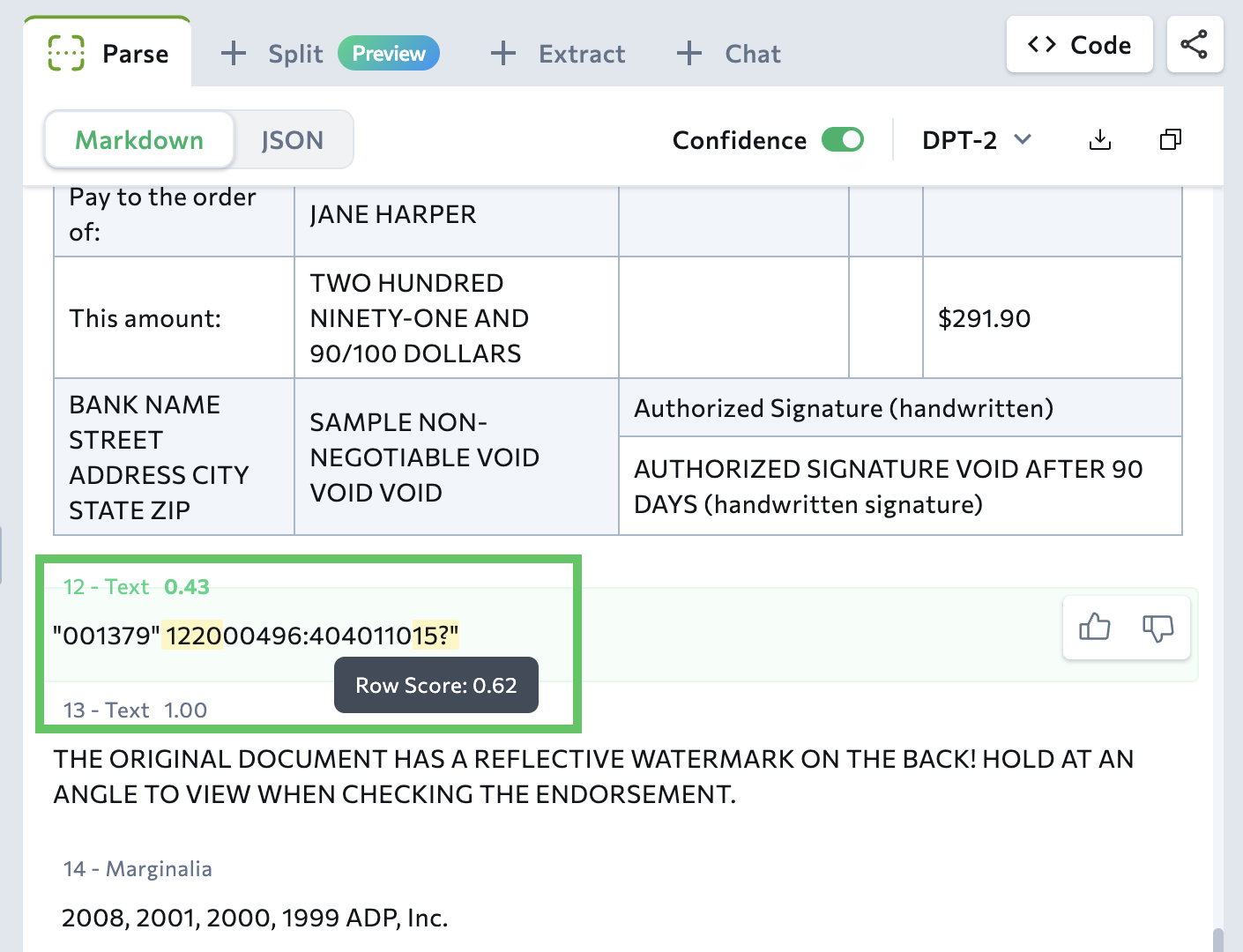
Low-confidence sections (with scores of 0.95 or lower) are highlighted in yellow in the Playground. Highlighting low-confidence sections helps you quickly identify content that may need review.
* **Text, card, marginalia chunks**: Specific text spans within a chunk are highlighted. A single chunk can contain multiple highlighted spans.
* **Tables**: Each cell has its own confidence score. If a cell has a low score, the entire cell is highlighted.
### Review Low-Confidence Sections
Low-confidence sections (with scores of 0.95 or lower) are highlighted in yellow in the Playground. Highlighting low-confidence sections helps you quickly identify content that may need review.
* **Text, card, marginalia chunks**: Specific text spans within a chunk are highlighted. A single chunk can contain multiple highlighted spans.
* **Tables**: Each cell has its own confidence score. If a cell has a low score, the entire cell is highlighted.
 #### Why is 0.95 the threshold for low confidence scores?
The Playground highlights content with confidence scores of 0.95 or lower because this is the threshold used internally to evaluate parsing quality.
This threshold works well for general review workflows, but your use case may require a different threshold. When [using the API](./ade-json-response#confidence-score), you can implement custom logic to identify and route content based on confidence scores that match your specific requirements.
#### Why don't I see the confidence score for files I uploaded in the past?
The confidence score displays for documents parsed on February 12, 2026 or later. If you parsed a document before that date, the Playground does not re-process documents.
If you want to see the newest results for a file that you've already parsed, re-upload it to the Playground.
### Use Confidence Scores in the API Response
The `grounding` object in the API response includes all the confidence information displayed in the Playground:
* Confidence scores for each chunk and table cell
* For text chunks with low-confidence spans: the text, confidence score, and character positions (`start`, `end`) for each span
This allows you to programmatically identify and route low-confidence content for review in your applications. Learn more in [Confidence Scores](./ade-json-response#confidence-score).
{dpt1} will experience a technology change on February 17, 2026 that may affect parsing results, and will be fully deprecated on March 31, 2026.
If you are using {dpt1}, update your code to use DPT-2. To learn more about DPT models, go to [Document Pre-Trained Transformers (Parsing Models)](./ade-parse-models).
## DPT-1 Underlying Technology Change: February 17, 2026
One of our underlying solution providers for {dpt1} is upgrading their technology on February 17, 2026. While {dpt1} will continue to function, table parsing behavior and results may change for some documents.
## DPT-1 Deprecation: March 31, 2026
Longer term, we plan to deprecate {dpt1}. After March 31, 2026, {dpt1} will no longer be supported and will be scheduled for shutdown.
## Impacted Users and Next Steps
Check the scenarios below to determine if you are impacted and what action to take. Complete any necessary migration before February 17, 2026.
* [Scenario 1: You Specify DPT-1 as the Model Parameter](#scenario-1-you-specify-dpt-1-as-the-model-parameter)
* [Scenario 2: You Use the Legacy API Endpoint](#scenario-2-you-use-the-legacy-api-endpoint)
* [Scenario 3: You Use the Legacy Python Library](#scenario-3-you-use-the-legacy-python-library)
We recommend that you test any changes in staging first, especially if you process table-heavy documents. After testing in staging, deploy changes to production.
### Scenario 1: You Specify DPT-1 as the Model Parameter
You are in this scenario if:
* You call the `/v1/ade/parse` or `/v1/ade/parse-jobs` endpoint
AND
* You set the `model` parameter to `dpt-1`, `dpt-1-latest`, or `dpt-1-20250615`
**What to do:**
Update your code to use `model=dpt-2-latest` or a specific {dpt2} snapshot.
For example, run the command below to use the latest snapshot of {dpt2}.
```shell theme={null}
curl -X POST 'https://api.va.landing.ai/v1/ade/parse' \
-H 'Authorization: Bearer YOUR_API_KEY' \
-F 'document=@document.pdf' \
-F 'model=dpt-2-latest'
```
### Scenario 2: You Use the Legacy API Endpoint
You are in this scenario if you call the legacy endpoint: `v1/tools/agentic-document-analysis`.
**What to do:**
1. Migrate to the `/v1/ade/parse` endpoint. To learn how to use this endpoint, go to [ADE Parse](./parse).
2. When calling the endpoint, use `model=dpt-2-latest` or a specific {dpt2} snapshot.
For example, run the command below to use the latest snapshot of {dpt2}.
```shell theme={null}
curl -X POST 'https://api.va.landing.ai/v1/ade/parse' \
-H 'Authorization: Bearer YOUR_API_KEY' \
-F 'document=@document.pdf' \
-F 'model=dpt-2-latest'
```
### Scenario 3: You Use the Legacy Python Library
You are in this scenario if you use the legacy `agentic-doc` Python library.
**What to do:**
1. Migrate to the [{adePythonLibrary}](https://github.com/landing-ai/ade-python) library. To learn how to use this library, go to [Python Library](./ade-python).
2. Update your code to use `model="dpt-2-latest"` or a specific {dpt2} snapshot when calling the `parse()` function.
For example, use this code to use the latest snapshot of {dpt2}.
```python theme={null}
response = client.parse(
document=Path("/path/to/file/document"),
model="dpt-2-latest"
)
```
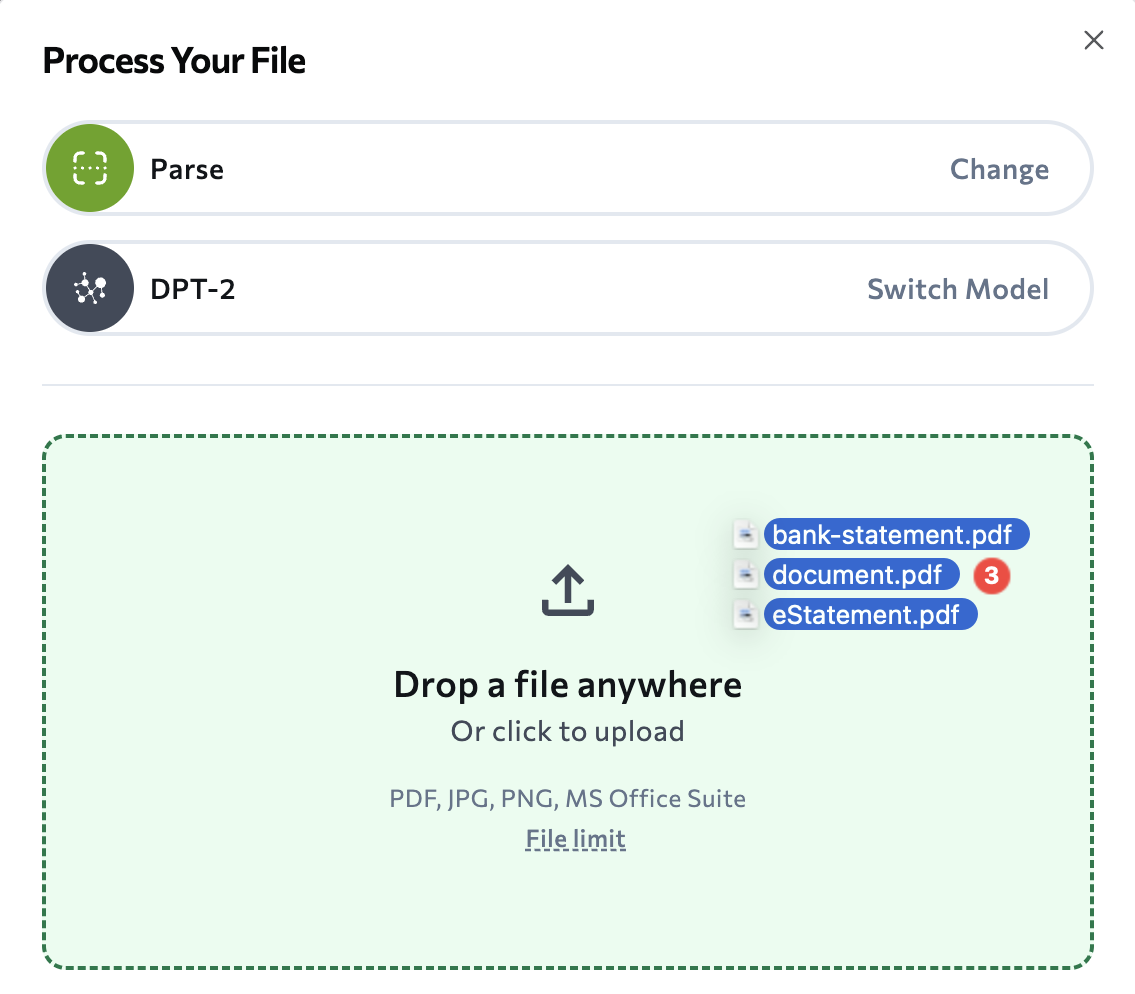
When using the {ade} [Playground](https://ade.landing.ai/), you can now load up to 10 files at once. After opening the Upload dialog box, navigate to and select multiple files or simply drag and drop the files.
#### Why is 0.95 the threshold for low confidence scores?
The Playground highlights content with confidence scores of 0.95 or lower because this is the threshold used internally to evaluate parsing quality.
This threshold works well for general review workflows, but your use case may require a different threshold. When [using the API](./ade-json-response#confidence-score), you can implement custom logic to identify and route content based on confidence scores that match your specific requirements.
#### Why don't I see the confidence score for files I uploaded in the past?
The confidence score displays for documents parsed on February 12, 2026 or later. If you parsed a document before that date, the Playground does not re-process documents.
If you want to see the newest results for a file that you've already parsed, re-upload it to the Playground.
### Use Confidence Scores in the API Response
The `grounding` object in the API response includes all the confidence information displayed in the Playground:
* Confidence scores for each chunk and table cell
* For text chunks with low-confidence spans: the text, confidence score, and character positions (`start`, `end`) for each span
This allows you to programmatically identify and route low-confidence content for review in your applications. Learn more in [Confidence Scores](./ade-json-response#confidence-score).
{dpt1} will experience a technology change on February 17, 2026 that may affect parsing results, and will be fully deprecated on March 31, 2026.
If you are using {dpt1}, update your code to use DPT-2. To learn more about DPT models, go to [Document Pre-Trained Transformers (Parsing Models)](./ade-parse-models).
## DPT-1 Underlying Technology Change: February 17, 2026
One of our underlying solution providers for {dpt1} is upgrading their technology on February 17, 2026. While {dpt1} will continue to function, table parsing behavior and results may change for some documents.
## DPT-1 Deprecation: March 31, 2026
Longer term, we plan to deprecate {dpt1}. After March 31, 2026, {dpt1} will no longer be supported and will be scheduled for shutdown.
## Impacted Users and Next Steps
Check the scenarios below to determine if you are impacted and what action to take. Complete any necessary migration before February 17, 2026.
* [Scenario 1: You Specify DPT-1 as the Model Parameter](#scenario-1-you-specify-dpt-1-as-the-model-parameter)
* [Scenario 2: You Use the Legacy API Endpoint](#scenario-2-you-use-the-legacy-api-endpoint)
* [Scenario 3: You Use the Legacy Python Library](#scenario-3-you-use-the-legacy-python-library)
We recommend that you test any changes in staging first, especially if you process table-heavy documents. After testing in staging, deploy changes to production.
### Scenario 1: You Specify DPT-1 as the Model Parameter
You are in this scenario if:
* You call the `/v1/ade/parse` or `/v1/ade/parse-jobs` endpoint
AND
* You set the `model` parameter to `dpt-1`, `dpt-1-latest`, or `dpt-1-20250615`
**What to do:**
Update your code to use `model=dpt-2-latest` or a specific {dpt2} snapshot.
For example, run the command below to use the latest snapshot of {dpt2}.
```shell theme={null}
curl -X POST 'https://api.va.landing.ai/v1/ade/parse' \
-H 'Authorization: Bearer YOUR_API_KEY' \
-F 'document=@document.pdf' \
-F 'model=dpt-2-latest'
```
### Scenario 2: You Use the Legacy API Endpoint
You are in this scenario if you call the legacy endpoint: `v1/tools/agentic-document-analysis`.
**What to do:**
1. Migrate to the `/v1/ade/parse` endpoint. To learn how to use this endpoint, go to [ADE Parse](./parse).
2. When calling the endpoint, use `model=dpt-2-latest` or a specific {dpt2} snapshot.
For example, run the command below to use the latest snapshot of {dpt2}.
```shell theme={null}
curl -X POST 'https://api.va.landing.ai/v1/ade/parse' \
-H 'Authorization: Bearer YOUR_API_KEY' \
-F 'document=@document.pdf' \
-F 'model=dpt-2-latest'
```
### Scenario 3: You Use the Legacy Python Library
You are in this scenario if you use the legacy `agentic-doc` Python library.
**What to do:**
1. Migrate to the [{adePythonLibrary}](https://github.com/landing-ai/ade-python) library. To learn how to use this library, go to [Python Library](./ade-python).
2. Update your code to use `model="dpt-2-latest"` or a specific {dpt2} snapshot when calling the `parse()` function.
For example, use this code to use the latest snapshot of {dpt2}.
```python theme={null}
response = client.parse(
document=Path("/path/to/file/document"),
model="dpt-2-latest"
)
```
When using the {ade} [Playground](https://ade.landing.ai/), you can now load up to 10 files at once. After opening the Upload dialog box, navigate to and select multiple files or simply drag and drop the files.
 ## Parsing Status
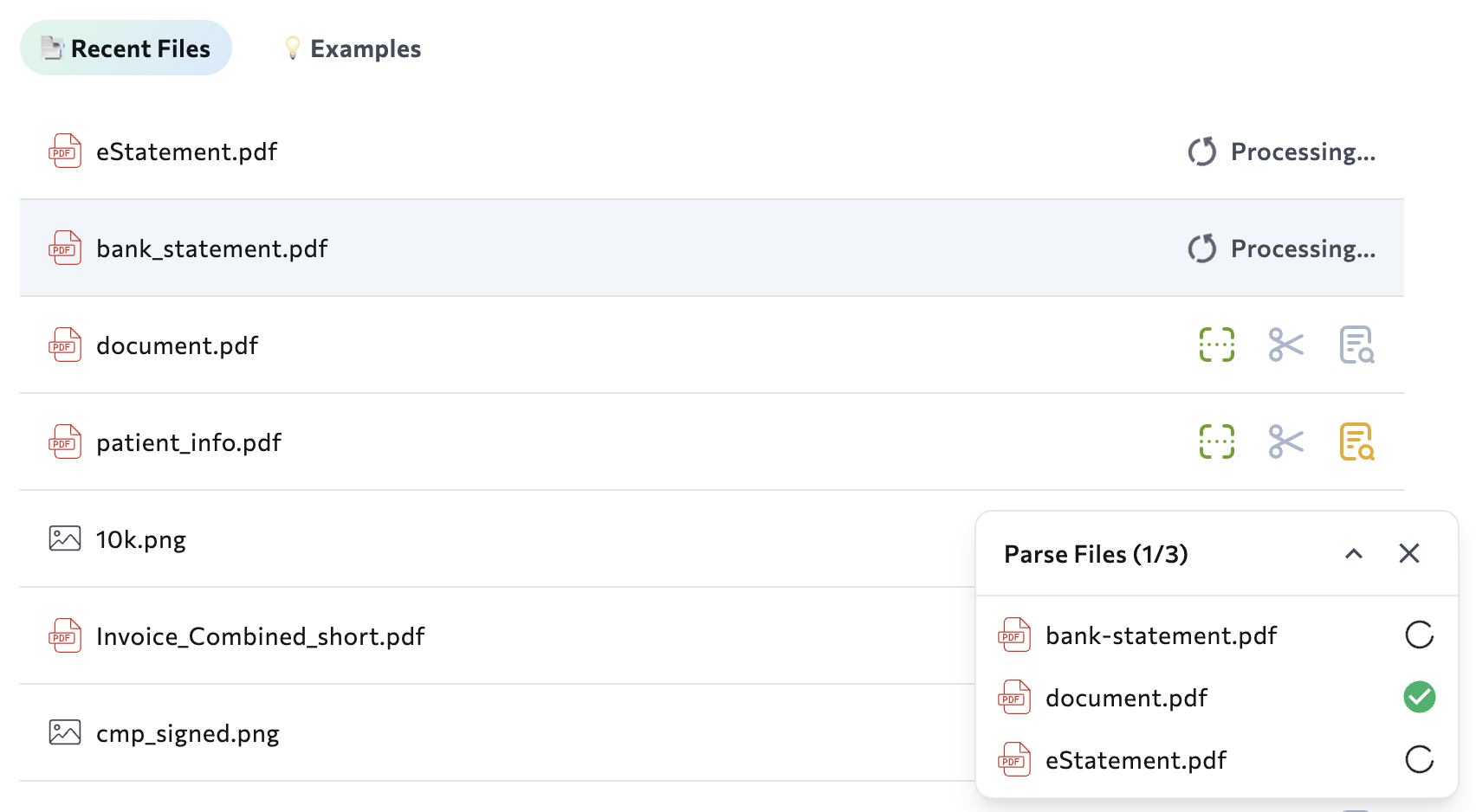
After loading multiple files into the Playground, a floating dialog box appears in the bottom right corner, showing the parsing progress for each file. If a file fails to process, an error message displays in this area.
## Parsing Status
After loading multiple files into the Playground, a floating dialog box appears in the bottom right corner, showing the parsing progress for each file. If a file fails to process, an error message displays in this area.
 ## Multiple File Upload Not Available with ZDR
When [Zero Data Retention](./zdr) (ZDR) is enabled, only one file can be loaded at a time.
## Python and TypeScript Libraries Support Saving Responses to Local Directories
The [{adePythonLibrary}](https://github.com/landing-ai/ade-python) and [{adeTypeScriptLibrary}](https://github.com/landing-ai/ade-typescript) libraries now support saving API responses directly to local directories as JSON files.
The save parameter:
* Creates the specified directory if it doesn't exist
* Saves the response with the filename format: `{input_file}_{method}_output.json`
* Works across all three core functions: parse, split, and extract
### Availability
* Python library: v1.4.0 (parameter: `save_to`)
* TypeScript library: v2.0.0 (parameter: `saveTo`)
### Example
These examples show how to save the API response when parsing.
```python Python theme={null}
from pathlib import Path
from landingai_ade import LandingAIADE
client = LandingAIADE()
response = client.parse(
document=Path("/path/to/document.pdf"),
model="dpt-2-latest",
save_to="output_folder" # optional: saves as {input_file}_parse_output.json
)
```
```typescript TypeScript theme={null}
import LandingAIADE from "landingai-ade";
import fs from "fs";
const client = new LandingAIADE();
const response = await client.parse({
document: fs.createReadStream("/path/to/document.pdf"),
model: "dpt-2-latest",
saveTo: "output_folder" // optional: saves as {input_file}_parse_output.json
});
```
For more information, go to [Python Library](./ade-python) or [TypeScript Library](./ade-typescript).
## Table Cell Position Information
When you parse documents with tables, the {parse} API response now includes row and column position information for each table cell in the `grounding` object. This allows you to map parsed data back to specific cell locations in the original table.
Each table cell in the `grounding` object now includes a `position` field with:
* `row`: Row position (zero-indexed)
* `col`: Column position (zero-indexed)
* `rowspan`: Number of rows the cell spans
* `colspan`: Number of columns the cell spans
* `chunk_id`: Associated chunk identifier
**Why this matters:**
* **Precise cell mapping**: You can now identify the exact row and column for each piece of data in your table
* **Merged cell detection**: The rowspan and colspan values indicate when cells are merged
* **Easier data validation**: You can verify that extracted data came from the expected cell location
For more information about the grounding object structure, go to [Table Cell Position Information](./ade-json-response#table-cell-position-information).
This release includes a new metadata field for tracking extraction model fallbacks, improved HTTP status codes for parse jobs with partial results, improved spreadsheet parsing, and documentation updates to Parse Jobs endpoint names.
## Fallback Model Version Field
The {extract} API response now includes a `metadata.fallback_model_version` field. This field shows which extraction model was actually used if the API falls back from your requested model.
For more information about the response structure, go to [JSON Response for Extraction](./ade-extract-response).
## Parse Jobs: Partial Content Now Returns a 206 Status
When you retrieve parse job results with the ADE Get Parse Jobs API, the API now returns a 206 (Partial Content) HTTP status code if some pages failed during processing.
The `failed_pages` array and `failure_reason` field that were already in the API response continue to provide details about which pages failed and why.
For more information, go to [Troubleshoot Parsing](./ade-parse-troubleshoot#status-206-partial-content).
## Improved Title Detection in Spreadsheets
The {parse} API now better identifies titles in spreadsheets. When a spreadsheet has a title or text at the top, the API now returns:
* The title as a separate text chunk
* The table as its own chunk
## You Can Now Resubscribe and Cancel in Interface
If you want to resubscribe to or cancel a subscription plan, you can now do so directly in the {ade} interface. For full details, go to [Plans & Billing](./ade-pricing#can-i-resubscribe).
## Updated API Endpoint Names
We've updated the names of two Parse Jobs API endpoints:
* "List Async Jobs" is now "**ADE List Parse Jobs**"
* "Get Async Job Status" is now "**ADE Get Parse Jobs**"
This is a documentation-only change. The endpoint URLs have not changed. Your existing API calls will continue to work without any modifications.
## Split Documents with the New Split API (Preview)
We're releasing a Preview of the [{split}](https://docs.landing.ai/api-reference/tools/ade-split) API, which classifies and separates a parsed document into multiple sub-documents based on Split Rules you define. This is useful when you receive batched documents containing multiple document types or multiple instances of the same document type.
For example, a financial institution processing KYC documentation might receive a single PDF containing bank statements, utility bills, and identification documents for a customer. The {split} API can automatically classify and separate each document type, enabling downstream processing systems to route each document appropriately.
Get the full details in [Split](./ade-split).
{split} is in Preview. This feature is still in development and may not return accurate results. Do not use this feature in production environments.
### How It Works
1. Parse your document using the [{parse} API](https://docs.landing.ai/api-reference/tools/ade-parse) to generate Markdown output
2. Define Split Rules that describe the document types or sections you want to identify
3. Call the {split} API with the parsed Markdown and your Split Rules
4. The API returns each classified sub-document with its full Markdown content
For the complete workflow, go to [Process Overview](./ade-split#process-overview).
### When to Use Split
Use the {split} API when you need to:
* Separate batched documents containing multiple document types (invoices, receipts, contracts)
* Split documents with repeated sections by unique identifiers (multiple pay stubs by date)
* Organize multi-section documents into logical parts (academic articles with body, references, supplemental materials)
* Route different document types to appropriate downstream systems
For more use cases, go to [Example Use Cases](./ade-split#example-use-cases).
### How to Use Split
The {split} API is available through multiple interfaces:
* [Playground](./ade-split#split-in-the-playground): Interactively create and test Split Rules
* [API](./ade-split#split-with-the-api): Integrate directly into your applications
* [Python Library](./ade-python#split-getting-started): Integrate into Python-based application with our Python library
* [TypeScript Library](./ade-typescript#split-getting-started): Integrate into TypeScript-based application with our TypeScript library
## Revamped Playground
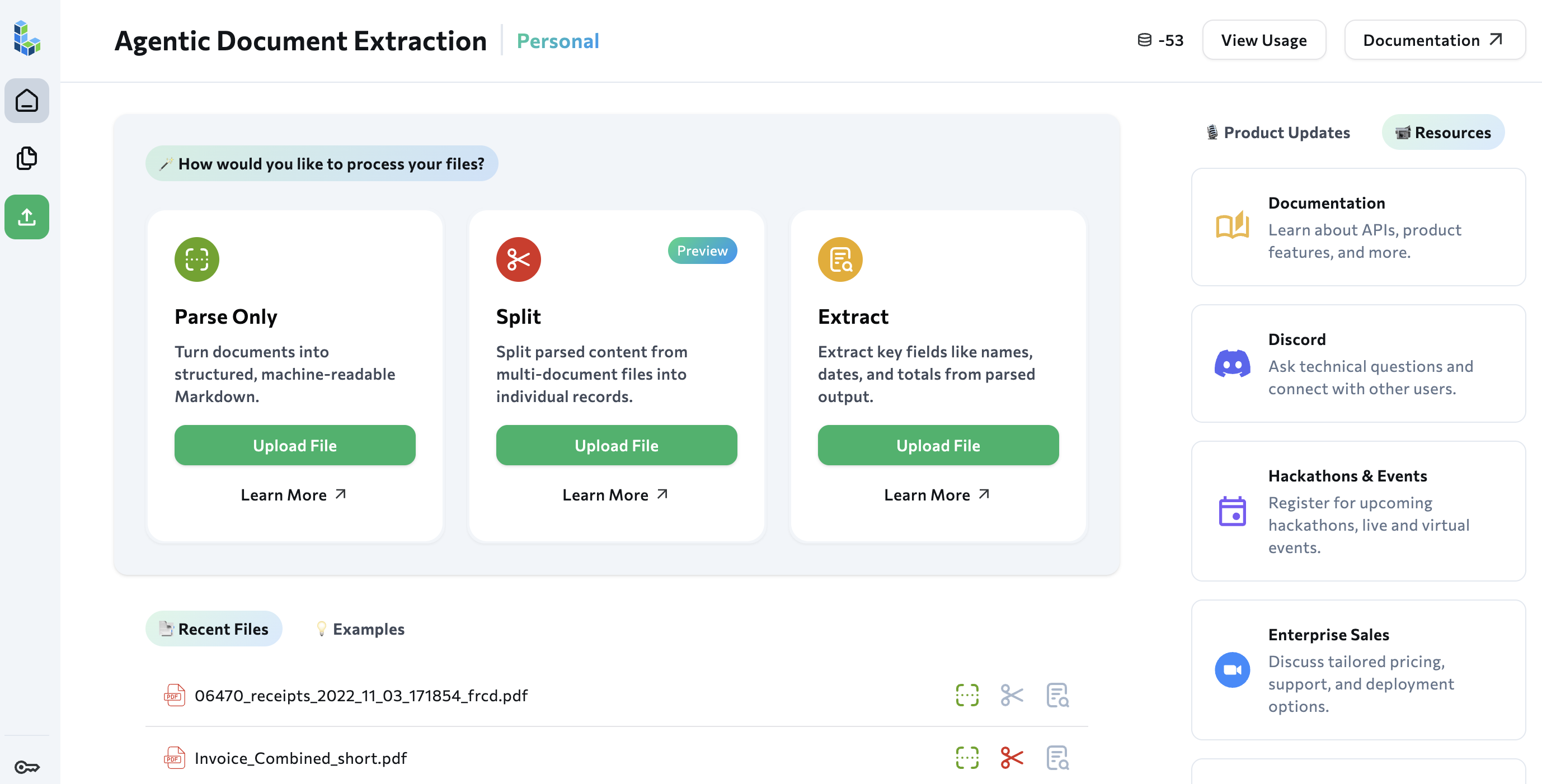
We've launched a complete redesign to our [Playground](https://ade.landing.ai/my/home)! The updated Playground now guides you through each step of the document processing process: **Parsing**, **Splitting**, and **Extraction**. Simply click a tile to get started!
You can now see all the files you've processed on your Playground homepage, including which tools you've run on each file (parse, extract, split).
We've also made it easier to get help with {ade} by adding **Product Update** and **Resources** panels.
## Multiple File Upload Not Available with ZDR
When [Zero Data Retention](./zdr) (ZDR) is enabled, only one file can be loaded at a time.
## Python and TypeScript Libraries Support Saving Responses to Local Directories
The [{adePythonLibrary}](https://github.com/landing-ai/ade-python) and [{adeTypeScriptLibrary}](https://github.com/landing-ai/ade-typescript) libraries now support saving API responses directly to local directories as JSON files.
The save parameter:
* Creates the specified directory if it doesn't exist
* Saves the response with the filename format: `{input_file}_{method}_output.json`
* Works across all three core functions: parse, split, and extract
### Availability
* Python library: v1.4.0 (parameter: `save_to`)
* TypeScript library: v2.0.0 (parameter: `saveTo`)
### Example
These examples show how to save the API response when parsing.
```python Python theme={null}
from pathlib import Path
from landingai_ade import LandingAIADE
client = LandingAIADE()
response = client.parse(
document=Path("/path/to/document.pdf"),
model="dpt-2-latest",
save_to="output_folder" # optional: saves as {input_file}_parse_output.json
)
```
```typescript TypeScript theme={null}
import LandingAIADE from "landingai-ade";
import fs from "fs";
const client = new LandingAIADE();
const response = await client.parse({
document: fs.createReadStream("/path/to/document.pdf"),
model: "dpt-2-latest",
saveTo: "output_folder" // optional: saves as {input_file}_parse_output.json
});
```
For more information, go to [Python Library](./ade-python) or [TypeScript Library](./ade-typescript).
## Table Cell Position Information
When you parse documents with tables, the {parse} API response now includes row and column position information for each table cell in the `grounding` object. This allows you to map parsed data back to specific cell locations in the original table.
Each table cell in the `grounding` object now includes a `position` field with:
* `row`: Row position (zero-indexed)
* `col`: Column position (zero-indexed)
* `rowspan`: Number of rows the cell spans
* `colspan`: Number of columns the cell spans
* `chunk_id`: Associated chunk identifier
**Why this matters:**
* **Precise cell mapping**: You can now identify the exact row and column for each piece of data in your table
* **Merged cell detection**: The rowspan and colspan values indicate when cells are merged
* **Easier data validation**: You can verify that extracted data came from the expected cell location
For more information about the grounding object structure, go to [Table Cell Position Information](./ade-json-response#table-cell-position-information).
This release includes a new metadata field for tracking extraction model fallbacks, improved HTTP status codes for parse jobs with partial results, improved spreadsheet parsing, and documentation updates to Parse Jobs endpoint names.
## Fallback Model Version Field
The {extract} API response now includes a `metadata.fallback_model_version` field. This field shows which extraction model was actually used if the API falls back from your requested model.
For more information about the response structure, go to [JSON Response for Extraction](./ade-extract-response).
## Parse Jobs: Partial Content Now Returns a 206 Status
When you retrieve parse job results with the ADE Get Parse Jobs API, the API now returns a 206 (Partial Content) HTTP status code if some pages failed during processing.
The `failed_pages` array and `failure_reason` field that were already in the API response continue to provide details about which pages failed and why.
For more information, go to [Troubleshoot Parsing](./ade-parse-troubleshoot#status-206-partial-content).
## Improved Title Detection in Spreadsheets
The {parse} API now better identifies titles in spreadsheets. When a spreadsheet has a title or text at the top, the API now returns:
* The title as a separate text chunk
* The table as its own chunk
## You Can Now Resubscribe and Cancel in Interface
If you want to resubscribe to or cancel a subscription plan, you can now do so directly in the {ade} interface. For full details, go to [Plans & Billing](./ade-pricing#can-i-resubscribe).
## Updated API Endpoint Names
We've updated the names of two Parse Jobs API endpoints:
* "List Async Jobs" is now "**ADE List Parse Jobs**"
* "Get Async Job Status" is now "**ADE Get Parse Jobs**"
This is a documentation-only change. The endpoint URLs have not changed. Your existing API calls will continue to work without any modifications.
## Split Documents with the New Split API (Preview)
We're releasing a Preview of the [{split}](https://docs.landing.ai/api-reference/tools/ade-split) API, which classifies and separates a parsed document into multiple sub-documents based on Split Rules you define. This is useful when you receive batched documents containing multiple document types or multiple instances of the same document type.
For example, a financial institution processing KYC documentation might receive a single PDF containing bank statements, utility bills, and identification documents for a customer. The {split} API can automatically classify and separate each document type, enabling downstream processing systems to route each document appropriately.
Get the full details in [Split](./ade-split).
{split} is in Preview. This feature is still in development and may not return accurate results. Do not use this feature in production environments.
### How It Works
1. Parse your document using the [{parse} API](https://docs.landing.ai/api-reference/tools/ade-parse) to generate Markdown output
2. Define Split Rules that describe the document types or sections you want to identify
3. Call the {split} API with the parsed Markdown and your Split Rules
4. The API returns each classified sub-document with its full Markdown content
For the complete workflow, go to [Process Overview](./ade-split#process-overview).
### When to Use Split
Use the {split} API when you need to:
* Separate batched documents containing multiple document types (invoices, receipts, contracts)
* Split documents with repeated sections by unique identifiers (multiple pay stubs by date)
* Organize multi-section documents into logical parts (academic articles with body, references, supplemental materials)
* Route different document types to appropriate downstream systems
For more use cases, go to [Example Use Cases](./ade-split#example-use-cases).
### How to Use Split
The {split} API is available through multiple interfaces:
* [Playground](./ade-split#split-in-the-playground): Interactively create and test Split Rules
* [API](./ade-split#split-with-the-api): Integrate directly into your applications
* [Python Library](./ade-python#split-getting-started): Integrate into Python-based application with our Python library
* [TypeScript Library](./ade-typescript#split-getting-started): Integrate into TypeScript-based application with our TypeScript library
## Revamped Playground
We've launched a complete redesign to our [Playground](https://ade.landing.ai/my/home)! The updated Playground now guides you through each step of the document processing process: **Parsing**, **Splitting**, and **Extraction**. Simply click a tile to get started!
You can now see all the files you've processed on your Playground homepage, including which tools you've run on each file (parse, extract, split).
We've also made it easier to get help with {ade} by adding **Product Update** and **Resources** panels.
 ## The Parse Jobs API Supports up to 6,000-Page Documents
The [ADE Parse Jobs](https://docs.landing.ai/api-reference/tools/ade-parse-jobs) API now supports documents up to 6,000 pages long. Previously, the limit was 1,000 pages.
For more information, go to [Rate Limits for ADE Parse Jobs](./ade-parse-async#rate-limits-for-ade-parse-jobs).
## Improved Support for Partial Content with the Parse Jobs API
We've improved how the [ADE Parse Jobs](https://docs.landing.ai/api-reference/tools/ade-parse-jobs) API handles partially parsed documents.
Previously, if any pages failed to process, the job would fail with status `failed`.
Now, the API processes all pages in the document. If some pages fail, the job completes with status `completed`, and the successfully processed pages are returned in the results.
The `failed_pages` array in the metadata lists which pages failed, and the `failure_reason` field provides details about the failures.
For more information, go to [Troubleshoot Parsing](./ade-parse-troubleshoot#check-for-partial-content).
## The Parse Jobs API Supports Additional Storage Providers for ZDR
When calling the [ADE Parse Jobs](https://docs.landing.ai/api-reference/tools/ade-parse-jobs) API with [zero data retention](./zdr) (ZDR) enabled, you must include the `output_save_url` parameter.
We have now tested and confirmed support for Amazon S3, Azure Blob Storage, and Google Cloud Storage. Other storage providers that support PUT or CREATE operations via public or presigned URLs may also work.
For detailed information, go to [ZDR Requirements](./ade-parse-async#zdr-requirements).
## Credit Rounding Updated
Credit usage for the {extract} API and {dpt2mini} is now rounded up to the nearest tenth decimal place instead of the nearest whole credit.
For example, if a calculation results in 1.67 credits, the cost is now rounded up to 1.7 credits (previously would have been rounded up to 2 credits).
For more information, go to [Plans & Billing](./ade-pricing).
## DPT-2 mini Preview
We've released a preview of **[{dpt2mini}](./ade-parse-models#dpt-2-mini)**, a lightweight parsing model optimized for simple, digitally native documents.
{dpt2mini} consumes fewer credits than other parsing models, making it a cost-effective option for straightforward document processing.
{dpt2mini} is in Preview. This model is still in development and may not return accurate results. Do not use this model in production environments.
## DPT-2 Is Now Generally Available
{dpt2}, the latest series of [parsing models](./ade-parse-models) for {ade}, is now generally available (GA). As part of going GA, we're releasing this new snapshot: `dpt-2-20251103`. This updated version offers improvements to table parsing, figure captioning, and chunk detection.
For more information about parsing models, go to [Document Pre-Trained Transformers (Parsing Models)](./ade-parse-models).
### How This Affects Your API Calls
The new snapshot `dpt-2-20251103` is now the default model. If you call the [ADE Parse](https://docs.landing.ai/api-reference/tools/ade-parse) or [ADE Parse Jobs](https://docs.landing.ai/api-reference/tools/ade-parse-jobs) API without specifying a `model` parameter (or if you use `dpt-2-latest`), your API calls will automatically use this latest snapshot.
Your parsing results may change with this update due to improvements in table parsing, figure captioning, and chunk detection.
### Choose Your Approach
You can choose between two approaches when setting the `model` parameter:
**Get automatic improvements**:
* Omit the `model` parameter, or set it to `dpt-2-latest`
* Your API calls will automatically use the latest snapshot
* You'll receive parsing improvements as new snapshots are released
* Parsing results may change when new versions are released
```shell theme={null}
curl -X POST 'https://api.va.landing.ai/v1/ade/parse' \
-H 'Authorization: Bearer YOUR_API_KEY' \
-F 'document=@document.pdf' \
-F 'model=dpt-2-latest'
```
**Maintain consistent results**:
* Set the `model` parameter to a specific snapshot (like `dpt-2-20251103`)
* Your parsing results will remain consistent over time
* You won't automatically receive improvements from new snapshots
```shell theme={null}
curl -X POST 'https://api.va.landing.ai/v1/ade/parse' \
-H 'Authorization: Bearer YOUR_API_KEY' \
-F 'document=@document.pdf' \
-F 'model=dpt-2-20251103'
```
For more information about model versioning and when to use each approach, go to [Model Versions and Snapshots](./ade-parse-models#model-versions-and-snapshots).
## Spreadsheet Support
{ade} can now parse the following file types:
* CSV (comma-separated values)
* XLSX (Microsoft Excel)
For more information, go to [Supported File Types](./ade-file-types).
## Credits Are Now Rounded Up
Credit usage for the {extract} API is now rounded up to the nearest whole credit. For more information, go to [Credit Consumption](./ade-credit-consumption#credit-costs-for-the-extract-api).
## Support for Text Documents & Presentations
{ade} can now parse the following file types:
* DOC (Word)
* DOCX (Word)
* PPT (PowerPoint)
* PPTX (PowerPoint)
* ODT (OpenDocument Text)
For more information, go to [Supported File Types](./ade-file-types).
## Document Length Limit Increased to 100 Pages
{ade} now supports documents with up to 100 pages in both the [Playground](https://ade.landing.ai/) and via the [{parse}](https://docs.landing.ai/api-reference/tools/ade-parse) API.
Need to parse longer documents? Use the [ADE Parse Jobs](https://docs.landing.ai/api-reference/tools/ade-parse-jobs) API to parse documents that are up to 1,000 pages or 1 GB.
For more information, go to [Rate Limits](./ade-rate-limits).
## Subscriptions Now Available for EU Users
The EU-hosted version of [{ade}](https://ade.eu-west-1.landing.ai/) now offers monthly subscription plans. To see the plans and upgrade, go to the [EU Plans](https://ade.eu-west-1.landing.ai/plan) page.
The credit-based monthly subscription plans are designed to deliver more value and features to your team.
All EU users start on our pay-as-you-go plan that comes with free credits to help you get started! Once you’re ready for production, upgrade to a monthly subscription plan to get access to these features:
* More credits per dollar
* Organization management
* Role-based access control (RBAC)
* API key management
## New APIs for Parsing Large Documents
We have released new APIs that allow you to create parsing jobs. These APIs allow you to process large documents without blocking other operations, improving performance and user experience.
To learn more about this workflow, go to [Parse Large Files (Parse Jobs)](./ade-parse-async).
### API Reference
To learn more, go to the reference pages for new APIs:
* [ADE Parse Jobs](https://docs.landing.ai/api-reference/tools/ade-parse-jobs)
* [ADE Get Parse Jobs](https://docs.landing.ai/api-reference/tools/ade-get-parse-jobs)
* [ADE List Parse Jobs](https://docs.landing.ai/api-reference/tools/ade-list-parse-jobs)
## Document Pre-Trained Transformers: You Can Now Pick a Parsing Model
In this release, we're previewing a concept called **{dpt}** (DPT). A DPT is the model that powers the parsing capabilities of the ADE Parsing APIs. The DPT identifies document layouts and chunks, then generates descriptive explanations (captions) for those chunks.
The {ade} API initially launched with a single DPT model called **{dpt1}**. Because there was only one DPT, it was not surfaced to users.
We are now introducing **{dpt2}**, which offers:
* Improved performance for complex tables
* Support for new chunk types (including barcodes and ID cards)
* More precise captioning for figures
With multiple DPT models now available, you can now select a DPT in both the Playground and when calling the API directly.
For more information about {dpt} models and how to use them, go to [Document Pre-Trained Transformers (Parsing Models)](./ade-parse-models).
## ADE Parse and ADE Extract Are Now Generally Available
The [{parse}](https://docs.landing.ai/api-reference/tools/ade-parse) and [{extract}](https://docs.landing.ai/api-reference/tools/ade-extract) APIs are now Generally Available (GA). We recommend using these endpoints moving forward.
## New Python Library
We've launched a new Python library to support extending the {ade} APIs: the [{adePythonLibrary}](https://github.com/landing-ai/ade-python) library.
Key benefits:
* Support for the [{parse}](https://docs.landing.ai/api-reference/tools/ade-parse) and [{extract}](https://docs.landing.ai/api-reference/tools/ade-extract) APIs.
* Support for setting the **{dpt}**.
* The library is automatically generated from our API specification, ensuring you have access to the latest endpoints and parameters.
* The library is lightweight, which makes it suitable for resource-constrained environments like AWS Lambda functions.
## agentic-doc Library Transitioned to Legacy Status
The [agentic-doc](https://github.com/landing-ai/agentic-doc) Python library has been transitioned to legacy status.
Migrate to the new [{adePythonLibrary}](https://github.com/landing-ai/ade-python) library, which is now the recommended Python library for {ade}.
## The tools/agentic-document-analysis Endpoint Is Now Legacy
This {ade} endpoint has been transitioned to legacy status: `https://api.va.landing.ai/v1/tools/agentic-document-analysis`.
Migrate to the new [{parse}](https://docs.landing.ai/api-reference/tools/ade-parse) and [{extract}](https://docs.landing.ai/api-reference/tools/ade-extract) APIs.
## Separate APIs for Parsing & Extraction
In our original launch of {ade}, the field extraction function was part of the parsing function; every time you wanted to run extraction, you had to run parsing, even if you had already parsed the document.
We are now introducing a Preview of two new endpoints that separate these functions: **{parse}** and **{extract}**. These APIs allow you to decouple parsing and extraction workflows for greater flexibility.
You can now parse the document once with the **{parse}** API, and then use the **{extract}** API to run field extraction on that output multiple times. This is helpful if you want to experiment with different extraction schemas or you have multiple extraction tasks.
To get detailed information about how to use these new APIs, go to [Parse Documents](./parse) and [Extract](./ade-extract).
## Monthly Subscriptions
We’re excited to announce a major update to [Agentic Document Extraction](https://ade.landing.ai/demo/doc-extraction)! We’ve just launched credit-based monthly subscription plans designed to deliver more value and features to your team.
Learn more about available plans in [Pricing](./ade-pricing).
All users start on our pay-as-you-go plan that comes with free credits to help you get started! Once you’re ready for production, upgrade to a monthly subscription plan to get access to these new features:
* More credits per dollar
* Organization management
* Role-based access control (RBAC)
* API key management
## Organization Management
Upgrading to a subscription or Enterprise plan automatically creates an organization. An organization contains all of the credits, members, API keys, and settings for the plan.
To learn more, go to [Organizations & Members](./ade-members).
## Member Management: Role-Based Access Control (RBAC)
Users on subscription and Enterprise plans can invite multiple users to their organization. These plans offer granular member controls, including the ability to:
* invite members
* assign roles to members that determine what functions they can perform
* change member roles
* revoke invitations
* remove members
To learn more, go to [Organizations & Members](./ade-members).
## API Key Management
Users on subscription and Enterprise plans can create multiple API keys for their organization. These plans offer granular API key controls, including the ability to:
* create API keys
* revoke API keys
To learn more, go to [API Key](./agentic-api-key).
## Agentic Document Extraction Now Available in Europe
Agentic Document Extraction is now available in Europe. To learn more, go to [European Union (EU)](./ade-eu).
Agentic Document Extraction in the EU provides:
* **Data residency**: All data is stored and processed within the EU
* **GDPR compliance**: Coming soon; learn more at our [Security and Data](https://landing.ai/security-at-landingai) page
* **Regional performance**: Reduced latency for European users
## Improved Accuracy
{ade} now delivers higher accuracy when extracting data from complex tables and multi-column layouts.
## Increased Processing Speed
{ade} is now significantly faster than before, so you can process thousands of pages per minute.
## Process Longer Pages
We've increased our page limits, so that you can process longer documents.
For more information, go to [Rate Limits](./ade-rate-limits).
## Zero Data Retention
Users on the Custom plan can enable a zero data retention policy.
For more information, [contact us](http://landing.ai/contact-va).
## Consolidated Chunk Types
We consolidated these chunk types into `page_header`:
* `page_header`
* `page_footer`
* `page_number`
We consolidated these chunk types into `form`:
* `form`
* `key_value`
For more information, go to [Chunk Types](./ade-chunk-types).
## The Parse Jobs API Supports up to 6,000-Page Documents
The [ADE Parse Jobs](https://docs.landing.ai/api-reference/tools/ade-parse-jobs) API now supports documents up to 6,000 pages long. Previously, the limit was 1,000 pages.
For more information, go to [Rate Limits for ADE Parse Jobs](./ade-parse-async#rate-limits-for-ade-parse-jobs).
## Improved Support for Partial Content with the Parse Jobs API
We've improved how the [ADE Parse Jobs](https://docs.landing.ai/api-reference/tools/ade-parse-jobs) API handles partially parsed documents.
Previously, if any pages failed to process, the job would fail with status `failed`.
Now, the API processes all pages in the document. If some pages fail, the job completes with status `completed`, and the successfully processed pages are returned in the results.
The `failed_pages` array in the metadata lists which pages failed, and the `failure_reason` field provides details about the failures.
For more information, go to [Troubleshoot Parsing](./ade-parse-troubleshoot#check-for-partial-content).
## The Parse Jobs API Supports Additional Storage Providers for ZDR
When calling the [ADE Parse Jobs](https://docs.landing.ai/api-reference/tools/ade-parse-jobs) API with [zero data retention](./zdr) (ZDR) enabled, you must include the `output_save_url` parameter.
We have now tested and confirmed support for Amazon S3, Azure Blob Storage, and Google Cloud Storage. Other storage providers that support PUT or CREATE operations via public or presigned URLs may also work.
For detailed information, go to [ZDR Requirements](./ade-parse-async#zdr-requirements).
## Credit Rounding Updated
Credit usage for the {extract} API and {dpt2mini} is now rounded up to the nearest tenth decimal place instead of the nearest whole credit.
For example, if a calculation results in 1.67 credits, the cost is now rounded up to 1.7 credits (previously would have been rounded up to 2 credits).
For more information, go to [Plans & Billing](./ade-pricing).
## DPT-2 mini Preview
We've released a preview of **[{dpt2mini}](./ade-parse-models#dpt-2-mini)**, a lightweight parsing model optimized for simple, digitally native documents.
{dpt2mini} consumes fewer credits than other parsing models, making it a cost-effective option for straightforward document processing.
{dpt2mini} is in Preview. This model is still in development and may not return accurate results. Do not use this model in production environments.
## DPT-2 Is Now Generally Available
{dpt2}, the latest series of [parsing models](./ade-parse-models) for {ade}, is now generally available (GA). As part of going GA, we're releasing this new snapshot: `dpt-2-20251103`. This updated version offers improvements to table parsing, figure captioning, and chunk detection.
For more information about parsing models, go to [Document Pre-Trained Transformers (Parsing Models)](./ade-parse-models).
### How This Affects Your API Calls
The new snapshot `dpt-2-20251103` is now the default model. If you call the [ADE Parse](https://docs.landing.ai/api-reference/tools/ade-parse) or [ADE Parse Jobs](https://docs.landing.ai/api-reference/tools/ade-parse-jobs) API without specifying a `model` parameter (or if you use `dpt-2-latest`), your API calls will automatically use this latest snapshot.
Your parsing results may change with this update due to improvements in table parsing, figure captioning, and chunk detection.
### Choose Your Approach
You can choose between two approaches when setting the `model` parameter:
**Get automatic improvements**:
* Omit the `model` parameter, or set it to `dpt-2-latest`
* Your API calls will automatically use the latest snapshot
* You'll receive parsing improvements as new snapshots are released
* Parsing results may change when new versions are released
```shell theme={null}
curl -X POST 'https://api.va.landing.ai/v1/ade/parse' \
-H 'Authorization: Bearer YOUR_API_KEY' \
-F 'document=@document.pdf' \
-F 'model=dpt-2-latest'
```
**Maintain consistent results**:
* Set the `model` parameter to a specific snapshot (like `dpt-2-20251103`)
* Your parsing results will remain consistent over time
* You won't automatically receive improvements from new snapshots
```shell theme={null}
curl -X POST 'https://api.va.landing.ai/v1/ade/parse' \
-H 'Authorization: Bearer YOUR_API_KEY' \
-F 'document=@document.pdf' \
-F 'model=dpt-2-20251103'
```
For more information about model versioning and when to use each approach, go to [Model Versions and Snapshots](./ade-parse-models#model-versions-and-snapshots).
## Spreadsheet Support
{ade} can now parse the following file types:
* CSV (comma-separated values)
* XLSX (Microsoft Excel)
For more information, go to [Supported File Types](./ade-file-types).
## Credits Are Now Rounded Up
Credit usage for the {extract} API is now rounded up to the nearest whole credit. For more information, go to [Credit Consumption](./ade-credit-consumption#credit-costs-for-the-extract-api).
## Support for Text Documents & Presentations
{ade} can now parse the following file types:
* DOC (Word)
* DOCX (Word)
* PPT (PowerPoint)
* PPTX (PowerPoint)
* ODT (OpenDocument Text)
For more information, go to [Supported File Types](./ade-file-types).
## Document Length Limit Increased to 100 Pages
{ade} now supports documents with up to 100 pages in both the [Playground](https://ade.landing.ai/) and via the [{parse}](https://docs.landing.ai/api-reference/tools/ade-parse) API.
Need to parse longer documents? Use the [ADE Parse Jobs](https://docs.landing.ai/api-reference/tools/ade-parse-jobs) API to parse documents that are up to 1,000 pages or 1 GB.
For more information, go to [Rate Limits](./ade-rate-limits).
## Subscriptions Now Available for EU Users
The EU-hosted version of [{ade}](https://ade.eu-west-1.landing.ai/) now offers monthly subscription plans. To see the plans and upgrade, go to the [EU Plans](https://ade.eu-west-1.landing.ai/plan) page.
The credit-based monthly subscription plans are designed to deliver more value and features to your team.
All EU users start on our pay-as-you-go plan that comes with free credits to help you get started! Once you’re ready for production, upgrade to a monthly subscription plan to get access to these features:
* More credits per dollar
* Organization management
* Role-based access control (RBAC)
* API key management
## New APIs for Parsing Large Documents
We have released new APIs that allow you to create parsing jobs. These APIs allow you to process large documents without blocking other operations, improving performance and user experience.
To learn more about this workflow, go to [Parse Large Files (Parse Jobs)](./ade-parse-async).
### API Reference
To learn more, go to the reference pages for new APIs:
* [ADE Parse Jobs](https://docs.landing.ai/api-reference/tools/ade-parse-jobs)
* [ADE Get Parse Jobs](https://docs.landing.ai/api-reference/tools/ade-get-parse-jobs)
* [ADE List Parse Jobs](https://docs.landing.ai/api-reference/tools/ade-list-parse-jobs)
## Document Pre-Trained Transformers: You Can Now Pick a Parsing Model
In this release, we're previewing a concept called **{dpt}** (DPT). A DPT is the model that powers the parsing capabilities of the ADE Parsing APIs. The DPT identifies document layouts and chunks, then generates descriptive explanations (captions) for those chunks.
The {ade} API initially launched with a single DPT model called **{dpt1}**. Because there was only one DPT, it was not surfaced to users.
We are now introducing **{dpt2}**, which offers:
* Improved performance for complex tables
* Support for new chunk types (including barcodes and ID cards)
* More precise captioning for figures
With multiple DPT models now available, you can now select a DPT in both the Playground and when calling the API directly.
For more information about {dpt} models and how to use them, go to [Document Pre-Trained Transformers (Parsing Models)](./ade-parse-models).
## ADE Parse and ADE Extract Are Now Generally Available
The [{parse}](https://docs.landing.ai/api-reference/tools/ade-parse) and [{extract}](https://docs.landing.ai/api-reference/tools/ade-extract) APIs are now Generally Available (GA). We recommend using these endpoints moving forward.
## New Python Library
We've launched a new Python library to support extending the {ade} APIs: the [{adePythonLibrary}](https://github.com/landing-ai/ade-python) library.
Key benefits:
* Support for the [{parse}](https://docs.landing.ai/api-reference/tools/ade-parse) and [{extract}](https://docs.landing.ai/api-reference/tools/ade-extract) APIs.
* Support for setting the **{dpt}**.
* The library is automatically generated from our API specification, ensuring you have access to the latest endpoints and parameters.
* The library is lightweight, which makes it suitable for resource-constrained environments like AWS Lambda functions.
## agentic-doc Library Transitioned to Legacy Status
The [agentic-doc](https://github.com/landing-ai/agentic-doc) Python library has been transitioned to legacy status.
Migrate to the new [{adePythonLibrary}](https://github.com/landing-ai/ade-python) library, which is now the recommended Python library for {ade}.
## The tools/agentic-document-analysis Endpoint Is Now Legacy
This {ade} endpoint has been transitioned to legacy status: `https://api.va.landing.ai/v1/tools/agentic-document-analysis`.
Migrate to the new [{parse}](https://docs.landing.ai/api-reference/tools/ade-parse) and [{extract}](https://docs.landing.ai/api-reference/tools/ade-extract) APIs.
## Separate APIs for Parsing & Extraction
In our original launch of {ade}, the field extraction function was part of the parsing function; every time you wanted to run extraction, you had to run parsing, even if you had already parsed the document.
We are now introducing a Preview of two new endpoints that separate these functions: **{parse}** and **{extract}**. These APIs allow you to decouple parsing and extraction workflows for greater flexibility.
You can now parse the document once with the **{parse}** API, and then use the **{extract}** API to run field extraction on that output multiple times. This is helpful if you want to experiment with different extraction schemas or you have multiple extraction tasks.
To get detailed information about how to use these new APIs, go to [Parse Documents](./parse) and [Extract](./ade-extract).
## Monthly Subscriptions
We’re excited to announce a major update to [Agentic Document Extraction](https://ade.landing.ai/demo/doc-extraction)! We’ve just launched credit-based monthly subscription plans designed to deliver more value and features to your team.
Learn more about available plans in [Pricing](./ade-pricing).
All users start on our pay-as-you-go plan that comes with free credits to help you get started! Once you’re ready for production, upgrade to a monthly subscription plan to get access to these new features:
* More credits per dollar
* Organization management
* Role-based access control (RBAC)
* API key management
## Organization Management
Upgrading to a subscription or Enterprise plan automatically creates an organization. An organization contains all of the credits, members, API keys, and settings for the plan.
To learn more, go to [Organizations & Members](./ade-members).
## Member Management: Role-Based Access Control (RBAC)
Users on subscription and Enterprise plans can invite multiple users to their organization. These plans offer granular member controls, including the ability to:
* invite members
* assign roles to members that determine what functions they can perform
* change member roles
* revoke invitations
* remove members
To learn more, go to [Organizations & Members](./ade-members).
## API Key Management
Users on subscription and Enterprise plans can create multiple API keys for their organization. These plans offer granular API key controls, including the ability to:
* create API keys
* revoke API keys
To learn more, go to [API Key](./agentic-api-key).
## Agentic Document Extraction Now Available in Europe
Agentic Document Extraction is now available in Europe. To learn more, go to [European Union (EU)](./ade-eu).
Agentic Document Extraction in the EU provides:
* **Data residency**: All data is stored and processed within the EU
* **GDPR compliance**: Coming soon; learn more at our [Security and Data](https://landing.ai/security-at-landingai) page
* **Regional performance**: Reduced latency for European users
## Improved Accuracy
{ade} now delivers higher accuracy when extracting data from complex tables and multi-column layouts.
## Increased Processing Speed
{ade} is now significantly faster than before, so you can process thousands of pages per minute.
## Process Longer Pages
We've increased our page limits, so that you can process longer documents.
For more information, go to [Rate Limits](./ade-rate-limits).
## Zero Data Retention
Users on the Custom plan can enable a zero data retention policy.
For more information, [contact us](http://landing.ai/contact-va).
## Consolidated Chunk Types
We consolidated these chunk types into `page_header`:
* `page_header`
* `page_footer`
* `page_number`
We consolidated these chunk types into `form`:
* `form`
* `key_value`
For more information, go to [Chunk Types](./ade-chunk-types).